LOCK
OPEN
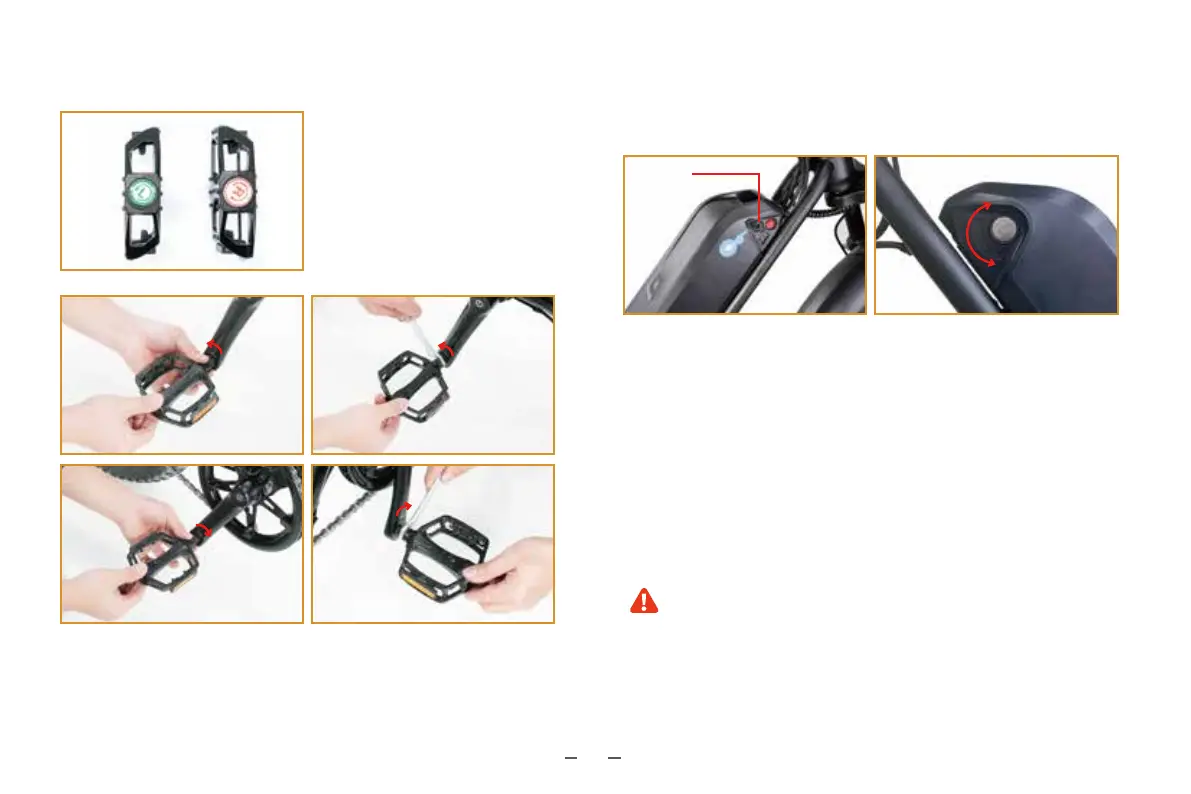
3.7 Install the pedals
3.8 Battery key positions
1. Identify the right pedal and left
pedal by the “R” and “L” marks
on the pedals.
2. Hand-tighten the pedals by spinning the right pedal clockwise and
the left pedal counter-clockwise. Then tighten the pedals with the
provided open-ended wrench.
(Before riding, familiarize yourself with the battery key positions and
charging port.)
1. When the key is in the “lock” position, the battery is locked on the
frame. You can remove the key and then ride the bike.
2. When the key is in the “open” position, the battery is opened, and
you can remove the battery from the frame. To prevent accidents,
ensure the battery is locked (turn the key clockwise to the “lock”
position) before carrying or riding the e-bike.
3.9 Remove the battery
(For your convenience, the battery is designed by CYCROWN to be
removable.)
When removing the battery, do not drop or damage the
battery. To install the battery, align the battery terminals with
the battery slots and then push down the battery. When you
hear a clicking sound, it means the battery is installed in place
and will not move around. If the bike is not used for extended
periods of time, press the power switch on the battery to turn
the battery off.
06
L L
RR
Battery
charging port



 To Next Page