Cyrus Streamline
2
series User Instructions
15
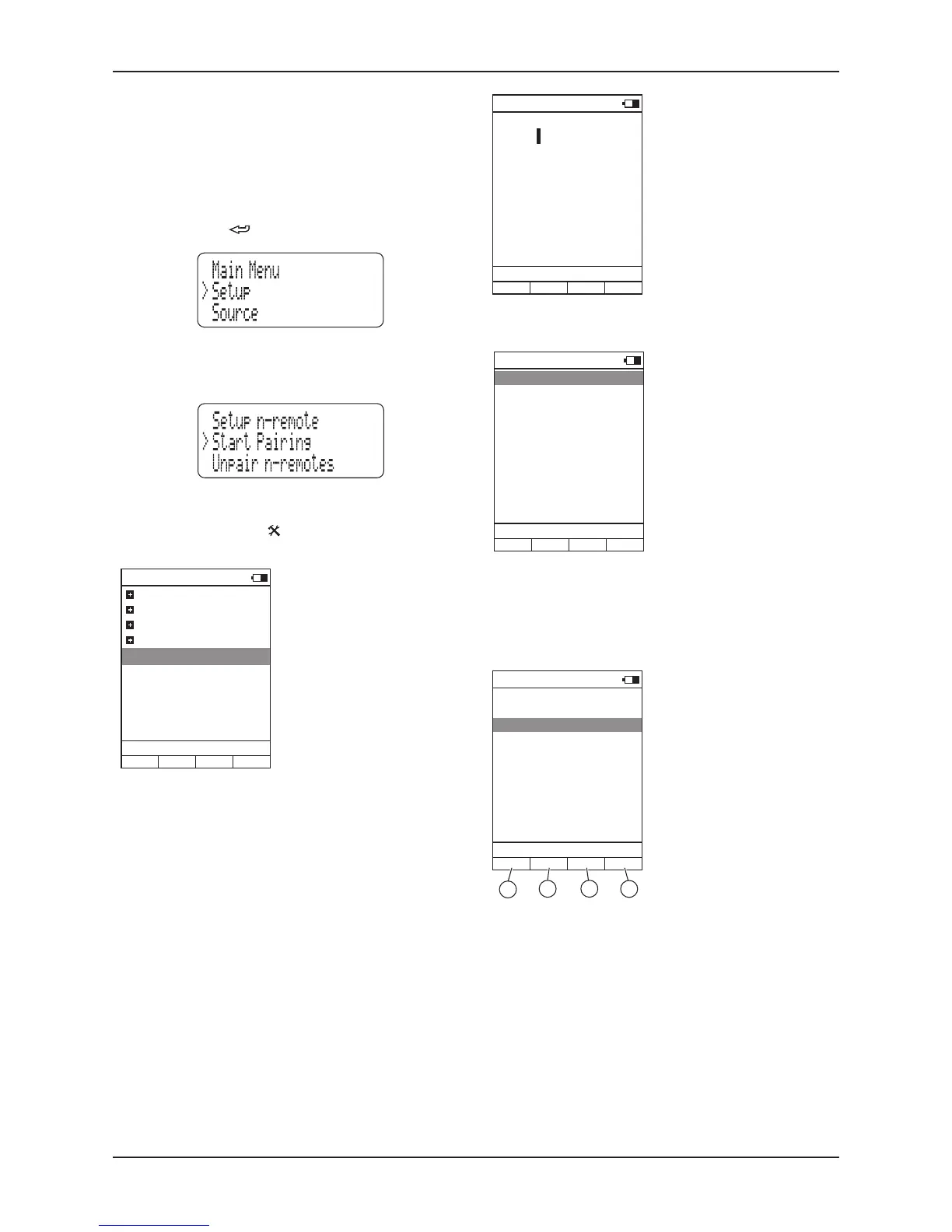
Select the Setup option from the Main Menu.•
The Setup Menu is displayed.
Select the n-remote option from the Setup Menu.•
The Start Pairing option will be highlighted. Move on to the next step
before selecting this option.
On the n-remote, press the •
(settings) button.
The System-Settings menu will be displayed.
System-Settings
User-Settings
Device Selection
Change Zone
System Information
Start Pairing
Stream CyIR
12:30 Not connected
To pair an n-remote to a Streamline
2
The wireless system of each n-remote must be paired to a particular
Streamline
2
. In this way, neighbouring Streamline
2
units can operate
without risk of interference.
Pairing should only be necessary once during initial setup unless the
n-remote or Streamline
2
are later to be paired with another unit.
When pairing a Streamline
2
to an n-remote, it is necessary for both
components to be in close range.
Press and hold the •
key on the front panel to return to the Main
Menu.
V+/V-/Mute to
Don’t change
CyIR
Line 1
12:30 Not connected
Stream
CyIR
Stream
NOTE: This setting can be changed at any time via the ‘Key mapping’
option of the ‘User-settings’ menu.
Once this setting has been made, pairing is complete.
Unpairing a remote control
If necessary, you can unpair n-remotes from a Streamline
2
.
For more information about unpairing n-remotes, refer to the Setup menu
section of the Streamline
2
instructions.
Pairing success
Please enter name:
Stream
Line 1
12:30 Not connected
CyIR
You will now get the option to select how the n-remote volume control
will operate.
Press ENTER to select the default •
name ‘Stream’ (recommended)
or rename this device.
Choose ‘Don’t change’ to retain •
the volume setup used when the
n-remote was previously paired
to the Streamline
2
.
Choose ‘Stream’ if you have •
connected speakers to the
Streamline
2
or if you are using the
Streamline
2
as a preamplifier.
The n-remote volume buttons will
now control the Streamline
2
volume
setting.
Choose ‘CyIR’ if you have •
connected the Streamline
2
as an
input to a Cyrus stereo amplifier.
The n-remote volume buttons will
now operate the volume control of a
Cyrus stereo amplifier (via infra-red).
You will now get the option to assign the Streamline
2
device to one of the
four quick-access Hotkeys below the display..
Choose Hotkey
None
Change Zone
Line 1
12:30 Not connected
CyIR
Hotkey A
Hotkey B
Hotkey C
Hotkey D
CyIr
A B C D
If you select one of the Hotkeys A •
to D, the ‘Stream’ device will be
selectable by the chosen Hotkey.
In the example on the left, •
Hotkey B is pre-assigned to
the CyIr device (to send remote
control commands to other
Cyrus products), so Hotkey A
would be recommended for the
Streamline
2
.
Highlight the ‘Start Pairing’ •
option.
To begin pairing, select the ‘Start •
Pairing’ options on both the
n-remote and Streamline
2
within
one or two seconds.
Pairing should occur almost immediately. The Streamline
2
will return to
the Source Menu and the n-remote will prompt for a device name.


 To Next Page