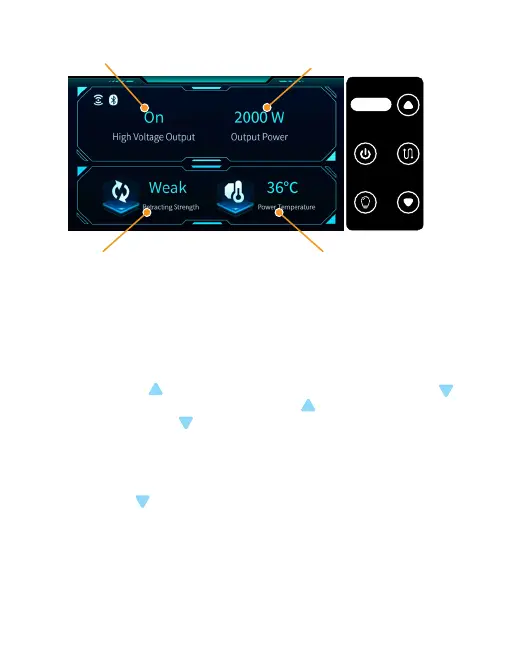
2.3 Ground power supply system control panel
Power On or Off Ground-end output power
Power supply temperature
2.3.1 Press the “Power On / Off” for 3 seconds to control the power output on
and off (Buzzing sound when turning on and off);
2.3.2 Short press the “Light On / Off” to control the turning on and off of the
light connected to the drone end (Buzzing sound when turning on and off);
2.3.3 Short press the “Cable retrieve On / Off” to control the automatic cable
retrieve on and off (Buzzing sound when turning on and off);
2.3.4 Short press to increase line retrieve strength; short press to
decrease line retrieve force; press and hold for 3S to switch language
mode, press and hold for 5S to enter frequency matching mode, in
frequency matching mode, press and hold to cancel frequency matching.
2.3.5 Power failure alarm: when the high-voltage output is “on” and the
power supply is disconnected, the “Power On / Off” buzzer will sound an
alarm for 60s. It can be restored by turning on the power.
2.3.6 Long press for 3S to enter into frequency matching mode, and at the
same time, long press 3S “Frequency matching button” on the drone end.
Before frequency matching of the drone end indicator light, the green light is
always on; in frequency matching, the green light is off and the red light is
flashing; if the frequency matching is successful, the red light is off and the
green light is always on; if the frequency matching fails, the red light is on for
3 seconds and then off, and the green light becomes always on.
Take-up strength in three gears:
“weak”, “medium” and “strong”
电源开 关
Power s witch
收线开 关
Line s witch
灯光开 关
Ligh t switc h
此键长 按
3秒
Press a nd hold t his
Bottom f or 3 secon ds
48



 To Next Page