TECHNICAL SUPPORT
dlink.com/support
PRODUCT SETUP
SET UP DAP-1635 WITH QRS MOBILE APP
Download the "D-Link QRS Mobile" application from the Apple App Store or Google
Play. Connect your smartphone to the DAP-1635 using the SSID and Password
information provided on the Wi-Fi Conguration Card and follow the in-app prompts.
SET UP DAP-1635 WITH A WEB BROWSER
Open the wireless utility on your computer, select the name (SSID) of the DAP-1635
network, and enter the password found on your Wi-Fi Conguration Card. Open a
web browser and enter http://dlinkap.local./ or if you have multiple DAP-1635’s,
enter http://dlinkapwxyz.local./ and replace wxyz with the last 4 digits of the MAC
address of the DAP-1635 you wish to congure. The web-conguration username
is Admin and the password eld should be left blank. Refer to the user manual for
further information on conguring the DAP-1635.
Note: Web browser conguration is not supported for Android Devices. Please use
the QRS Mobile Application to congure your device.
TROUBLESHOOTING
SETUP AND CONFIGURATION PROBLEMS
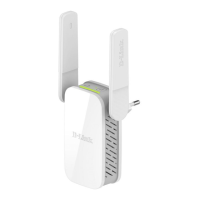
1. HOW DO I RESET MY DAP-1635 AC1200 WI-FI RANGE EXTENDER WITH POWER
PASSTHROUGH TO FACTORY DEFAULT SETTINGS?
- Ensure the product is powered on.
- Using a paperclip, press and hold the reset button on the side of the device for 5 seconds.
Note: Resetting the product to the factory default will erase the current conguration
settings. The default Wi-Fi network name (SSID) and password are printed on
the DAP-1635's Wi-Fi Conguration Card.
2. HOW DO I CONNECT A PC OR OTHER DEVICE TO THE DAP-1635 IF I HAVE FORGOTTEN
MY WI-FI NETWORK NAME (SSID) OR WI-FI PASSWORD?
- If you haven't changed the extended Wi-Fi network's settings, you can use the
network name (SSID) and Wi-Fi password on the Wi-Fi Conguration Card.
- If you did change the network name (SSID) or Wi-Fi password and you did not record
this information on the Wi-Fi Conguration Card or somewhere else, you must reset
the device as described in Question 1 above.
- It is recommended that you make a record of this information so that you can easily
connect additional wireless devices in the future. You can use the included Wi-Fi
Conguration Card to record this important information for future use.
SETUP



 To Next Page