38D-Link DCS-5009L User Manual 38
Section 4 - Conguration
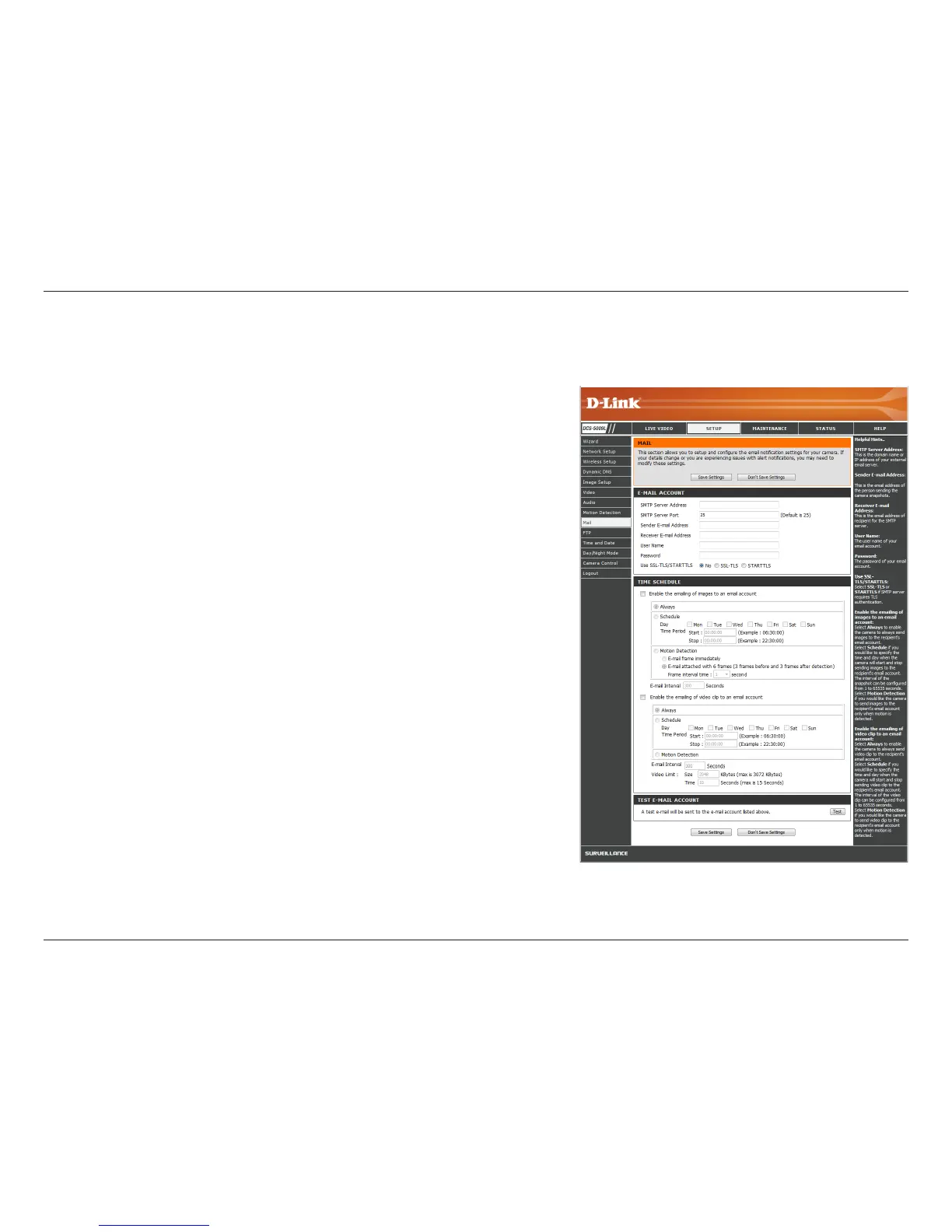
Mail
SMTP Server
Address:
SMTP Server
Port:
Sender E-mail
Address:
Receiver E-mail
Address:
User Name:
Password:
Use SSL-TLS/
STARTTLS:
Enter the domain name or IP address of your external e-mail server.
Enter the port number for the SMTP Server. The default value is 25,
and should only be changed if suggested by your e-mail provider.
Enter the e-mail address to be listed as the sender for your notication
e-mails.
Enter the e-mail address that your notication e-mails will be sent to.
If the SMTP server uses authentication, enter your User Name.
If the SMTP server uses authentication, enter your Password.
This section allows you to congure your camera to send snapshots and video clips to an e-mail address. If you are not sure what settings to use,
check with your e-mail provider (e.g., Gmail, Yahoo Mail, etc.)
Select a protocol for security. For example, if you want to use Gmail
with SSL-TLS for e-mail notications, you can follow the steps below:
Step 1 - Enter smtp.gmail.com in the SMTP Server Address eld.
Step 2 - Change the SMTP Server Port number from 25 to 465.
Step 3 - Enter your Gmail e-mail address in Sender E-mail Address.
Step 4 - Enter the destination e-mail address in Receiver E-mail Address.
Step 5 - Enter the User Name required to access the SMTP server.
Step 6 - Enter the Password required to access the SMTP server.
Step 7 - Select SSL-TLS and then click Save Settings.
Step 8 - Click the Test button to send a test e-mail to the account
listed above.
Note:
• You can also use STARTTLS, which will use SMTP server port number 587.
• If you want to use a Yahoo SMTP server, the SMTP server address will
be dierent between each registered region, and only SMTP port 465 is
supported for SSL-TLS.


 To Next Page