EasyManua.ls Logo

D-Link DGS-F1010P-E - User Manual

D-Link DGS-F1010P-E
4 pages
Print Icon
To Next Page IconTo Next Page
Loading...
Product Quick Installation Guide
DGS-F1010P-E
10-Port Gigabit Switch with Long Reach PoE+
Question and Answer IconNeed help?

Do you have a question about the D-Link DGS-F1010P-E and is the answer not in the manual?

Summary

Package Contents and Safety

Package Contents

Lists the items included in the product package, such as the PoE switch and power adapter.

Safety Instructions

Provides critical safety guidelines for installation and operation to prevent damage and ensure personal safety.

Connecting Power

Step-by-step guide for connecting the external power adapter to the PoE switch.

Product Connection and Port Descriptions

Product Connection Diagram

Illustrates how to connect the D-Link PoE switch to PCs, NVRs, and network switches.

Product Ports Description

Details the functionality of each port on the PoE switch, including PoE and Uplink ports.

Detailed Product Specifications

Switch Modes and Network Port Details

Explains switch modes like Extend, VLAN, QoS, and PoE, and describes network port configurations.

Performance and Standards

Covers transfer rates, supported standards, bandwidth, and network delay performance.

LED Indicators, PoE Pins, and Power Specifications

Describes LED indicators, PoE pin assignments, single port power, and total power adapter capacity.

Dimensions, Weight, Environment, and Safety Certifications

Outlines physical dimensions, weight, operating environment, and safety compliance.

Summary

Package Contents and Safety

Package Contents

Lists the items included in the product package, such as the PoE switch and power adapter.

Safety Instructions

Provides critical safety guidelines for installation and operation to prevent damage and ensure personal safety.

Connecting Power

Step-by-step guide for connecting the external power adapter to the PoE switch.

Product Connection and Port Descriptions

Product Connection Diagram

Illustrates how to connect the D-Link PoE switch to PCs, NVRs, and network switches.

Product Ports Description

Details the functionality of each port on the PoE switch, including PoE and Uplink ports.

Detailed Product Specifications

Switch Modes and Network Port Details

Explains switch modes like Extend, VLAN, QoS, and PoE, and describes network port configurations.

Performance and Standards

Covers transfer rates, supported standards, bandwidth, and network delay performance.

LED Indicators, PoE Pins, and Power Specifications

Describes LED indicators, PoE pin assignments, single port power, and total power adapter capacity.

Dimensions, Weight, Environment, and Safety Certifications

Outlines physical dimensions, weight, operating environment, and safety compliance.

Overview

The D-Link DGS-F1010P-E is a 10-Port Gigabit Unmanaged PoE+ Switch designed to simplify network deployment and power compatible devices over Ethernet cabling. This device is ideal for small to medium-sized networks requiring reliable data transmission and power delivery to IP cameras, Wi-Fi access points, and IP phones without the need for separate power outlets. As an unmanaged switch, it offers plug-and-play functionality, making it easy to set up and use without complex configuration.

Function Description:

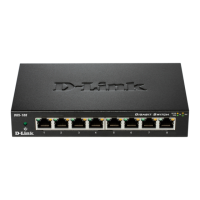
The primary function of the DGS-F1010P-E is to provide network connectivity and Power over Ethernet (PoE) to various devices. It features eight 10/100/1000Mbps PoE RJ45 ports (Port 1-8) that support the IEEE 802.3af/at standard, allowing it to deliver power and data simultaneously to connected Powered Devices (PDs). Additionally, it includes two 10/100/1000Mbps RJ45 Uplink ports (Port 9-10) for connecting to Network Video Recorders (NVRs), personal computers (PCs), or aggregation switches, ensuring high-speed data transfer to the wider network or internet.

A key usage feature of this switch is its "Long Reach PoE delivery" capability, which allows PoE to be delivered up to 250 meters, significantly extending the range for deploying PoE-powered devices. This is particularly beneficial for installations where devices are located far from the main network hub, reducing the need for additional power sources or network extenders. For optimal performance over extended distances, Cat 5 or better cabling is recommended.

The switch also incorporates several operational modes to enhance network performance and security. The "VLAN" mode isolates ports from each other, improving network security by constraining broadcast traffic and preventing unauthorized access between segments. This also helps in improving overall network performance by reducing broadcast storms. The "QOS" (Quality of Service) mode introduces application prioritization, ensuring that traffic with higher priority, such as Voice over IP (VoIP), is forwarded ahead of other data, thereby guaranteeing better performance for critical applications. Another notable feature is the "PoE" mode, which automatically restarts a remote device by disabling and re-enabling PoE on the port if it detects that the remote device has locked up (i.e., no incoming traffic). This self-healing capability minimizes downtime and reduces the need for manual intervention, making it a valuable maintenance feature.

Important Technical Specifications:

  • Network Ports:
    • 8 x 10/100/1000Mbps PoE RJ45 ports (Port 1– Port 8)
    • 2 x 10/100/1000Mbps RJ45 Uplink ports (Port 9 – Port 10)
  • Transfer Rate: 1000Mbps full Duplex, 10 or 100/1000Mbps Half Duplex.
  • Standards: IEEE 802.3i, IEEE 802.3u, IEEE 802.3x, IEEE 802.3af, IEEE 802.3at.
  • Bandwidth: 20Gbps (non-blocking), ensuring high data throughput without bottlenecks.
  • Network Delay:
    • 100to100 Mbps: maximum 20µs (using 64-byte packet).
    • 1000 to 1000M bps: maximum 10µs (using 64-byte packet).
  • Frame Filtering and Transmission Rate:
    • 10M port maximum 14,800pps.
    • 100M port maximum 148,800pps.
    • 1000M port maximum 1,488,000pps.
  • PoE Pins: 1/2(+), 3/6(-).
  • Max Power for Single Port: 30W.
  • External Power Adapter: 96W (supports 48-56V). It is crucial to use the adapter supplied with the switch to ensure proper operation and prevent damage.
  • Dimensions (L x W x H): 184mm x 94mm x 27mm.
  • Weight: 0.95kg.
  • Operating Temperature: 0° - 40°C.
  • Operating Humidity: 10% - 90%, Non-condensing.
  • Safety Certifications: CE/ROHS/FCC.

Usage Features:

The DGS-F1010P-E is designed for ease of use, making it suitable for users with varying levels of technical expertise.

  • Plug-and-Play: As an unmanaged switch, it requires no software configuration, allowing for immediate deployment upon connecting power and network cables.
  • Flexible Deployment: The long-reach PoE capability (up to 250m) provides significant flexibility in placing PoE devices, reducing infrastructure costs and complexity.
  • Multiple Operating Modes: The switch offers selectable modes (Extend, VLAN, QOS, PoE) via a physical switch, allowing users to optimize network behavior based on specific application requirements.
    • Extend Mode: Extends PoE delivery distance up to 250m.
    • VLAN Mode: Isolates ports to enhance security and reduce broadcast traffic.
    • QOS Mode: Prioritizes critical network traffic like VoIP.
    • PoE Mode: Automatically restarts unresponsive PoE devices.
  • LED Indicators: The front panel includes LED indicators for Power, RESV, and LINK/ACT status, providing visual feedback on the switch's operational status and port activity. This helps in quick troubleshooting and monitoring.
  • External Power Adapter: The use of an external power adapter (96W) ensures stable power delivery to all connected devices, supporting a total power budget sufficient for multiple PoE+ devices.

Maintenance Features:

While an unmanaged switch typically has limited maintenance requirements, the DGS-F1010P-E incorporates features that contribute to its reliability and ease of upkeep.

  • Automatic PoE Device Restart: The "PoE" mode acts as a self-healing mechanism. If a remote PoE device (like an IP camera) becomes unresponsive, the switch can automatically power cycle the port, attempting to bring the device back online without manual intervention. This reduces the need for on-site troubleshooting and maintenance calls.
  • Status LEDs: The LINK/ACT LEDs for each port provide immediate visual cues about network connectivity and data transmission, helping administrators quickly identify and diagnose connection issues. The Power LED confirms the device is receiving power, and the RESV LED indicates reserved status, which can be useful for diagnostics.
  • Robust Design: The switch's compact and sturdy design (184mm x 94mm x 27mm, 0.95kg) is built for durability in various operating environments, with an operating temperature range of 0° - 40°C and humidity tolerance of 10% - 90% (non-condensing).
  • Safety Compliance: Adherence to CE/ROHS/FCC standards ensures the device meets international safety and environmental regulations, contributing to long-term reliability and peace of mind.
  • Quick Installation Guide: The inclusion of a Quick Installation Guide simplifies the initial setup process, providing clear instructions for connecting power and network cables, which minimizes potential setup errors and facilitates faster deployment.

In summary, the D-Link DGS-F1010P-E is a versatile and user-friendly unmanaged PoE+ switch that offers robust performance, extended reach capabilities, and intelligent operational modes to support a wide range of network applications, particularly those involving PoE-powered devices. Its simplicity, combined with its advanced features for power delivery and network management, makes it an excellent choice for expanding network infrastructure efficiently.
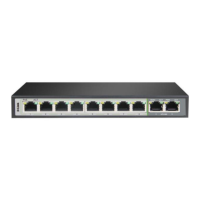
D-Link DGS-F1010P-E Specifications

General IconGeneral
BrandD-Link
ModelDGS-F1010P-E
CategorySwitch
LanguageEnglish

Related product manuals