9
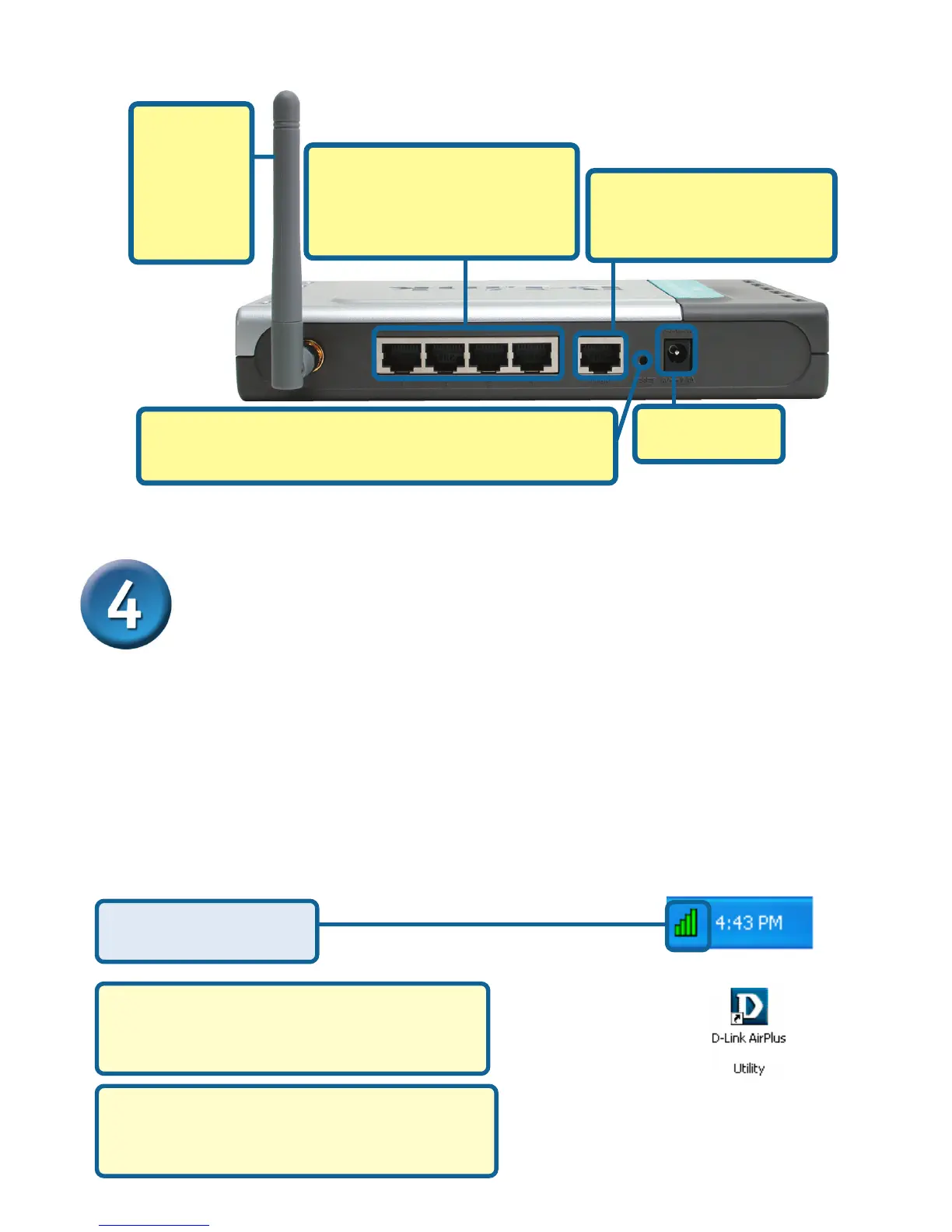
B. WAN PORT
Connect an Ethernet cable
to the Cable/DSL modem.
D. Antennas
Used to
wirelessly
connect to
802.11b
adapters.
C. LAN PORTS
These are the connections for
Ethernet cables to Ethernet
enabled computers.
A. Receptor for
Power Adapter.
Reset Button
Pressing this button restores the Router to its original
factory default settings.
Your Installation is Complete!Your Installation is Complete!
Your Installation is Complete!Your Installation is Complete!
Your Installation is Complete!
After you’ve continued in Windows XP (or after the computer restarts
in the other Windows operating systems), the D-Link AirPlus DWL-
650+ Configuration Utility will automatically start and the utility icon
will appear in the bottom right hand corner of the desktop screen
(systray). If this icon appears GREEN, then you have success-
fully installed the DWL-650+, are connected to a wireless
network and are ready to communicate!
DWL-650+
Click Yes to finalize
the installation
If the utility icon does not appear,
double-click the shortcut icon that has
appeared on your desktop
For Windows XP, if you wish to use the
D-Link AirPlus Utility, please refer to
Appendix B.








 To Next Page