24D-Link DIR-645 User Manual
Section 3 - Software Conguration
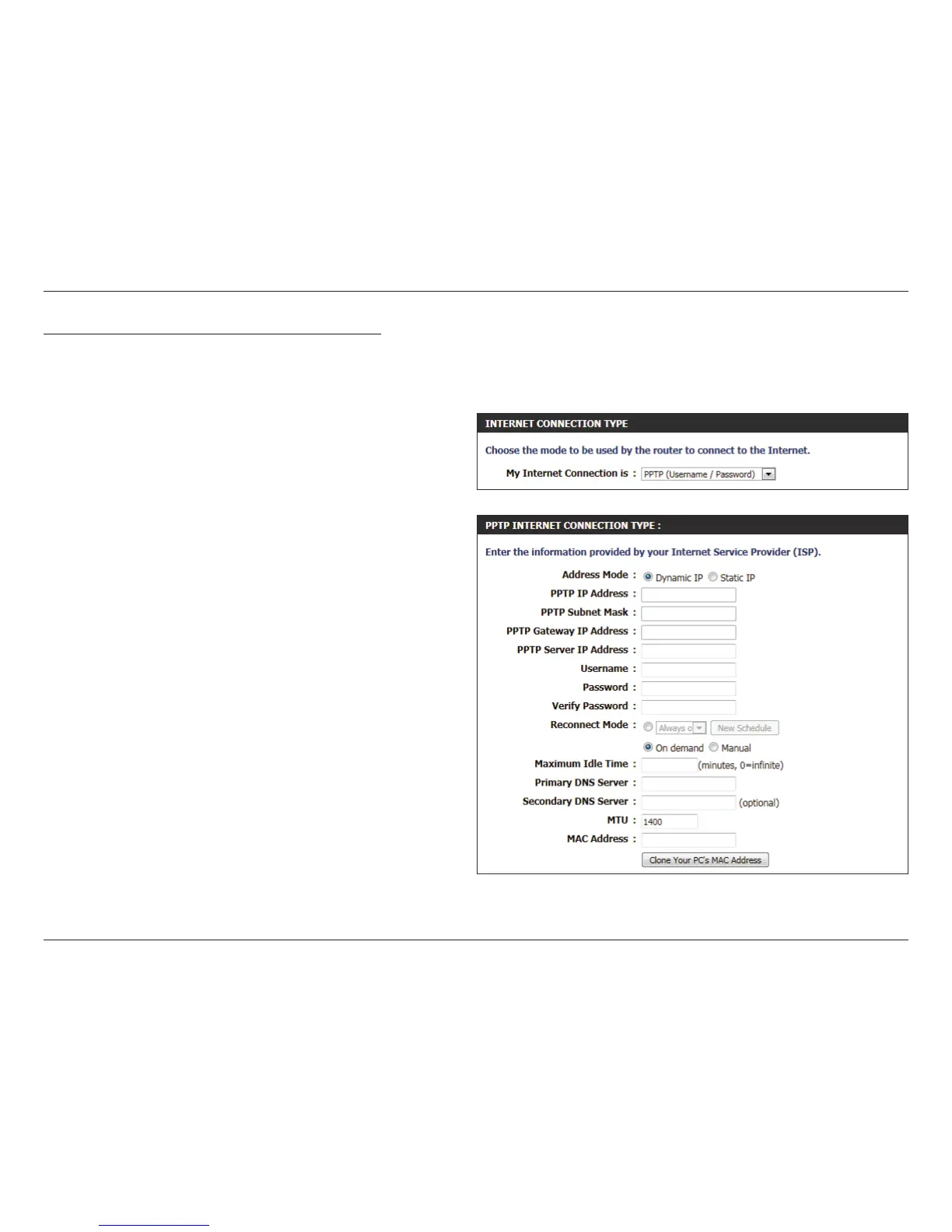
My Internet Connection is: PPTP (Username/Password)
Another Internet Connection type is PPTP. This option is typically used if you have a secure DSL Internet Connection. Most of the information
needed for this connection type is provided to you by your ISP.
Address Mode: Here the user can specify whether this Internet
connection requires the use of a Dynamic or
Static IP address. PPTP usually requires a Dynamic
IP conguration.
PPTP IP Address: Enter the PPTP IP address used here. This option is
only available if Static IP is selected.
PPTP Subnet
Mask:
Enter the PPTP Subnet Mask used here.
PPTP Gateway IP
Address:
Enter the PPTP Gateway IP address used here.
PPTP Server IP
Address:
Enter the PPTP Server IP address used here. This is
normally the same a the PPTP Gateway IP address.
Username: Enter the PPTP username used here.
Password: Enter the PPTP password used here.
Verify Password: Re-enter the PPTP password used here.
Reconnect
Mode:
Use the radio buttons to specify the reconnect
mode. The user can specify a custom schedule
or specify the On Demand, or Manual option. To
specify a custom schedule, use the drop-down
menu to select one of the schedules that has been
dened in the Schedules page. To create a new
schedule, click the New Schedule button to open
the Schedules page. Schedules will be discussed
later.













 To Next Page