76D-Link DIR-645 User Manual
Section 3 - Software Conguration
Inbound Filter
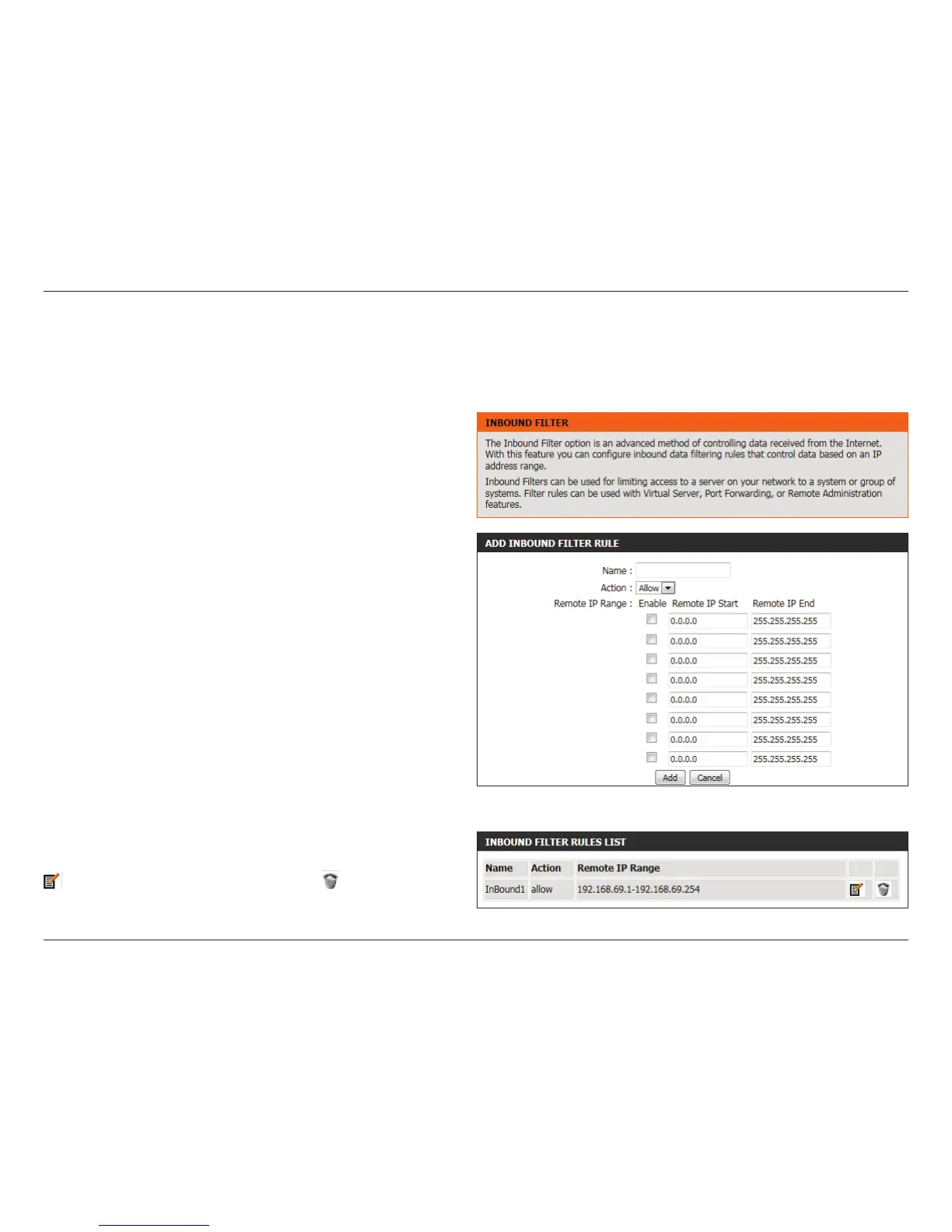
The Inbound Filter option is an advanced method of controlling data received from the Internet. With this feature you can congure inbound
data ltering rules that control data based on an IP address range. Inbound Filters can be used for limiting access to a server on your network to a
system or group of systems. Filter rules can be used with Virtual Server, Port Forwarding, or Remote Administration features. The user can add new
Inbound lter rule in the next section.
The following parameters will be available for conguration:
Name: The user can enter a custom name for the inbound
lter rule here.
Action: Select an action that will take place when this rule
is initiated. Options to choose from are Allow and
Deny.
Enable: Tick this option to enable the specied IP range
for this rule.
Remote IP Start: Enter the remote starting IP address here in the
range.
Remote IP End: Enter the remote ending IP address here in the
range.
Add: Click this button to add the new inbound lter
rule.
Cancel: Click this button to discard the new inbound lter
rule.
In the Inbound Filter Rules List section, the user can view a list of the
inbound lter rules already created. To edit a specic rule, click on the
icon. The delete a specic rule, click on the icon.













 To Next Page