5D-Link DIR-645 User Manual
Section 1 - Product Overview
Hardware Overview
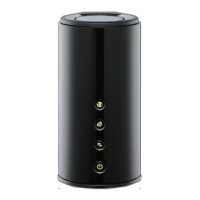
Front Panel
1 Internet Light A solid green light indicates that the Internet connection negotiation has successfully been completed.
2 Wireless Light A solid green light indicates the device is ready to link up.
3 WPS Light and Button
Press the WPS button for 1 second to initiate the WPS process. The button will ash green while a
WPS connection is being established. The button will light green for 5 seconds if a successful WPS
connection has been made.
4 Power Light Button
Press the button to power on the device. The LED lights solid green to indicate the power is on. Press
the button again to turn it o.
1
2
3
4













 To Next Page