26D-Link DIR-645 User Manual
Section 3 - Software Conguration
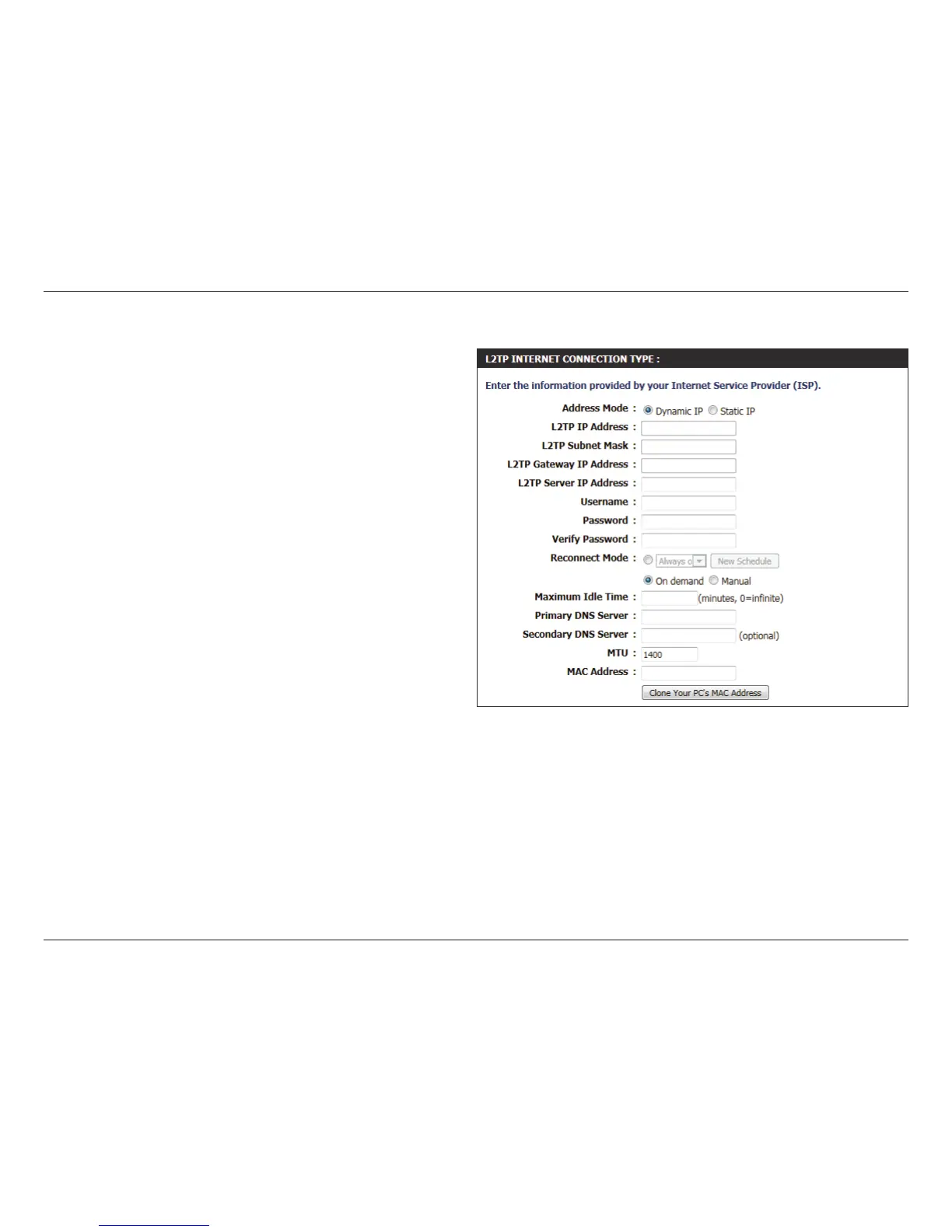
Address Mode: Here the user can specify whether this Internet
connection requires the use of a Dynamic or
Static IP address. L2TP usual requires a Dynamic IP
conguration.
L2TP IP Address: Enter the L2TP IP address used here. This option is
only available if Static IP is selected.
L2TP Subnet
Mask:
Enter the L2TP Subnet Mask used here.
L2TP Gateway IP
Address:
Enter the L2TP Gateway IP address used here.
L2TP Server IP
Address:
Enter the L2TP Server IP address used here. This is
normally the same a the L2TP Gateway IP address.
Username: Enter the L2TP username used here.
Password: Enter the L2TP password used here.
Verify Password: Re-enter the L2TP password used here.
Reconnect
Mode:
Use the radio buttons to specify the reconnect
mode. The user can specify a custom schedule
or specify the On Demand, or Manual option. To
specify a custom schedule, use the drop-down
menu to select one of the schedules that has been
dened in the Schedules page. To create a new
schedule, click the New Schedule button to open
the Schedules page. Schedules will be discussed
later.
Maximum Idle
Time:
Enter a maximum idle time during which the Internet connection is maintained during inactivity. To disable this feature,
enable Auto-reconnect.
Primary DNS
Server:
Enter the Primary DNS IP address used here.
Secondary DNS
Server:
Enter the Secondary DNS IP address used here. This eld is normally optional. Only one DNS address is required for a functional
Internet connection, but using a second DNS address provides more stability.













 To Next Page