50D-Link DIR-645 User Manual
Section 3 - Software Conguration
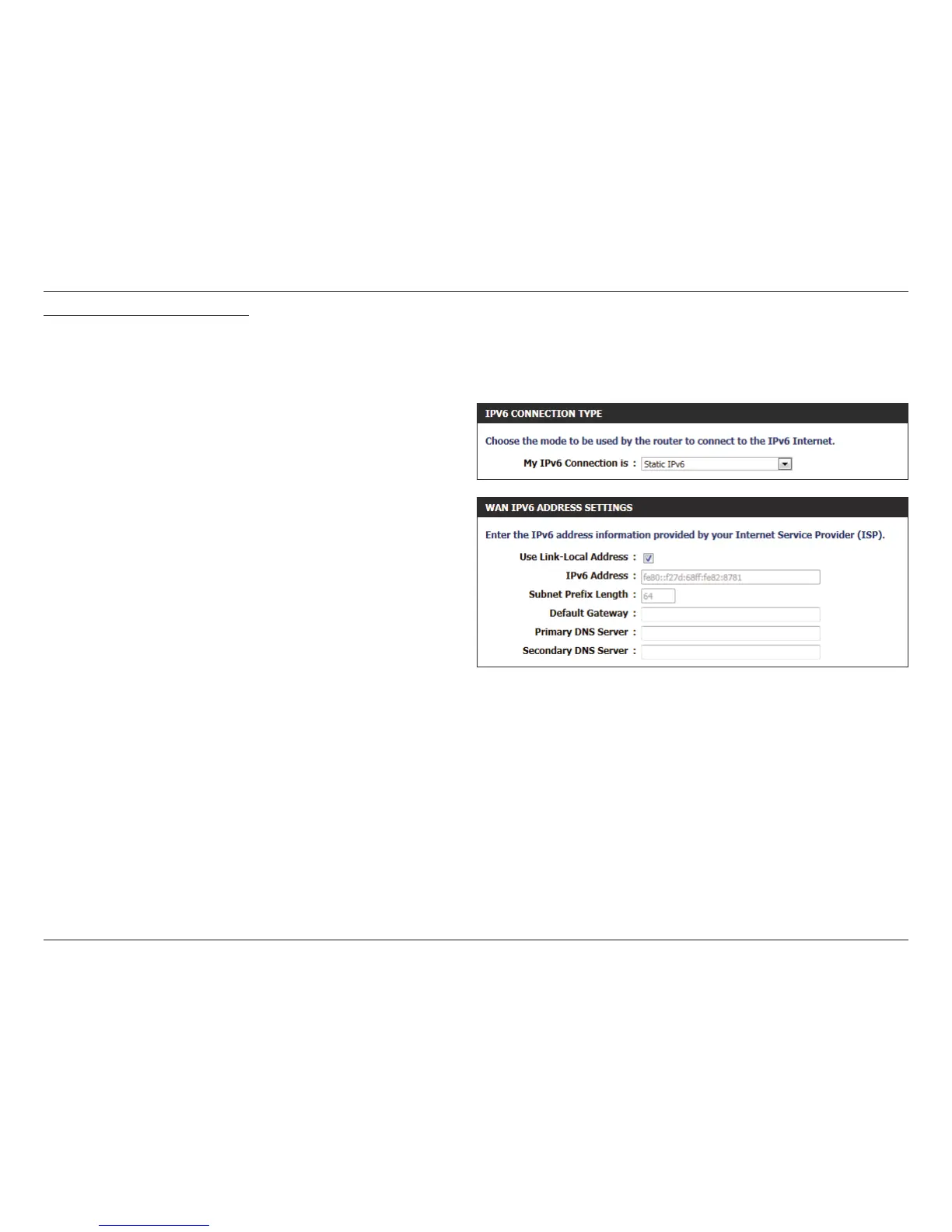
IPv6 Connection Type: Static IPv6
In the following section we’ll discuss the parameters that can be congured when setting up an Static IPv6 connection. This mode is used when
your ISP provides you with a set IPv6 addresses that does not change. The IPv6 information is manually entered in your IPv6 conguration settings.
You must enter the IPv6 address, Subnet Prex Length, Default Gateway, Primary DNS Server, and Secondary DNS Server. Your ISP provides
you with all this information.
The following parameters will be available for conguration:
Use Link-Local
Address:
The Link-local address is used by nodes and
routers when communicating with neighboring
nodes on the same link. This mode enables IPv6-
capable devices to communicate with each other
on the LAN side.
IPv6 Address: Enter the WAN IPv6 address for the router here.
Subnet Prex
Length:
Default
Gateway:
Enter the WAN default gateway IPv6 address used
here.
Primary DNS
Server:
Secondary DNS
Servers:
Enter the WAN primary DNS Server address used
here.
Enter the WAN secondary DNS Server address used
here.













 To Next Page