61D-Link DIR-645 User Manual
Section 3 - Software Conguration
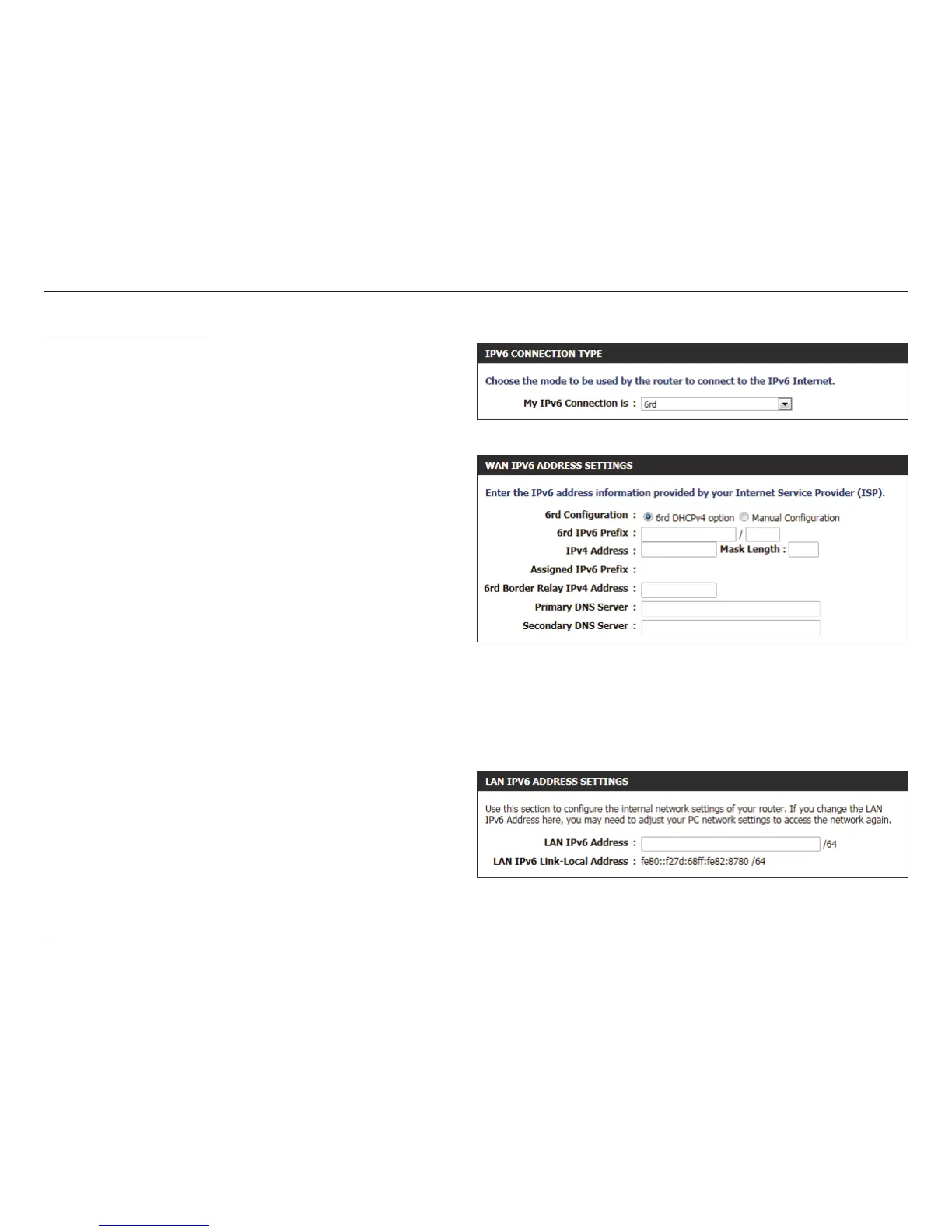
IPv6 Connection Type: 6rd
In this section the user can congure the IPv6 6rd connection settings.
The following parameters will be available for conguration:
6rd
Conguration:
Select the desired 6rd conguration option here.
6rd IPv6 Prex: Enter the 6rd IPv6 address and prex value used
here.
IPv4 Address: Enter the IPv4 address used here.
Mask Length: Enter the IPv4 mask length used here.
Assigned IPv6
Prex:
Displays the IPv6 assigned prex value here.
6rd Border Relay
IPv4 Address:
Enter the 6rd border relay IPv4 address used here.
Primary DNS
Server
Enter the primary DNS Server address used here.
Secondary DNS
Server:
Enter the secondary DNS Server address uses here.
The following parameters will be available for conguration:
LAN IPv6
Address:
Enter the LAN IPv6 address used here. This address
must be in the ‘/64’ subnet.
LAN IPv6 Link-
Local Address:
Displays the LAN IPv6 Link-Local address used
here.













 To Next Page