72D-Link DIR-645 User Manual
Section 3 - Software Conguration
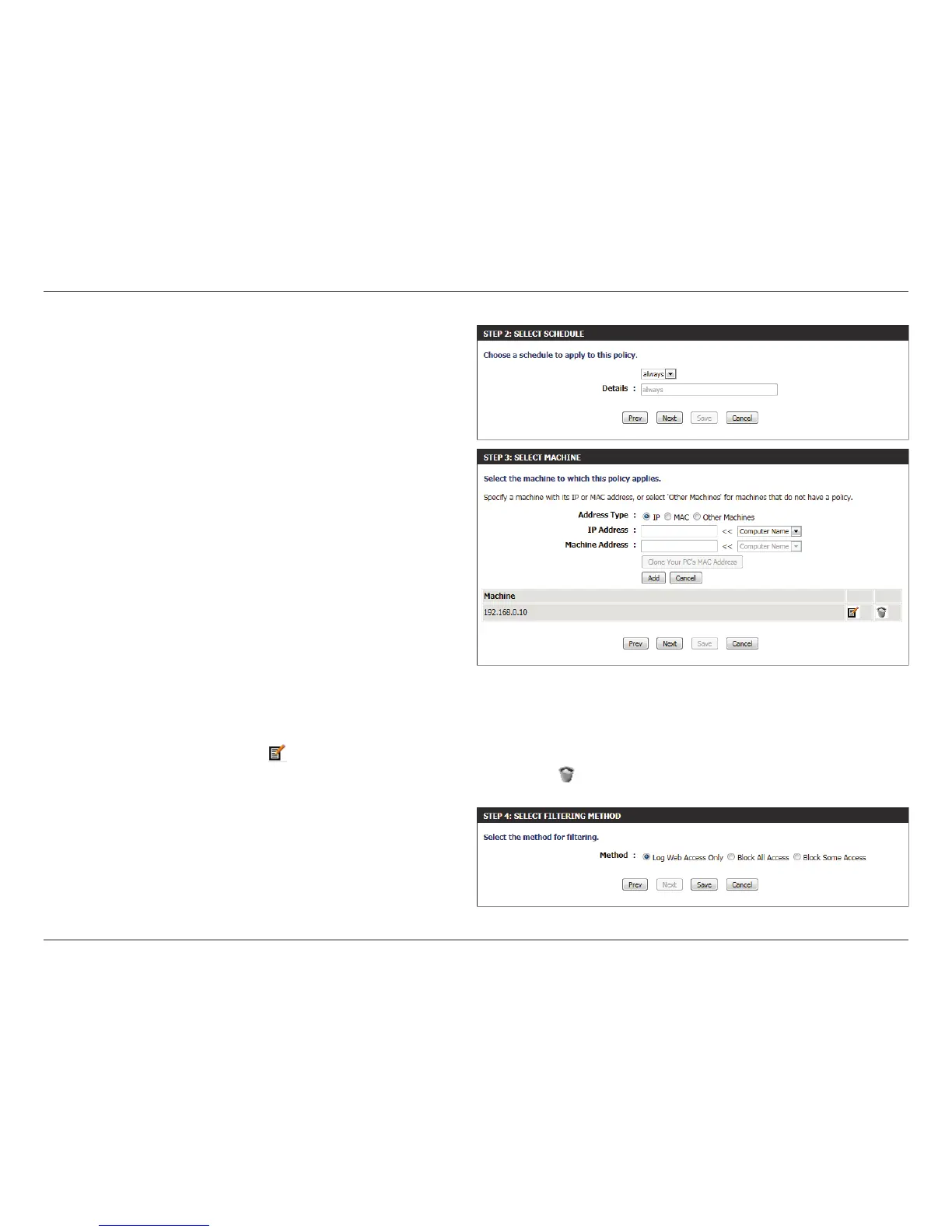
Step 2: In the second step, the user can congure the schedule settings
for this rule.
The following parameters will be available for conguration:
Details: Select the appropriate predened schedule rule
to apply to this rule from the drop-down menu.
Step 3: In the third step, the user can congure the address type and IP
address of the machines used in this rule.
The following parameters will be available for conguration:
Address Type: Specify a machine with its IP or MAC address, or
select ‘Other Machines’ for machines that do not
have a policy.
IP Address: After selecting the IP address type, the user can
enter the IP address of the machines used in
this rule here. Alternatively, the user can select a
Computer from the Computer Name list.
Machine
Address:
After selecting the MAC address type, the user
can enter the MAC address of the machine used in
this rule here. Alternatively, the used can select a
Computer from the Computer Name list.
Add: Click on this button to add the machine to the list.
Update:
After clicking the
option, the user will be able to update the machine information.
Delete:
If the user chooses to remove a machine from the list, click on the
icon.
Step 4: In the fourth step, the user can select the ltering method used
for this rule.
The following parameters will be available for conguration:
Method: Here the user can select the ltering method used.
Options to choose from are ‘Log Web Access Only’,
‘Block All Access’, and ‘Block Some Access’.













 To Next Page