ENGLISH
38
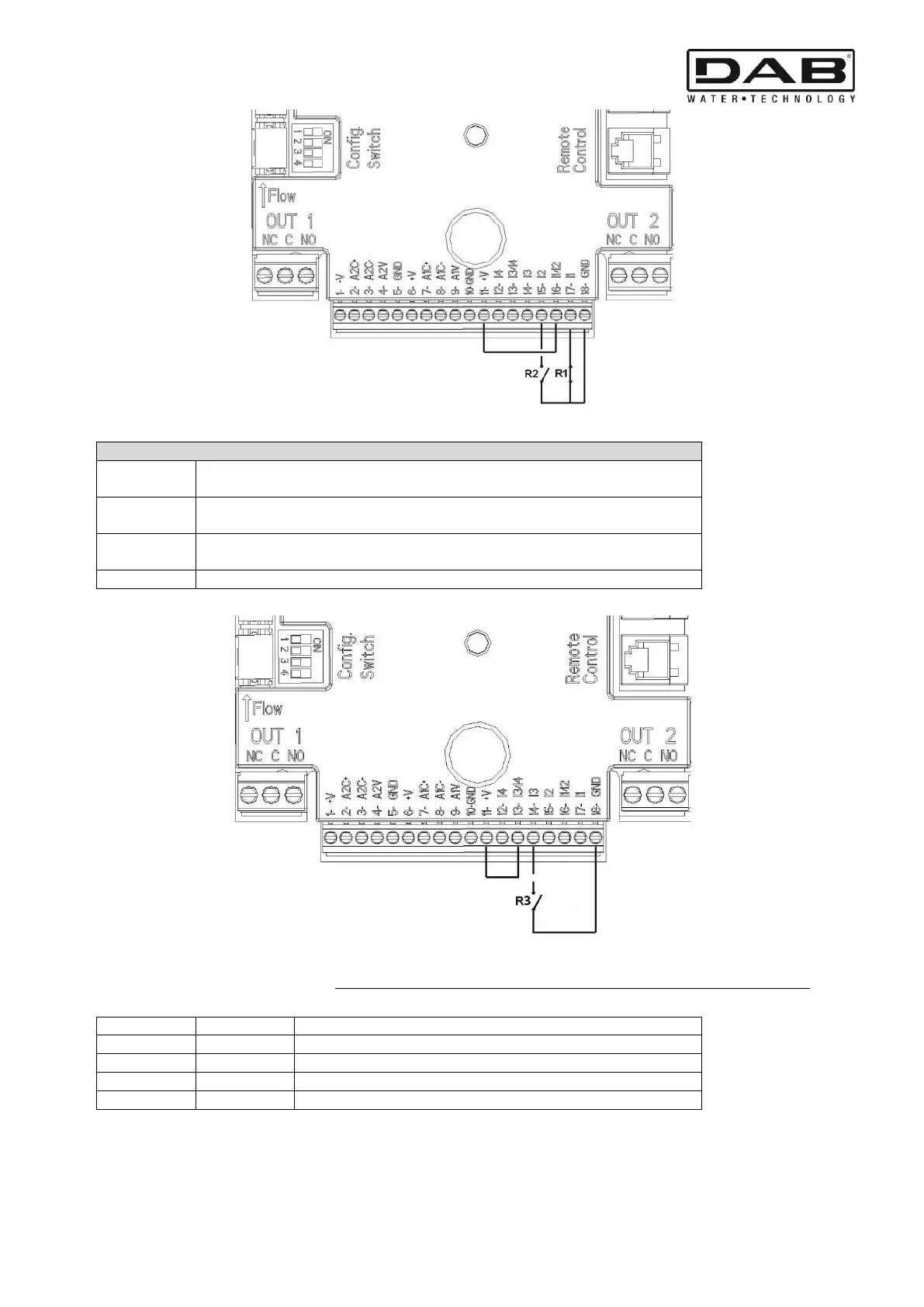
Figure 4: Example of Connection of Digital Inputs Start/Stop and Economy
Functions associated with the digital inputs
Start/Stop: If input 1 is activated from the control panel (see par. 9) it will be possible to
command the switching on and off of the pump in remote mode.
Economy: If input 2 is activated from the control panel (see par. 9) it will be possible to
active the set-point reduction function in remote mode.
Quick Start: If input 3 is activated from the control panel, the pump is started at
the quick start frequency Fq (see advanced menu).
Figure 5: Example of Connection of Quick Start Digital Input
With reference to the example in Figure 4, and if the EXT and Economy functions have been activated from the control panel, the
system behaviour will be as follows:
Pump running with set-point set by the user
Pump running with reduced set-point



 To Next Page