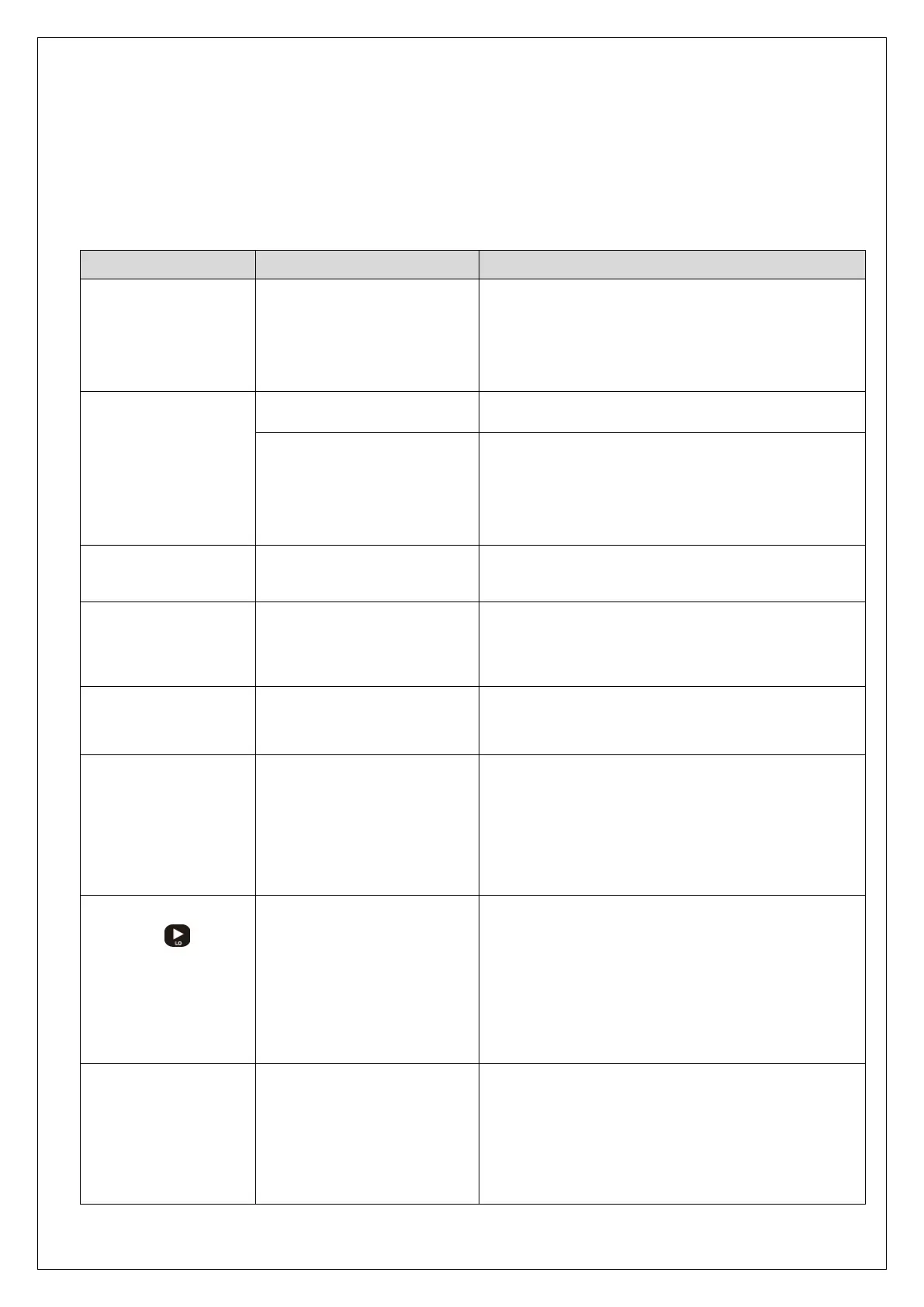
Symptom Cause Action
When Display
trembles.
• Load cell is damaged.
• Load cell insulation
resistance.
• Indirect occurrence
• Load cell input, output.
• Check resistance
• Check load cell’s insulation resistance.
When weight goes
up at a regular ratio
or zero returns are
not made.
• Loadcell faulty • Check load cell’s insulation resistance.
• Loadcell connection is
insufficient.
• Check the wiring between load cell and the
main device.
• Check the load cell’s calbe’s disconnection.
When weight
changes into (-).
• Loadcell wiring is
reversed.
• Check load cell’s ouput
cable connection.
Displayed as Lc_Er
• Load cell is damaged.
• Load cell connection is
bad.
• Check the load cell’s condition and calbe
connection.
Displayed as c_Err
• Actual calibration set
below zero (-)
• Performing actual load calibration at plus(+)
If the number on
the Display does
not match
• Out of maximum display
range(-19999 ~ 99999)
• Re-check the 8-4 Digital Calibration setting
and the F-51 Force unit setting.
• Restore to the settings saved by RESTORE
execution
Pressing
key
in FUNC state does
not move to
calibration mode.
• Locked State at 8-7
Lock Set-up.
•State in which units of
conversion at F-51 Force
unit is established.
• Unlock from Locking Settings at 8-7 Lock
Set-up.
• Change to kgf unit (set value :0) at F-51.
Force unit
The number of
measurements is
incorrect
• Maximum Display
Range Out of 99999
• Check calibration settings and F-51
settings. (page 30~36), (page 29)
• Restore to the settings saved by RESTORE
execution (page 37)



 To Next Page