23
PMOR30B
PMOR30R
PMOR30S
TEST PROCEDURES
PROCEDURE
LETTER
COMPONENT TEST
1) Disconnect the power supply cord, and then remove outer case.
2) Open the door and block it open.
3) To discharge high voltage capacitor, wait for 60 seconds.
4) Reconnect all leads removed from components during testing.
5) Re-install the outer case (cabinet).
6) Reconnect the power supply cord after the outer case is installed.
7) Run the oven and check all functions.
1. Disconnect the power supply cord, and then remove outer case.
2. Open the door and block it open.
3. To discharge high voltage capacitor, wait for 60 seconds.
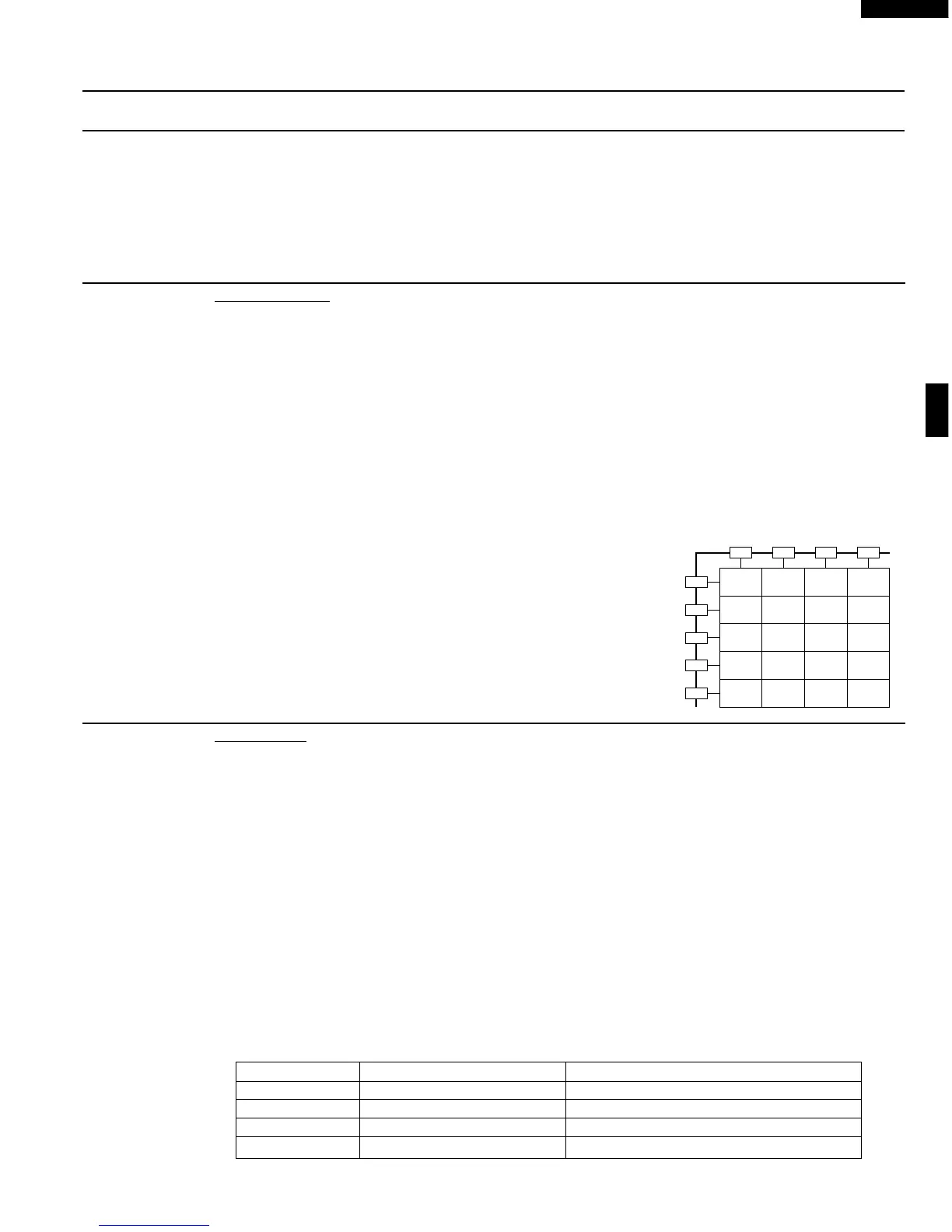
4. If the display fails to clear when the STOP/CLEAR pad is depressed, first verify the flat ribbon cable
is making good contact, verify that the stop switch operates properly; that is the contacts are closed
when the door is closed and open when the door is open. If the stop switch is good, disconnect the flat
ribbon cable that connects the key unit to the control unit and make sure the stop switch is closed (either
close the door or short the stop switch connector). Use the Key unit matrix indicated on the control
panel schematic and place a jumper wire between the pins that correspond to the STOP/CLEAR pad
making momentary contact. If the control unit responds by clearing with a beep the key unit is faulty
and must be replaced. If the control unit does not respond, it is faulty and must be replaced. If a specific
pad does not respond, the above method may be used (after clearing the control unit) to determine if
the control unit or key pad is at fault.
5. Reconnect all leads removed from components during testing.
6. Re-install the outer case (cabinet).
7. Reconnect the power supply cord after the outer case is installed.
8. Run the oven and check all functions.
K KEY UNIT TEST
1. Disconnect the power supply cord, and then remove outer case.
2. Open the door and block it open.
3. To discharge high voltage capacitor. wait for 60 seconds.
4. Disconnect the leads to the primary of the power transformer.
5. Ensure that these leads remain isolated from other components and oven chassis by using insulation
tape.
6. After that procedure, re-connect the power supply cord.
7. Remove the outer case and check voltage between Pin No. 5 of the 4 pin connector (A) and the
common terminal of the relay RY1 on the control unit with an A.C. voltmeter.
The meter should indicate 120 volts, if not check oven circuit.
RY1, RY2, RY3 and RY4 Relays Test
These relays are operated by D.C. voltage
Check voltage at the relay coil with a D.C. voltmeter during the microwave cooking operation.
DC. voltage indicated .................... Defective relay.
DC. voltage not indicated .............. Check diode which is connected to the relay coil. If diode
is good, control unit is defective.
RELAY SYMBOL OPERATIONAL VOLTAGE CONNECTED COMPONENTS
RY1 Approx. 25.6V D.C. Oven lamp / Stirrer motor / Cooling fan motor
RY2 Approx. 25.6V D.C. Turntable motor
RY3 Approx. 25.6V D.C. Hood motor
RY4 Approx. 25.6V D.C. Hood motor (HIGH/LOW selection)
8. Disconnect power supply cord, and then remove outer case.
L RELAY TEST
G 1 G 2 G 3 G14
G 5
G 6
G13
G12
G11
Baked
Potatoes
STOP/
CLEAR
EASY
MINUTE
Keep
Warm
Popcorn
Reheat
Poultry
Meats
START
Set Up
Vegetables
Fish/
Seafood
Fan
Options
Light
Options
Pasta
Grains
Frozen
Food
Turntable
On/Off
Defrost
Beverages
Microwave
Recipes &
Instructions



 To Next Page