24
PMOR30B
PMOR30R
PMOR30S
TEST PROCEDURES
PROCEDURE
LETTER
COMPONENT TEST
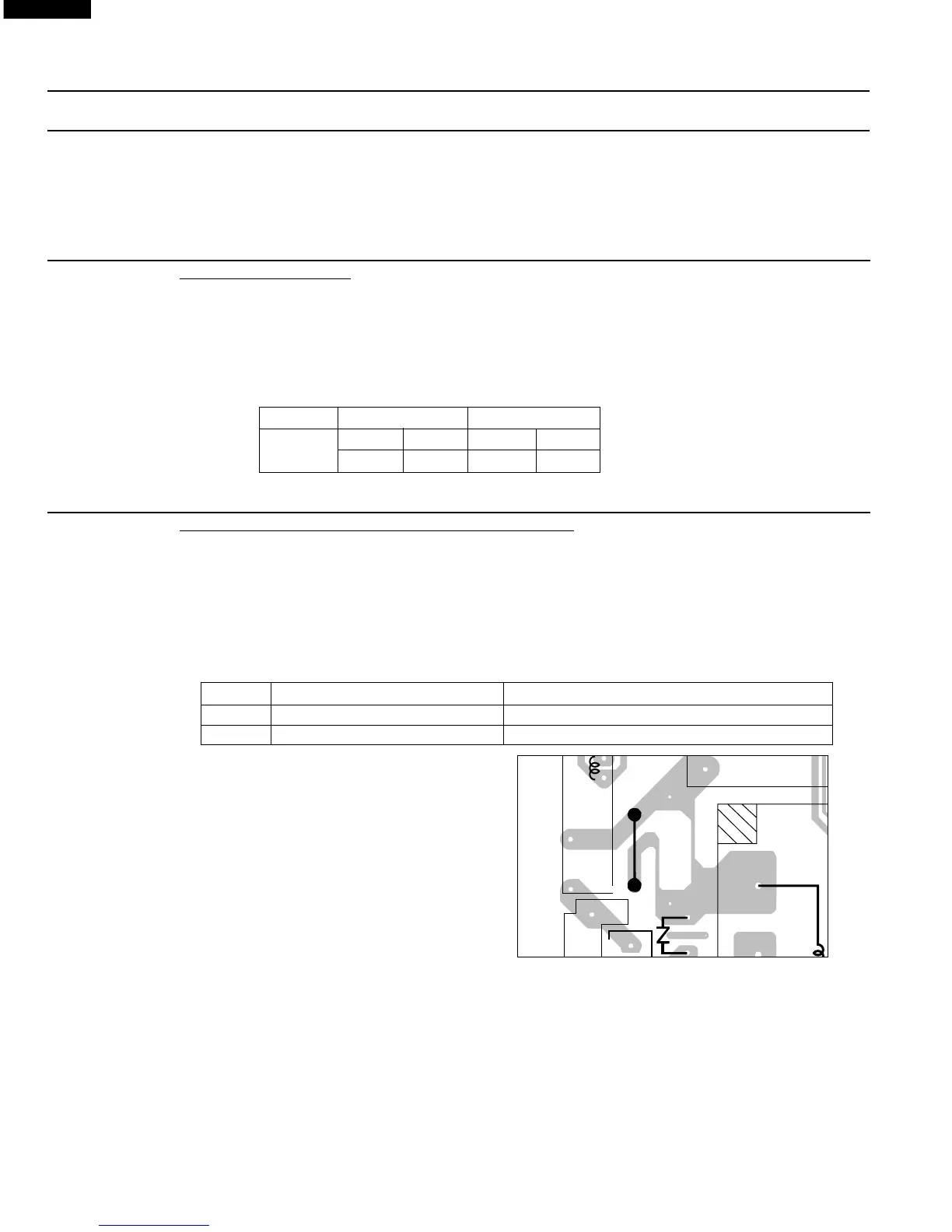
To protect the electronic circuits, this model is provided with a fine foil pattern added to the primary on
the PWB, this foil pattern acts as a fuse.
1. Foil pattern check and repairs.
1) Disconnect the power supply cord, and then remove outer case.
2) Open the door and block it open.
3) To discharge high voltage capacitor, wait for 60 seconds.
4) Follow the troubleshooting guide given below for repair.
STEPS OCCURRENCE CAUSE OR CORRECTION
1 Only pattern at "a" is broken. *Insert jumper wire J1 and solder.
2 Pattern at "a" and "b" are broken. *Insert the coil RCILF2003YAZZ between "c" and "d".
5) Make a visual inspection of the varistor.
Check for burned damage and examine
the transformer with a tester for the
presence of layer short-circuit (check
the primary coil resistance which is
approximately 138ý ± 10%). If any
abnormal condition is detected, replace
the defective parts.
6) Reconnect all leads removed from components during testing.
7) Re-install the outer case (cabinet).
8) Reconnect the power supply cord after the outer case is installed.
9) Run the oven and check all functions.
2. Follow the troubleshooting guide given below, if indicator does not light up after above check and
repairs are finished.
1) Disconnect the power supply cord, and then remove outer case.
2) Open the door and block it open.
3) To discharge high voltage capacitor, wait for 60 seconds.
4) Disconnect the leads to the primary of the power transformer.
5) Ensure that these leads remain isolated from other components and oven chassis by using
insulation tape.
N FOIL PATTERN ON THE PRINTED WIRING BOARD TEST
9. Open the door and block it open.
10.To discharge high voltage capacitor, wait for 60 seconds.
11.Reconnect all leads removed from components during testing.
12.Re-install the outer case (cabinet).
13.Reconnect the power supply cord after the outer case is installed.
14.Run the oven and check all functions.
M COMPU DEFROST TEST
WARNING : The oven should be fully assembled before following procedure.
(1) Place one cup of water in the center of the turntable tray in the oven cavity.
(2) Close the door, touch the Defrost pad and select compu Defrost. Then select Steaks/Chops/Fish.
(Now, weight 0.5lb is set.) And then touch the start pad.
(3) The oven is in Compu Defrost cooking condition.
(4) The oven will operate as follows
WEIGHT 1ST STAGE 2ND STAGE
LEVEL TIME LEVEL TIME
0.5lb
70% 30sec. 40% 25sec.
(5) If improper operation is indicated, the control unit is probably defective and should be checked.
1
RY2
(J1)
VRS1
T1
P
TTM
AC
7
RY1
a
b
d
c



 To Next Page