Using the Timer
• Press the Timer Button (14) to enter the timer mode.
• The timer can be set in 1 hour increments, every press of the Timer Button (14)
the set time will increase by 1 hour and the time will be displayed on the LED
Display (15).
• The set time on the LED Display (15) will show as “07” for 7 hours, etc.
• The Timer Indicator (22) above the Timer Button (14) will illuminate during the
set time period. After the set time period has ended, the Timer Indicator (22)
will go out.
If the Timer is set with the unit on, the Timer will turn the Dehumidifier off at
the end of the set time.
If the Timer is set with the unit in standby mode, (i.e. with the Dehumidifier
plugged in but not running), the Timer will turn the Dehumidifier on at the
end of the set time.
• To cancel the timer, press the Timer Button (14) until the LED Display (15)
returns to “00”.
Humidity
• Press the Humidity Set Button (16) to check the current ambient humidity,
press the button again to set the desired humidity.
• After setting the desired humidity level, the LED Display (15) will confirm the set
value for about 3 seconds and then return to show the current ambient
humidity.
• To view the current ambient temperature at any point, press and hold the
Humidity Set Button (16) for 3 seconds.
The range of target humidity is 30%, 35%, 40%, 45%, 50%, 55%, 60%, 65%, 70%,
75% and 80%.
In the “Continuous drying mode” the humidity cannot be changed.
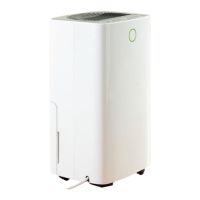
Colour Digital Display (3)
The Colour Digital Display (3) will turn blue, green and red depending on the
room humidity level in different ranges:
Ambient humidity ≤ 45%, it turns blue.
45% ≤ ambient humidity < 65%, it turns green.
Ambient humidity ≥ 65%, it turns red.


 To Next Page