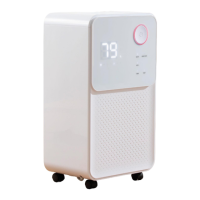
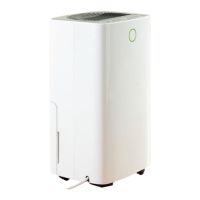
This document is the user manual for the Daewoo 12L Dehumidifier, Model No. COL1471. It provides comprehensive information on the device's function, technical specifications, usage, and maintenance.
Function Description:
The Daewoo 12L Dehumidifier is designed to reduce humidity levels in indoor environments, making the air more comfortable and preventing issues like mold and mildew growth. It operates by drawing in moist air, passing it over a cooling element to condense the moisture, and then releasing drier air back into the room. The collected water is stored in a removable tank or can be continuously drained via a hose. The device is intended for household use only and is suitable for rooms with a floor area larger than 4m².
Important Technical Specifications:
- Model Number: COL1471
- Rated Capacity: 12L/D (30°C, 80%RH) – This indicates it can remove 12 liters of water per day under conditions of 30°C and 80% relative humidity.
- Power Supply: 220-240V~ 50Hz
- Power Consumption: 185W 1.0A (30°C, 80%RH)
- Water Tank Capacity: 2L
- Noise Level: ≤36dB (A)
- Refrigerant: R290/55g (R290 is a flammable refrigerant gas, complying with EU environmental directives. The appliance must be used and stored in a well-ventilated room to prevent stagnation of potential leaks.)
- Net Weight: 11kg
- Maximum Suction Side Working Pressure: 0.7MPa
- Maximum Exhaust Side Working Pressure: 3.2MPa
- Minimum Room Size: 4m² (Floor area)
- Dimensions (Without Castors): 255mm (w) x 220mm (d) x 430mm (h)
- Dimensions (With Castors): 255mm (w) x 220mm (d) x 460mm (h)
- Warranty: 1 year standard guarantee, extendable to an extra 2 years (total 3 years) upon online registration within 28 days of purchase.
Usage Features:
The dehumidifier features a control panel with a colour digital display and various buttons for operation:
- Power Button (18): Turns the unit on/off. When powered on, it defaults to high fan speed and 50% humidity setting.
- Modes: The device offers three operating modes selected via the Mode Button (17):
- Auto Mode: The fan and compressor run based on the ambient humidity relative to the set humidity. Both fan speed and humidity can be adjusted.
- Continuous/Clothes Drying Mode: The dehumidifier runs continuously, ideal for drying clothes. Humidity setting cannot be adjusted in this mode.
- Sleep Mode: LED indicators dim after 10 seconds of idle time, and fan speed automatically switches from high to low. Fan speed and humidity cannot be adjusted. Touching any button wakes the unit.
- Humidity Set Button (16): Allows checking the current ambient humidity and setting the desired humidity level (range: 30% to 80% in 5% increments). Holding the button for 3 seconds displays the current ambient temperature.
- Speed Button (13): Selects between low and high fan speeds. Not adjustable in Continuous drying or Sleep modes.
- Timer Button (14): Sets an operation timer in 1-hour increments (up to 7 hours). The timer can be used to turn the unit off after a set period if it's currently running, or to turn it on after a set period if it's in standby mode.
- Child Lock Button (12): Holds for 3 seconds to activate/deactivate the child lock, preventing accidental changes to settings.
- Colour Digital Display (3): Provides visual feedback on humidity levels:
- Blue: Ambient humidity ≤ 45%
- Green: 45% ≤ ambient humidity < 65%
- Red: Ambient humidity ≥ 65%
- Water Tank Full Alarm: When the 2L water tank (8) is full, the Tank Full Indicator (26) illuminates, and the unit buzzes 5 times. The compressor and fan pause until the tank is emptied and replaced.
- Continuous Drainage: An option to connect a drain hose (11) to the rear of the main body (4) for continuous water removal, bypassing the need to empty the water tank.
Maintenance Features:
Regular maintenance ensures optimal performance and longevity of the dehumidifier:
- Cleaning the Water Tank: The water tank (8) should be cleaned with warm soapy water. Do not use harsh abrasive chemicals. The float inside the tank should not be removed.
- Cleaning the Body: The main body (4) can be wiped with a soft, damp cloth.
- Cleaning the Air Filter (10): The air filter should be removed from the unit and cleaned using a vacuum cleaner hose to remove dust and lint. If heavily soiled, it can be washed in warm soapy water with a mild detergent and thoroughly dried before reinstallation.
- Storage: For long periods of non-use, the water tank should be emptied, excess moisture wiped from the tank and body, and the filter cleaned. The appliance should then be stored in a cool and dry environment.
- Transportation: The dehumidifier must always be stored and transported upright to prevent damage to the compressor. If there's any doubt, wait at least 24 hours before restarting the unit.
- Restart Delay: Avoid restarting the dehumidifier unless 3 minutes have passed since it was turned off to prevent compressor damage.
The manual also includes important safety instructions, an explanation of symbols, and a troubleshooting guide to address common issues. It emphasizes the importance of proper installation, avoiding obstructions, and ensuring the appliance is used on a stable, level surface away from heat sources and direct sunlight.


 To Next Page
 General