EasyManua.ls Logo

Daewoo DLP-26C2 - Page 30

Daewoo DLP-26C2
48 pages
Print Icon
To Next Page IconTo Next Page
To Previous Page IconTo Previous Page
Loading...
Setting Up TV
Stations
30
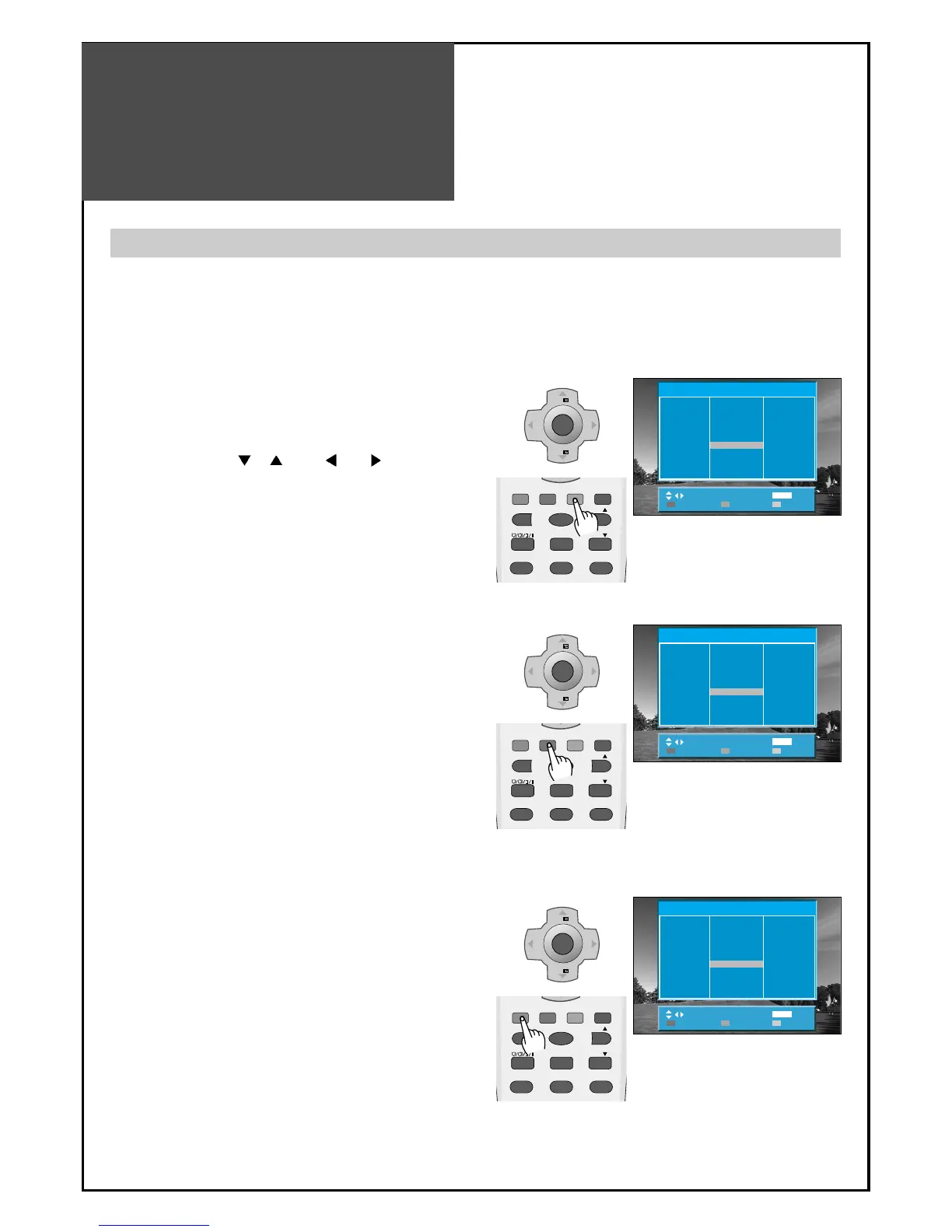
The Edit menu shows you information as follows:
- Program position assignment: Program number and Station name, Real channel number.
- Skip information: Red (Skip Yes), White (Skip No)
MENU
V
O
L
V
O
L
PR
PR
Position
MoveSkip Delete
MENU
Exit
Edit
Pr
01
02
03
04
05
06
07
08
09
10
Ch.
- --
- --
- --
- --
- --
- --
- --
- --
- --
- --
Pr
21
22
23
24
25
26
27
28
29
30
Ch.
- --
- --
- --
- --
- --
- --
- --
- --
- --
- --
Pr
11
12
13
14
15
16
17
18
19
20
Ch.
- --
- --
- --
- --
- --
- --
- --
- --
- --
- --
P.MODE
STILL
3D PANORAMA P.PR
P. P R
P.STILL P.SWAP P.INPUT
1 23
DYNAMIC BASS
MENU
V
O
L
V
O
L
PR
PR
Position
MoveSkip Delete
MENU
Exit
Edit
Pr
01
02
03
04
05
06
07
08
09
10
Ch.
- --
- --
- --
- --
- --
- --
- --
- --
- --
- --
Pr
21
22
23
24
25
26
27
28
29
30
Ch.
- --
- --
- --
- --
- --
- --
- --
- --
- --
- --
Pr
11
12
13
14
15
16
17
18
19
20
Ch.
- --
- --
- --
- --
- --
- --
- --
- --
- --
- --
P.MODE
STILL
3D PANORAMA P.PR
P. P R
P.STILL P.SWAP P.INPUT
1 23
DYNAMIC BASS
MENU
V
O
L
V
O
L
PR
PR
Position
MoveSkip Delete
MENU
Exit
Edit
Pr
01
02
03
04
05
06
07
08
09
10
Ch.
- --
- --
- --
- --
- --
- --
- --
- --
- --
- --
Pr
21
22
23
24
25
26
27
28
29
30
Ch.
- --
- --
- --
- --
- --
- --
- --
- --
- --
- --
Pr
11
12
13
14
15
16
17
18
19
20
Ch.
- --
- --
- --
- --
- --
- --
- --
- --
- --
- --
P.MODE
STILL
3D PANORAMA P.PR
P. P R
P.STILL P.SWAP P.INPUT
1 23
DYNAMIC BASS
Edit
1. Deleting the program positions.
• Move to EDIT in the Install menu.
• Move the selection bar to program number to
delete with the “
PR ” or “ VOL buttons.
• Press the Delete(Yellow) button.
2. Moving the program positions
• Move to EDIT in the Install menu.
• Press the Move(Green) button. The colour of
"Move" Character will be changed to Red from
White.
• Move the selection bar to a new program number.
• Press the Move (Green) button again, then the
programs are changed.
3. Skipping the Programs
• Move to EDIT in the Install menu.
• Move the selection bar to the program number you
want to skip
• Press the skip (Red) button, then the colour of the
program number and channel will be changed to
Red from White.
• The skipped program number will be displayed as
red in the EDIT menu.


Other manuals for Daewoo DLP-26C2

Related product manuals