MODE
SLEEP
ON/OFF
TIMER
ENTER/
CANCEL
FAN SPEED
TURBO/MILD
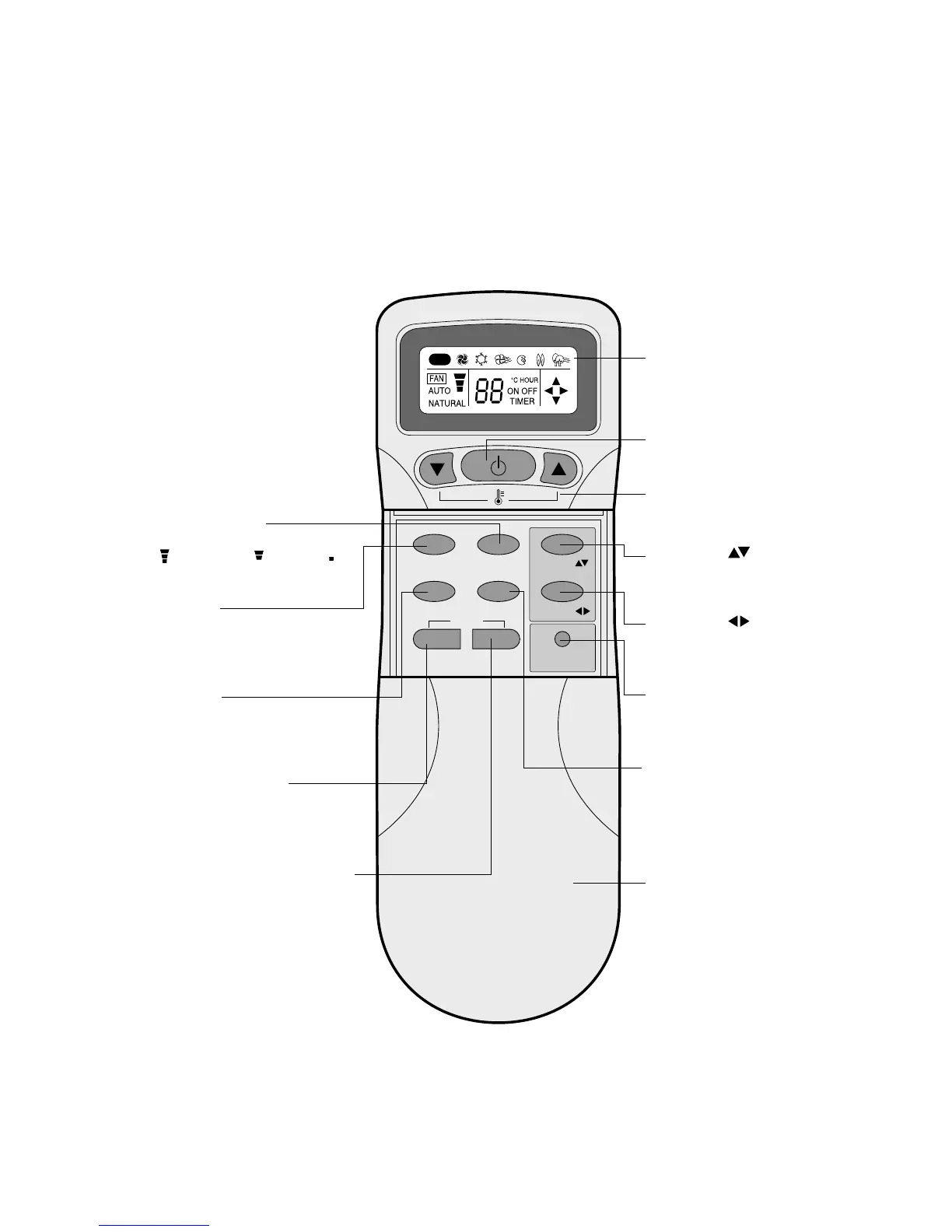
Display
Displays information
pertaining to unit.
TURBO/MILD
Press to select super power
operation(Turbo) mode
TIMER ENTER/CANCEL Button
Press to enter a timer setting or
to cancel timer setting
TIMER ON/OFF Button
Press to set the unit off or on time.
(0.5, 1, 1.5, 2, 2.5, 3, 4, 5, 6, 8,
10, 12, 16, 20, 24hr)
MODE Button
Press to cycle through the modes
(Auto/Quick/Cool/Fan/Dehumidifier/
Heat)
SLEEP Button
Press to set the unit for
the sleep mode.
FAN DIR. Button
Press to select up/down
direction for fan.
FAN DIR. Button
Press to select left/right
direction for fan.
ON/OFF Button
Press to turn the unit
on or off.
TEMPERATURE Buttons
Press to raise or lower
the desired temperature.
FAN SPEED Button
Press to select the fan speed
(High " ", Middle " ", Low " ",
Natural).
COVER
Slide down to access most
of the remote buttons.
Slide down further to
access the battery
compartment.
AUTO
FAN DIR.
FAN DIR.
PLASMA
PLASMA Button
Press to purify air.



 To Next Page