10
3. OPERATION AND FUCTIONS
1. Fufrosting Mode
1-1. DISPLAY
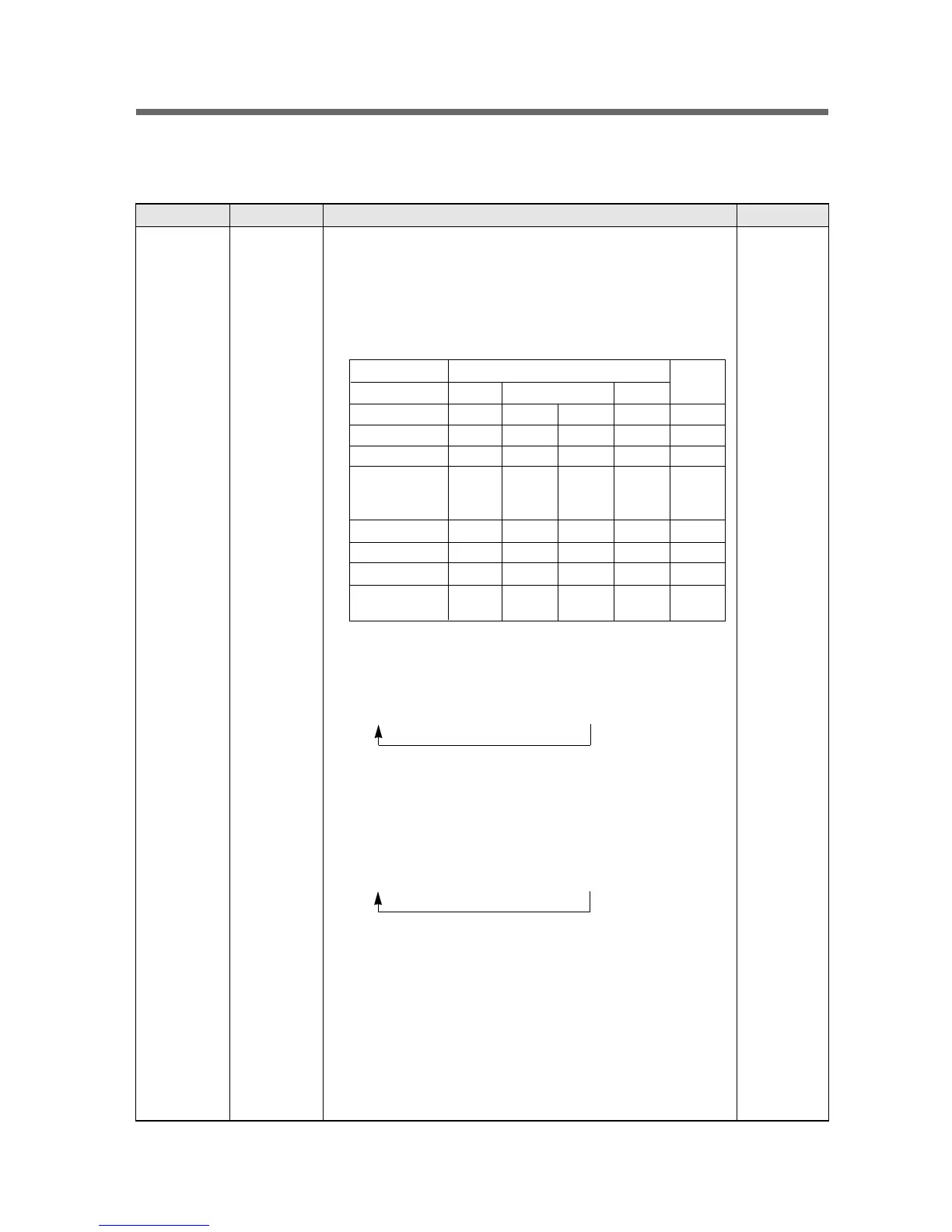
Input Control Object Contents Remark
F-PCB Button
FRZ.SET,
REF.SET,
SLEEP
CUSTOM LED 1. Normal Operation
1) SLEEP Icon(Amber):OFF
2) Initial Temperature Setting:
Freezer/Refrigerator=middle/middle
3) Radar:in rotation
4) EXERGY CONTROL, FRZ/REF:On
5) Else:
2. Freezer Button
1) Temperature Control of Freezer Compartment
2) Temperature mode changes as the button is pushed.
(Weak) --> Weak --> Middle --> Strong --> Quick FRZ.
3) When Quick FRZ. Mode is selected, FRZ. LEDs flicker 3 times and
only FRZ. LED turns ON.
3. Refrigerator Button
1) Temperature Control of Refrigerator (Fresh Food Compartment)
2) Temperature mode changes as the button is pushed.
(Weak) --> Weak --> Middle --> Strong --> Quick REF.
3) When Quick REF. Mode is selected, REF. LEDs flicker 3 times and
only REF. LED turns ON.
4. Sleep Button
1) Sleep Mode starts with push of the button and "SLEEP" icon turns
ON, while other LEDs are all OFF.
2) If pushed again, the icon turns OFF and returns to normal mode.
3) Automatic OFF ; This mode lasts maximum 12 hours and then ends
of itself.
- Sleep ICON LED : OFF
- The rest LEDs return to normal operation.
Normal Silent
Sleep
Normal Under Load Silent
DIAL DIAL DIAL DIAL OFF
DIAL DIAL DIAL DIAL OFF
Rotation OFF OFF OFF OFF
ON ON ON ON OFF
OFF OFF OFF OFF ON
OFF OFF ON ON OFF
OFF ON ON OFF OFF
OFF
ON ON
OFF OFF
(Sequential) (Sequential)
CUSTOM
LED
Freezer Bar
Refrigerator Bar
Radar
EXERGY
CONTROL,
F/R TEXT
Sleep ICON
Silent ICON
SPEED ICON
SPEED BAR



 To Next Page