Using Your Microwave Oven
1. Place the Microwave Oven on a solid level, heat resistant surface, ensure that
the ventilation outlets are not obstructed.
2. Before first use pull the door open and place the Turntable Support Ring (5) on
the base of the oven as shown in the diagram above.
3. Place the Glass Turntable (3) onto the Motor Spindle (4).
Rotate the Turntable a little until the notches in the Glass Turntable (3) drop
onto the Motor Spindle (4).
4. Insert the mains plug into the nearest socket.
5. The display will light up and show ‘1:00’.
Setting the clock
The Clock displays the time in 24 hours format.
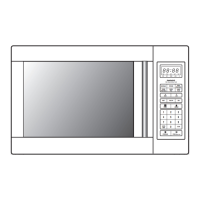
1. Press and hold the STOP/Clock button for three seconds until the hour display
flashes.
2. Rotate the Time.Weight control to show the correct hour.
3. Press the START+30s button to confirm the hours and select the minutes.
4. Rotate the Time.Weight control to show the correct minutes.
5. Press the START+30s button to confirm the set time.
Instant microwave cooking
1. You can start to microwave cook immediately by just pressing the START+30s
button. The time starts at 30 seconds, each press of the START+30s button will
increase cooking time by 30 seconds.
2. Press the STOP/Clock button to stop cooking, press the STOP/Clock button
again to clear the cooking time and return to the clock.
Microwave cooking
1. Press the Microw button to select the required power level, for each press the
display will show 100P, 80P, 50P, 30P and 10P.


 To Next Page