54 WGZ030D through WGZ200D OMM 1130
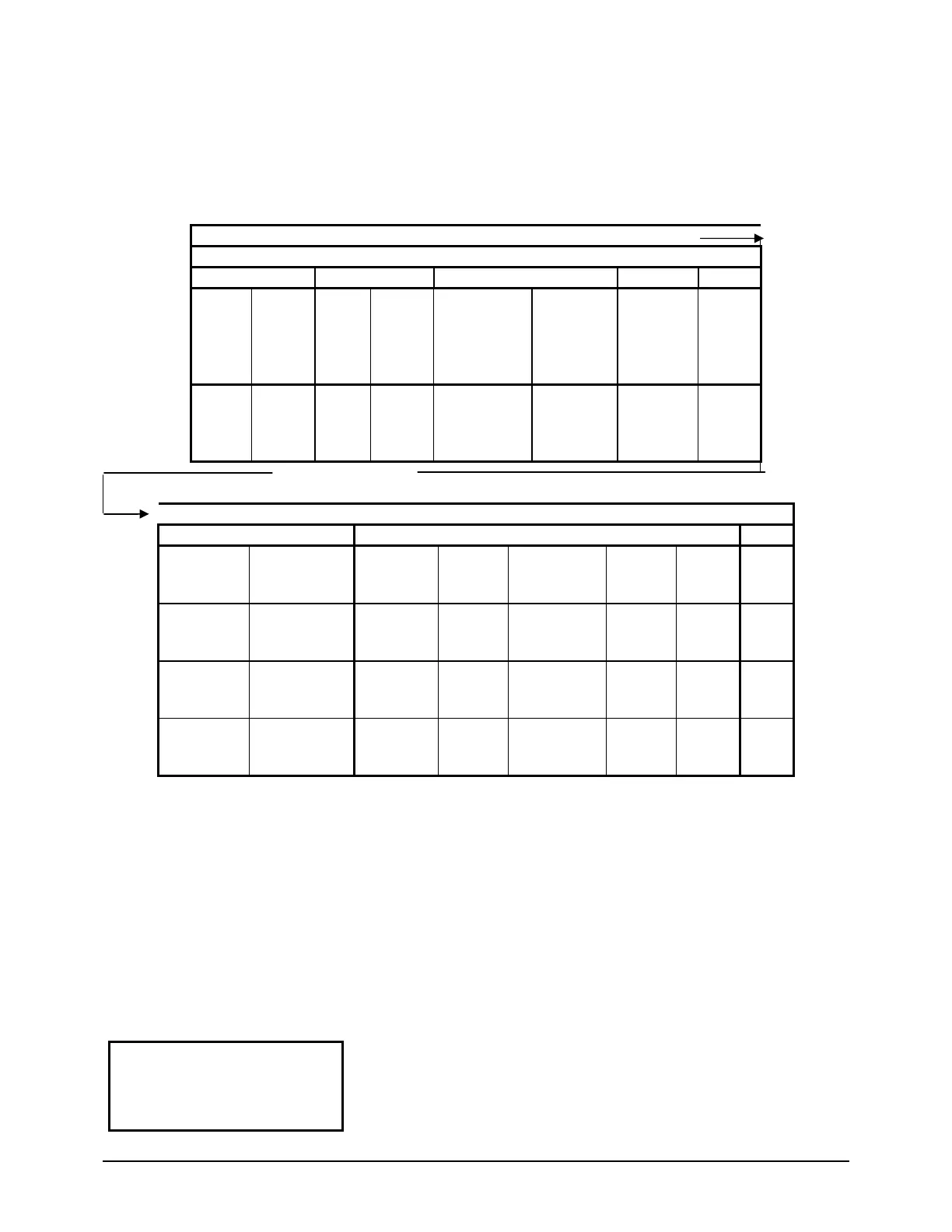
The menus are arranged in a matrix of screens across a top horizontal row. Some of these top-level
screens have sub-screens located under them. The content of each screen and its location in the matrix are
shown in Figure 10. A description of each menu begins on page 54.
The arrow key
s on the controller are used to navigate through the menus. The keys are also used to
change numerical setpoint values contained in certain menus.
Figure 10, Menu Matrix
“MENU”
“VIEW” MENUS
UNIT CIRCUITS REFRIGERANT FANS EVENTS
VIEW UNIT
STATUS
(1)
VIEW UNIT
TEMP
(1)
VIEW
CIRC #1
STATUS
(1)
VIEW
CIRC #2
STATUS
(1)
VIEW
REFRIGERANT
CIRCUIT #1
(1)
VIEW
REFRIGERANT
CIRCUIT #2
(1)
VIEW
FAN/TOWER
(1)
VIEW
EVENT (1)
VIEW UNIT
STATUS
(5)
VIEW UNIT
TEMP
(2)
VIEW
COMP #1
STATUS
(3)
VIEW
CIRC #2
STATUS
(3)
VIEW EVAP
(2)
VIEW EVAP
(2)
VIEW
FAN/TOWER
(n)
VIEW
EVENT (n)
(Right side of matrix continued from above)m
“ALARM” MENUS “SET” MENUS TEST
ALARM LOG
(LAST)
TYPE, TIME
ACTIVE ALARM (1)
TYPE, TIME
SET UNIT
SPs, (1)
SET COMP
SPs (1)
SET LIMIT
ALARMS (1)
SET FANS (1)
STAGES
FANTROL
SET
TOWER
(1)
TEST
UNIT (1)
ALARM LOG
(NEXT TO LAST)
ACTIVE ALARM (2)
TYPE, TIME
ADDITIONAL
SET UNIT SPs,
(2)
SET COMP
SPs
(2)
SET LIMIT
ALARMS (2)
SET FANS (2)
STAGE ON
SET
TOWER
(2)
ALARM LOG
(SECOND TO
LAST)
ACTIVE ALARM (3)
CLEAR/VIEW
SET UNIT SPs,
(3)
SET LIMIT
ALARMS (3)
SET FANS (3)
STAGE OFF
SET
TOWER
(3)
ALARM LOG
LAST 25 SHOWN
SET UNIT SPs,
(4)
(to 13)
SET TOWER
(to n)
TEST
UNIT (7)
Selection can be made within the matrix by using the LEFT/RIGHT keys to move between columns and
the UP/DOWN keys to move between rows.
Menu Descriptions
This section contains information on each screen. The menu screens are in order of the matrix in Figure
10 going from left to right and down when there are sub-menus. Many menus are self-explanatory. A
Setpoint menu allows selection of whether the unit has a water-cooled condenser, WaterCooled = Y (Yes)
or a remote condenser, WaterCooled = N (No). This selection will alter some menus as appropriate to the
type of condenser.
Screen Definitions – MENU
Top level menu:
< ALARM
< VIEW
< SET
<
Continued


 To Next Page