User reference guide
26
BRC0731A4
3P422724-1
Menu Manipulation
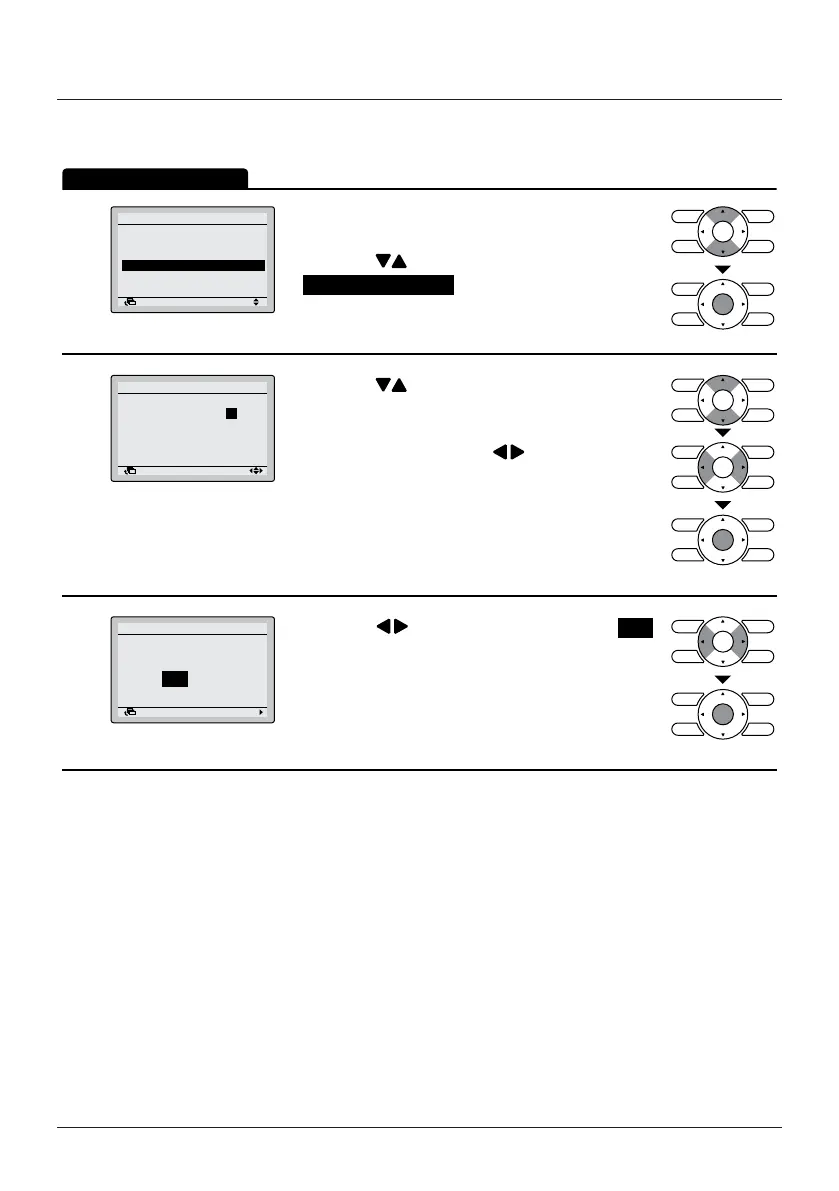
Setpoint Auto Reset
1
Energy Saving List
Setpoint Range
Setback Condition
Setpoint Auto Reset
Off Timer
Energy Saving Options
SettingReturn
• Display the Energy Saving Options (See "Energy
Saving List" on page 23).
• Press the
(Up/Down) buttons to select
Setpoint Auto Reset and press the Menu/Enter
button.
2
28 °C
30 min
20°C
30 min
Cool
Heat
2/2
Set temp.:
Set Time:
Set temp.:
Set Time:
Setpoint Auto Reset
SettingReturn
• Press the (Up/Down) buttons to set the
preset temperature and timing for the auto reset of
the setpoint.
• Move the cursor using the
(Left/Right)
buttons.
• Press the Menu/Enter button when all the changes
are made. The conrmation screen will appear.
3
NoYes
Setpoint Auto Reset
Save the settings?
SettingReturn
• Press the (Left/Right) buttons to select Yes .
• Press the Menu/Enter button to conrm the
settings and to return to the Basic Screen.
Operation Method
This function should not be used when a centralised controller is connected
via the KRP928 Interface adapter for Room Air Conditioner.


 To Next Page