User reference guideBRC0731A4
3P422724-1
23
Menu Manipulation
Movement of the airow direction blades
When the following operation conditions are active, the airow direction is controlled
automatically. Actual operation may thus be different than what is displayed on the remote
controller.
Operation
condition
• Room temperature is higher than the remote controller's set
temperature (in heating mode).
• Under continuous operation with the airow blowing horizontally.
Note
Heating mode includes automatic operation.
Energy Saving Options
Energy Saving List
Some functions should not be enabled when a centralised controller is
connected via the KRP928 Interface adapter for Room Air Conditioner.
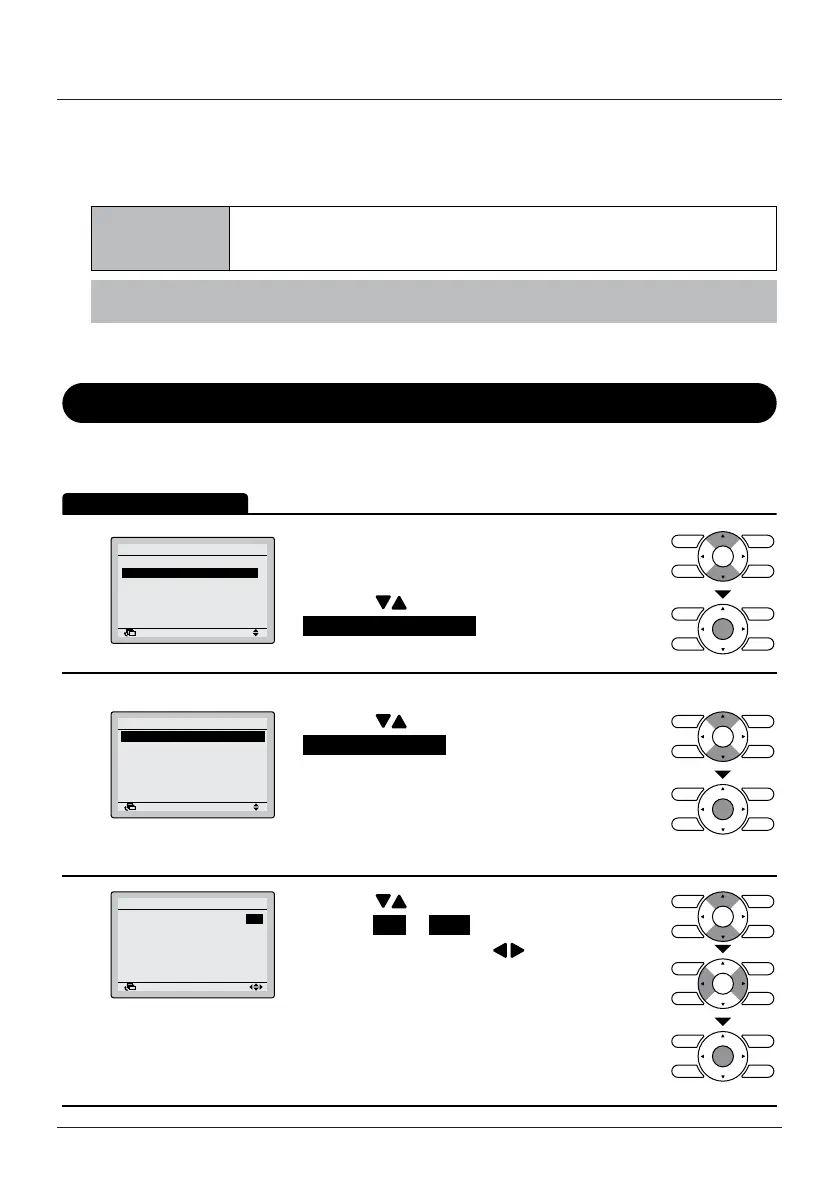
1
Airflow Direction
Energy Saving Options
Schedule
Maintenance Information
Configuration
Current Settings
1/2
SettingReturn
Main Menu
• Display the Main Menu.
(See "Manipulating the Main Menu" on
page 21).
• Press the
(Up/Down) buttons to select
Energy Saving Options and press the Menu/
Enter button.
2
Energy Saving List
Setpoint Range
Setback Condition
Setpoint Auto Reset
Off Timer
1/2
Energy Saving Options
SettingReturn
• Press the (Up/Down) buttons to select
Energy Saving List and press the Menu/Enter
button.
3
Setpoint Range
Setback Condition
Setpoint Auto Reset
Off Timer
Energy Saving List
SettingReturn
: ON
: OFF
: OFF
: OFF
• Press the (Up/Down) buttons to change the
setting to ON or OFF .
• Move the cursor using the
(Left/Right)
buttons.
• Press the Menu/Enter button when all changes
are made. The conrmation screen will appear.


 To Next Page