EasyManua.ls Logo

Daikin BRC1H63K - User Manual

Daikin BRC1H63K
49 pages
Print Icon
To Next Page IconTo Next Page
Loading...
Wired Remote
Controller
Operation Manual
• Thank you for purchasing this wired remote controller.
• This manual describes safety measures which should be considered during the use of
this product.
Read this manual carefully and be sure you understand the information provided
before using the product.
Keep this manual where it is readily accessible to all current and future operators.
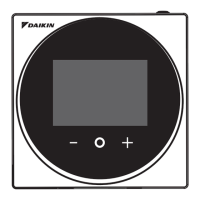
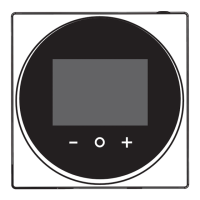
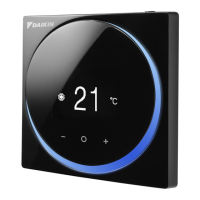
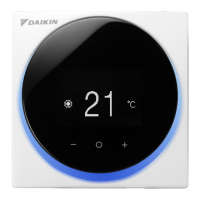
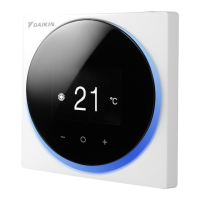
MODEL BRC1H63W/BRC1H63K
+
-

Other manuals for Daikin BRC1H63K

Question and Answer IconNeed help?

Do you have a question about the Daikin BRC1H63K and is the answer not in the manual?

Summary

Safety Precautions

Disposal Requirements

Button Locations and Descriptions

Controller Button Functions

Explains the function and operation of each button on the wired remote controller.

Overview of Screens

Screen Navigation and Types

Describes how to navigate between Home, User, Administrator, and Information screens.

Setting Screen List

Names and Functions

Home Screen Icons and Symbols

Explains the meaning of icons and indicators displayed on the home screen.

Information Screen Icons and Symbols

Explains the meaning of icons and indicators displayed on the information screen.

Information Screen

Accessing the Information Screen

Details the procedure to access the Information Screen from the Home Screen.

Information Screen Icons Explained

Setpoint Adjustment

Setting Temperature Setpoint

Step-by-step guide to adjust the desired temperature for cooling, heating, or auto operation.

Ventilation Rate Control

Setting Ventilation Rate

Guide to adjusting the ventilation rate for the connected indoor unit or heat exchanger.

User Menu Operations

User Menu Access and Exit

Instructions on how to navigate into and out of the User Menu.

Operation Mode Selection

Setting System Operation Mode

Procedure to choose and activate different operating modes like Auto, Cool, Heat, or Dry.

Operation Mode Icons

Heat Mode Characteristics

Explains special operations like defrost and hot start within the Heat mode.

Fan Speed Settings

Adjusting Fan Speed

Instructions for changing the fan speed settings based on the indoor unit model.

Airflow Direction Control

Setting Airflow Direction

Guide to adjust the horizontal and vertical airflow directions for optimal air distribution.

Vertical Airflow Direction

Energy Recovery Ventilator (ERV)

Setting ERV Ventilation Mode

How to select ventilation modes (Auto, ERV, Bypass) for the ERV unit.

ERV Ventilation Rate

Off Timer Function

Setting the Off Timer

Procedure to enable or disable the automatic turn-off timer and set its duration.

LED Brightness (Light Ring ON)

Adjusting LED Brightness When ON

Guide to changing the brightness of the light ring when the controller backlight is active.

LED Brightness (Light Ring OFF)

Adjusting LED Brightness When OFF

Guide to changing the brightness of the light ring when the controller backlight is off.

Dual Setpoint Configuration

Setting Cooling and Heating Setpoints

Procedure for setting distinct temperature values for cooling and heating modes.

Temperature Unit Selection

Setting Fahrenheit or Celsius Display

How to choose between Celsius and Fahrenheit for temperature display.

Administrator Menu Access

Administrator Menu Access and Exit

Steps to enter and leave the Administrator Menu.

Display Settings

Adjusting Backlight Brightness

How to modify the brightness level of the controller's screen backlight.

Adjusting Display Contrast

How to modify the contrast level of the controller's screen.

Clock and Time Settings

Setting Date and Time

Instructions for setting the current date and time on the remote controller.

Bluetooth Connectivity

Establishing Bluetooth Connection

Guide to pairing the remote controller with a mobile device via Bluetooth.

Controller Information

Accessing Administrator Information

How to view controller software IDs, versions, and MAC addresses.

Administrator Password Management

Setting and Managing Passwords

Instructions for enabling, disabling, and setting an administrator password for secure access.

Unit Maintenance

Cleaning the Controller

Guidelines for cleaning the remote controller's exterior and LCD screen.

Understanding Error Codes

Information on how error codes appear on the controller and their meanings.

Filter Status Indicators

Display of Filter Maintenance Signs

How the controller indicates when filter maintenance is required.

Filter and Element Maintenance

Resetting Filter Indicators

Steps to reset filter or element indicators after cleaning or replacement.

Dust Box Indicator Reset

Filter Replacement Indicator

Troubleshooting Common Issues

After-Sales Service and Support

Important Service Warnings

Crucial warnings about self-repair, modification, and relocation of the controller.

Information for Repair Service

Key details to provide to a service technician for accurate diagnosis.

Relocation and Service Inquiries

Guidance on consulting dealers for relocation and general after-sales service.

Summary

Safety Precautions

Disposal Requirements

Button Locations and Descriptions

Controller Button Functions

Explains the function and operation of each button on the wired remote controller.

Overview of Screens

Screen Navigation and Types

Describes how to navigate between Home, User, Administrator, and Information screens.

Setting Screen List

Names and Functions

Home Screen Icons and Symbols

Explains the meaning of icons and indicators displayed on the home screen.

Information Screen Icons and Symbols

Explains the meaning of icons and indicators displayed on the information screen.

Information Screen

Accessing the Information Screen

Details the procedure to access the Information Screen from the Home Screen.

Information Screen Icons Explained

Setpoint Adjustment

Setting Temperature Setpoint

Step-by-step guide to adjust the desired temperature for cooling, heating, or auto operation.

Ventilation Rate Control

Setting Ventilation Rate

Guide to adjusting the ventilation rate for the connected indoor unit or heat exchanger.

User Menu Operations

User Menu Access and Exit

Instructions on how to navigate into and out of the User Menu.

Operation Mode Selection

Setting System Operation Mode

Procedure to choose and activate different operating modes like Auto, Cool, Heat, or Dry.

Operation Mode Icons

Heat Mode Characteristics

Explains special operations like defrost and hot start within the Heat mode.

Fan Speed Settings

Adjusting Fan Speed

Instructions for changing the fan speed settings based on the indoor unit model.

Airflow Direction Control

Setting Airflow Direction

Guide to adjust the horizontal and vertical airflow directions for optimal air distribution.

Vertical Airflow Direction

Energy Recovery Ventilator (ERV)

Setting ERV Ventilation Mode

How to select ventilation modes (Auto, ERV, Bypass) for the ERV unit.

ERV Ventilation Rate

Off Timer Function

Setting the Off Timer

Procedure to enable or disable the automatic turn-off timer and set its duration.

LED Brightness (Light Ring ON)

Adjusting LED Brightness When ON

Guide to changing the brightness of the light ring when the controller backlight is active.

LED Brightness (Light Ring OFF)

Adjusting LED Brightness When OFF

Guide to changing the brightness of the light ring when the controller backlight is off.

Dual Setpoint Configuration

Setting Cooling and Heating Setpoints

Procedure for setting distinct temperature values for cooling and heating modes.

Temperature Unit Selection

Setting Fahrenheit or Celsius Display

How to choose between Celsius and Fahrenheit for temperature display.

Administrator Menu Access

Administrator Menu Access and Exit

Steps to enter and leave the Administrator Menu.

Display Settings

Adjusting Backlight Brightness

How to modify the brightness level of the controller's screen backlight.

Adjusting Display Contrast

How to modify the contrast level of the controller's screen.

Clock and Time Settings

Setting Date and Time

Instructions for setting the current date and time on the remote controller.

Bluetooth Connectivity

Establishing Bluetooth Connection

Guide to pairing the remote controller with a mobile device via Bluetooth.

Controller Information

Accessing Administrator Information

How to view controller software IDs, versions, and MAC addresses.

Administrator Password Management

Setting and Managing Passwords

Instructions for enabling, disabling, and setting an administrator password for secure access.

Unit Maintenance

Cleaning the Controller

Guidelines for cleaning the remote controller's exterior and LCD screen.

Understanding Error Codes

Information on how error codes appear on the controller and their meanings.

Filter Status Indicators

Display of Filter Maintenance Signs

How the controller indicates when filter maintenance is required.

Filter and Element Maintenance

Resetting Filter Indicators

Steps to reset filter or element indicators after cleaning or replacement.

Dust Box Indicator Reset

Filter Replacement Indicator

Troubleshooting Common Issues

After-Sales Service and Support

Important Service Warnings

Crucial warnings about self-repair, modification, and relocation of the controller.

Information for Repair Service

Key details to provide to a service technician for accurate diagnosis.

Relocation and Service Inquiries

Guidance on consulting dealers for relocation and general after-sales service.

Daikin BRC1H63K Specifications

General IconGeneral
ModelBRC1H63K
CategoryRemote Control
CompatibilityDaikin Air Conditioners
DisplayLCD
FunctionsTemperature Control, Mode Selection, Fan Speed Control, Timer Function
TypeWireless
Temperature Range16°C to 30°C

Related product manuals