8
Names and Functions
Home screen
30
˚C
28
OFF
j
k
i
Information screen
12:34
A3-01 (Unit 00)
r
n
p
o
Icon view
12:34
30
˚C
32
˚C
1050
PPM
A3-01 (Unit 00)
n
p
s
Sensor view
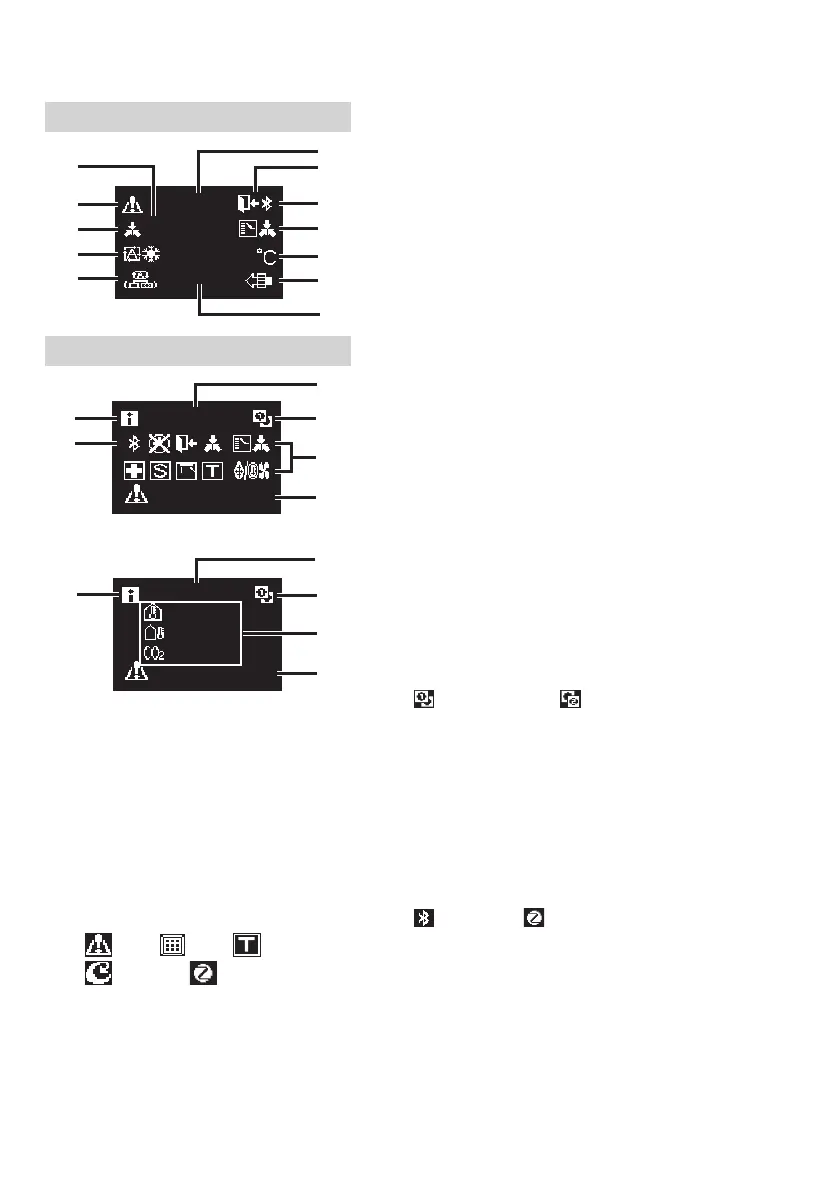
c Centralized Control
• Displayed when under centralized management.
d Operation mode
• Displays the current operation mode.
e Ventilation mode
f Room temperature
• Displays the current room temperature.
g Setback
• Blinks during setback operation.
• Displayed during setback setting.
h Bluetooth*
• Indicates that the controller is communicating
with a mobile device, for use with the app.
i Changeover Under Control
• Displayed when controller is unauthorized to
select heating/cooling operation.
j Fahrenheit/Celsius
• Depending on the setting, Fahrenheit/Celsius
display can be selected.
k Air Purifying
l Set temperature
• Displays setpoint temperature.
m Clock (24 hours time display)
n MAIN/SUB remote controller sign
•
: Main controller, : Sub controller
o Status
• Noties the status.
p Error display
• If an error occurs, the icon, an error code and unit
number are displayed.
q Information icon
r Bluetooth/Zigbee icon
• Bluetooth and Zigbee icons are displayed.
: Bluetooth, : Zigbee
s Sensor values
• Zigbee sensor values are displayed when normal
values are received and Zigbee sensor settings
have been congured.
• If Zigbee sensor values cannot be received,
sensor values will be displayed as per original
settings.
• If there are no sensors, a horizontal bar (“–”) is
displayed.
Screen display explanation
a OFF
• Displayed when operation is
stopped.
b Error/Filter/Test/Streamer/
Zigbee icon*
• Error, lter, test, streamer and Zigbee
icons are displayed.
: Error : Filter : Test
: Streamer : Zigbee
• The streamer icon is displayed when
Mold Proof operation is active.
• The Zigbee icon will ash when
sensor connection is lost.


 To Next Page