5
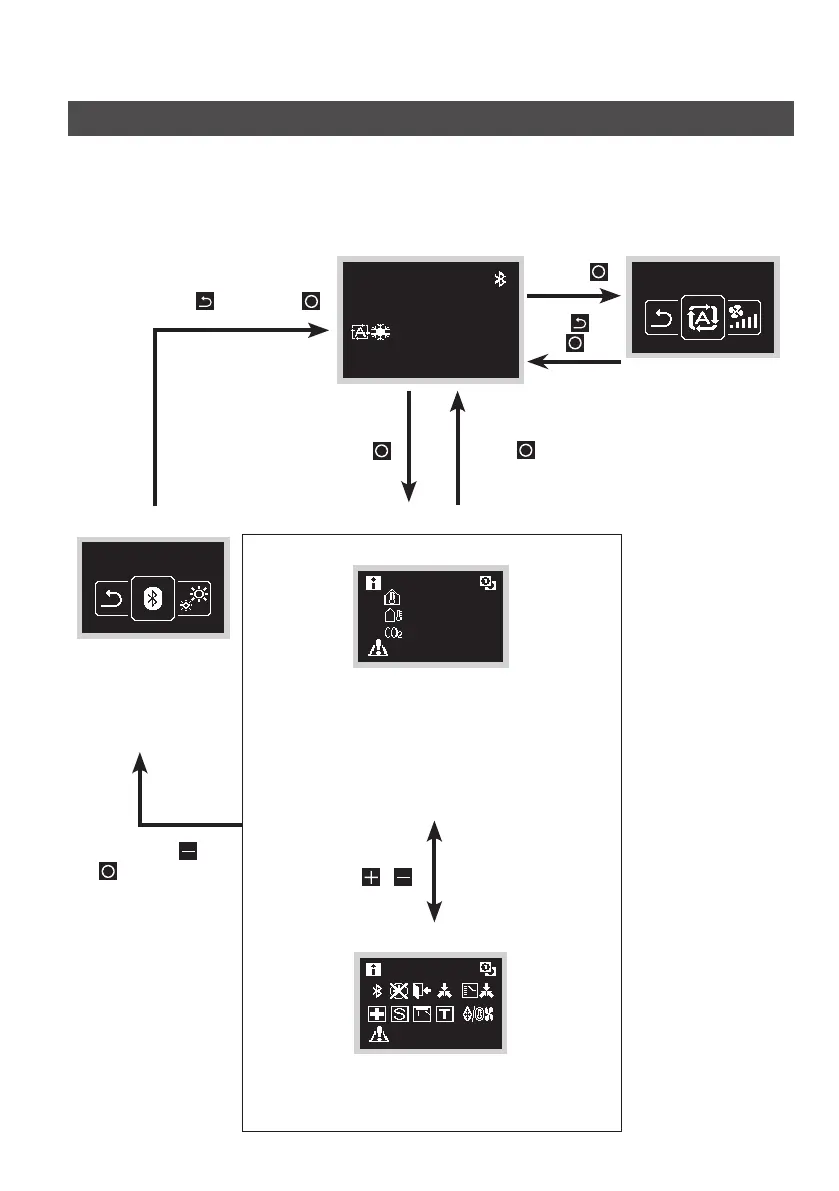
Overview of Screens
How to display the screen (Standard mode)
The following is just an example. The items available for setting vary depending on the
indoor unit you are using. If there is no button operation for about 10 seconds, the screen
returns to the home screen.
Home screen
30
˚C
˚C
Press
User menu
This screen is a
menu for the user.
See “Setting Screen
List” for items which
can be selected.
Administrator menu
This screen is a menu
for the administrator.
See “Setting Screen
List” for items which
can be selected.
Information screen
Sensor view
12:34
30
˚C
32
˚C
1050
PPM
A3-01 (Unit 00)
This screen displays the sensor values.
If there are no sensors, a horizontal bar (“–”) is
displayed.
Choose which items are displayed by setting from
the remote controller.
This screen is not displayed by factory default. If it
is not displayed, the icon view will be shown instead.
Icon view
12:34
A3-01 (Unit 00)
This screen displays the time and the status of
the remote controller and the system. If an error
occurs, the error code is displayed.
Select
, then press .
Press
Select , then
press .
Press and hold
for 5 seconds.
Press and hold
and for 5seconds.
Press
/


 To Next Page