6 Electrical installation
Installation manual
13
EHBH/X04+08EA/EJ6V+9W
Daikin Altherma 3 R W
4P629081-1A – 2020.08
LAN adapter – System requirements
The requirements posed on the system depend on the LAN adapter
application/system layout (app control, or Smart Grid application).
App control:
Smart Grid application:
Item Requirement
LAN adapter software It is recommended to ALWAYS keep the
LAN adapter software up-to-date.
Unit control method On the user interface, make sure to set
[2.9]=2 (Control = Room thermostat)
Domestic hot water
settings
To allow for energy buffering in the domestic
hot water tank, on the user interface, make
sure to set [9.2.1] (Domestic hot water) to
one of the following:
▪ EKHWS/E
Tank with booster heater installed at the
side of the tank.
▪ EKHWP/HYC
Tank with optional booster heater installed
at the top of the tank.
Power consumption
control settings
On the user interface, make sure to set:
▪ [9.9.1]=1 (Power consumption control
= Continuous)
▪ [9.9.2]=1 (Type = kW)
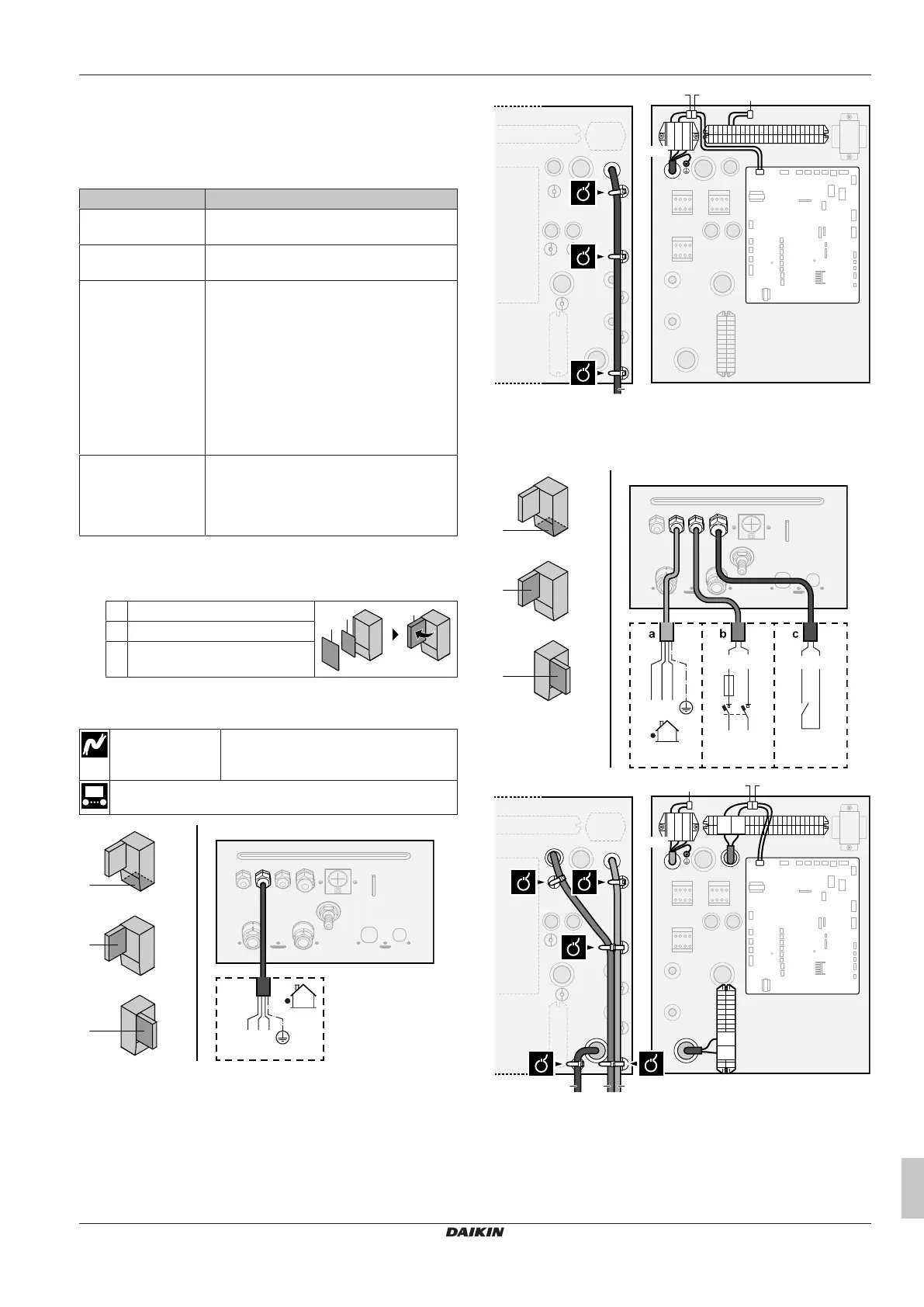
6.3.1 To connect the main power supply
1 Open the following (see "4.2.1To open the indoor unit"[48]):
1 Front panel
2 Switch box cover
3 Switch box
2 Connect the main power supply.
In case of normal kWh rate power supply
Interconnection
cable (=main
power supply)
Wires: (3+GND)×1.5mm²
—
CB
1 2 3
X11YA X11YB
X11Y
X1A
A1P
X2M
X1M
X2M
A1P
a
X1M
a Interconnection cable (=main power supply)
In case of preferential kWh rate power supply
Connect X11Y to X11YB.
NL
56
B
C
A
A
10 9
S1S
1 2 3
1N~, 50 Hz,
230 V AC, 6.3 A
CB
5 6
1 2 3
X11YA X11YB X11Y
X5M
X1A
X2M
X1M
X5M
X2M
c b a
A1P A1P
X1M
9 10
a Interconnection cable (=main power supply)
b Normal kWh rate power supply
c Preferential power supply contact
3 Fix the cables with cable ties to the cable tie mountings.




 To Next Page