4 Unit installation
Installation manual
8
EHBH/X04+08EA/EJ6V+9W
Daikin Altherma 3 R W
4P629081-1A – 2020.08
4.2 Opening and closing the unit
4.2.1 To open the indoor unit
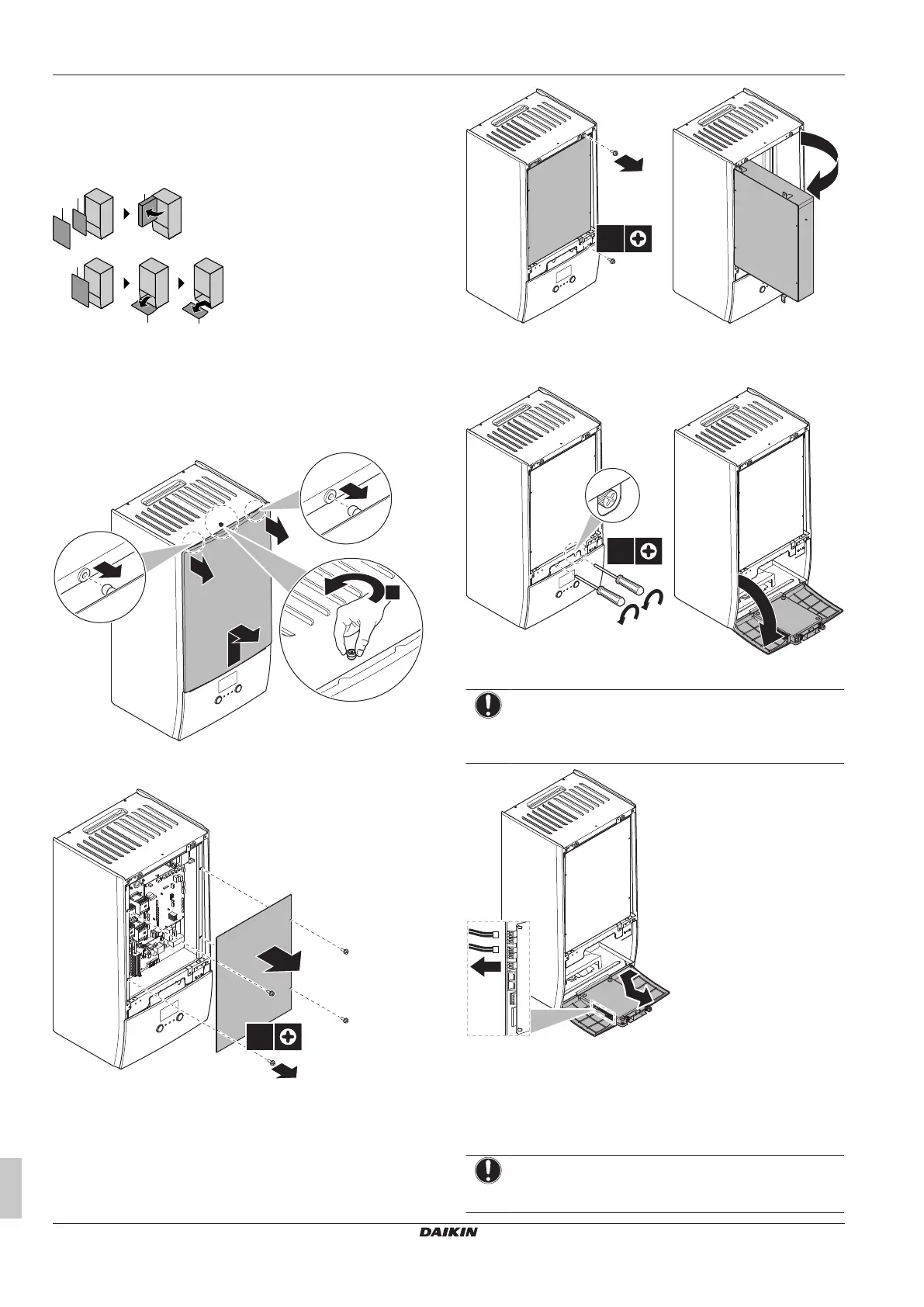
Overview
1 Front panel
2 Switch box cover
3 Switch box
4 User interface panel
Open
1 Remove the front panel.
2 If you have to connect electrical wiring, remove the switch box
cover.
3 If you have to do work behind the switch box, open the switch
box.
4 If you have to do work behind the user interface panel or upload
new software into the user interface, open the user interface
panel.
5 Optional: Remove the user interface panel.
NOTICE
If you remove the user interface panel, also disconnect the
cables from the back of the user interface panel to prevent
damage.
4.2.2 To close the indoor unit
1 Reinstall the user interface panel.
2 Reinstall the switch box cover and close the switch box.
3 Reinstall the front panel.
NOTICE
When closing the indoor unit cover, make sure that the
tightening torque does NOT exceed 4.1N•m.




 To Next Page