OPERATION OPERATION
MOLD PROOF Operation
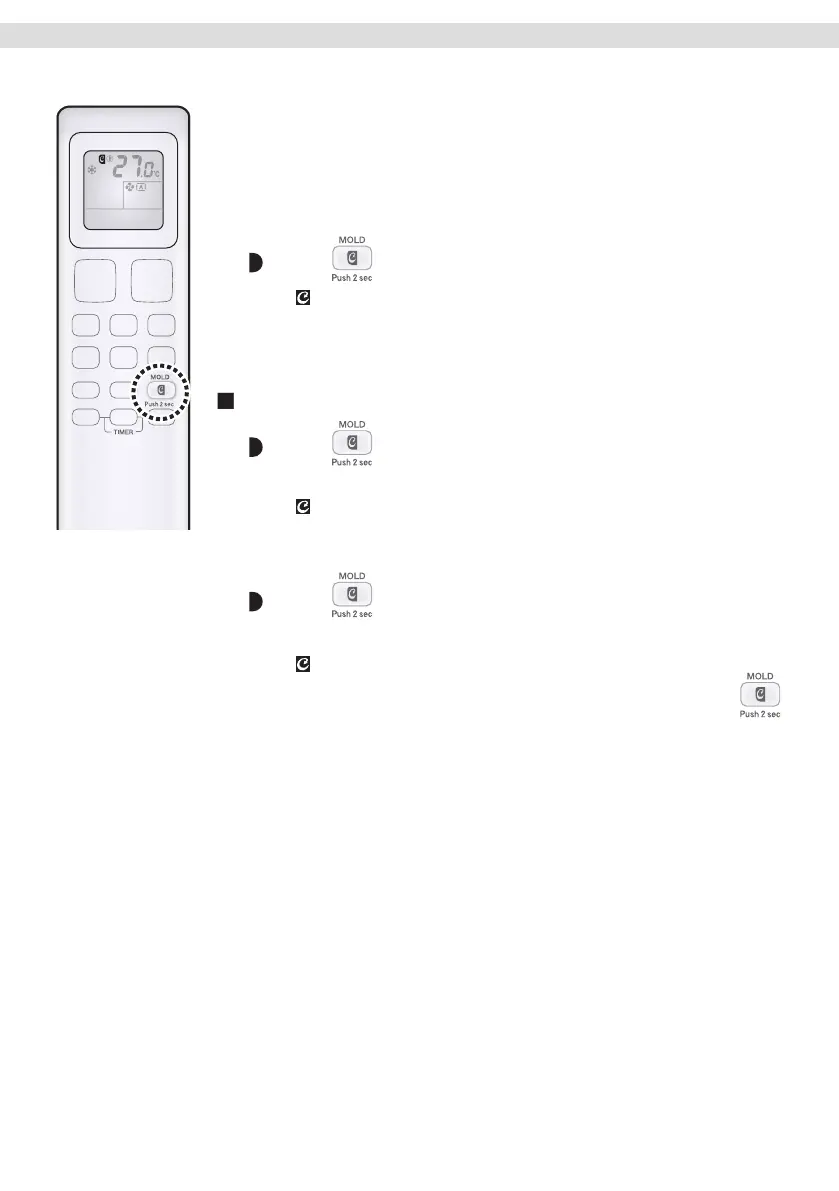
MOLD PROOF operation is a function which reduces the spread of mold by
using FAN operation to lower the humidity inside the indoor unit.
[To operate automatically]
To set
Press and hold the button for 2 seconds.
• “ ” appears on the LCD.
• After DRY or COOL operation stops, the air conditioner starts
MOLD PROOF operation automatically.
• The OPERATION lamp blinks.
To cancel
Press and hold the button for 2 seconds one
more time.
• “ ” disappears from the LCD.
[To operate manually]
Press for about 2 seconds while the unit is
not operating.
• “ ” blinks on the LCD, and the display returns to normal after a while.
• If the air conditioner is turned off for more than 3 minutes, press
once again and hold the button for 2 seconds to start
MOLD PROOF operation.
• The OPERATION lamp blinks.
16
01_EN_3P658678-11W.indd 16 03-Feb-23 4:45:04 PM


 To Next Page