12
Adjusting the Air Flow Direction
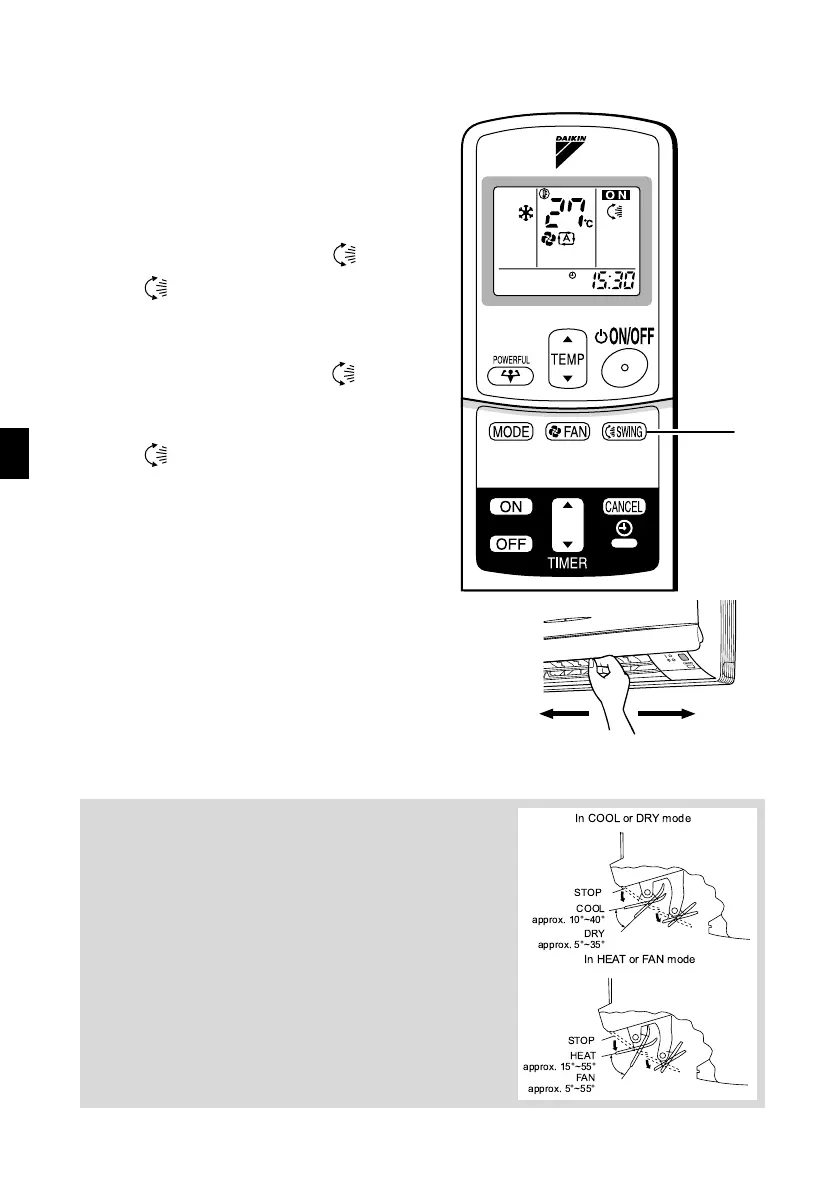
You can adjust the air flow direction to increase your com-
fort.
■ To adjust the horizontal
blade (flap)
1. Press “SWING button ”.
• “ ” is displayed on the LCD.
2. When the flap has reached the
desired position,
press “SWING button ” once
more.
The flap will stop moving.
• “ ” disappears from the LCD.
■ To adjust the vertical
blades (louvers)
Hold the knob and move the louvers.
(You will find a knob on the left-side and the right-side blades.)
Notes on flaps and louvers angles
•
When “
SWING button
” is selected, the flaps swinging
range depends on the operation mode.
(See the figure.
)
■
■■
■
ATTENTION
•
Always use a remote controller to adjust the flaps angle. If
you attempt to move it forcibly with hand when it is swinging,
the mechanism may be broken.
•
Be careful when adjusting the louvers. Inside the air outlet, a
fan is rotating at a high speed.
1, 2
STOP
COOL
approx. 10°~40°
DRY
approx. 5°~35°
In COOL or DRY mode
STOP
HEAT
approx. 15°~55°
In HEAT or FAN mode
FAN
approx. 5°~55°
01_EN_3P170835-3.fm Page 12 Tuesday, October 25, 2005 3:55 PM


 To Next Page