13
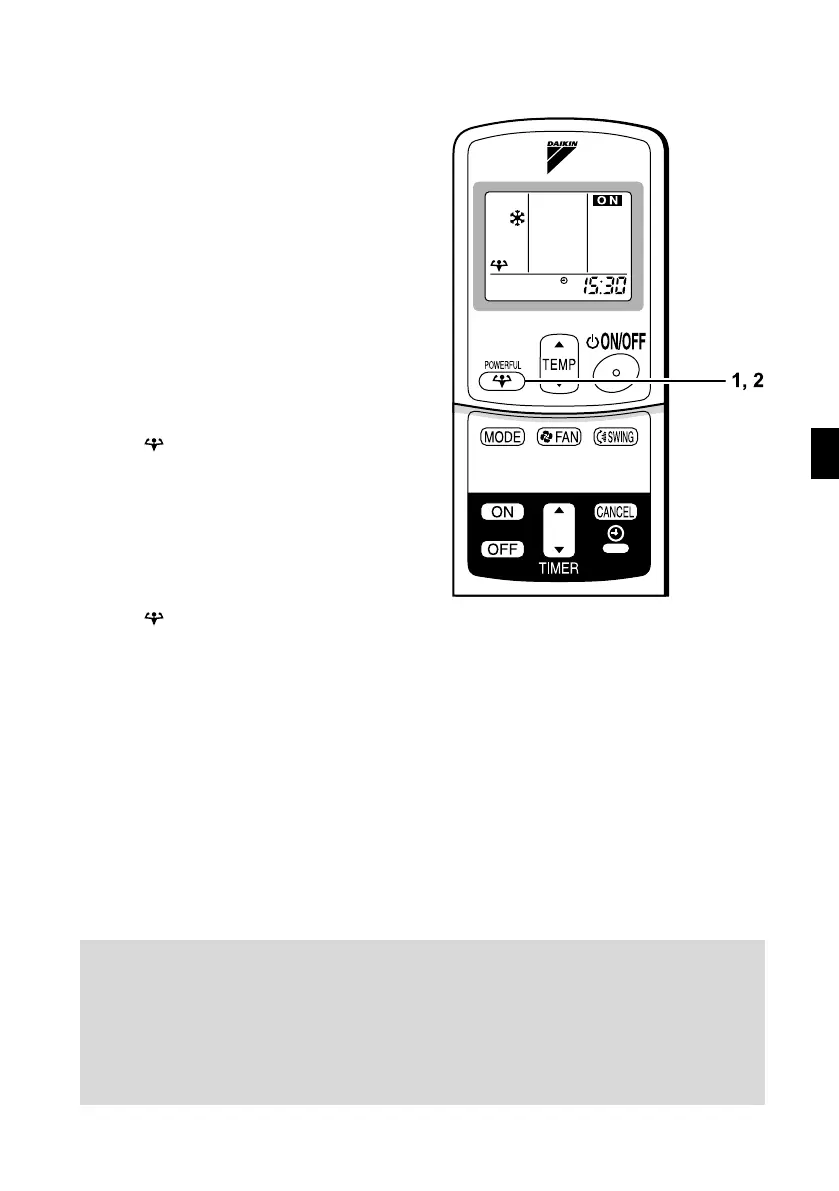
POWERFUL Operation
POWERFUL operation quickly maximizes the cooling
(heating) effect in any operation mode. You can get the
maximum capacity.
■ To start POWERFUL
operation
1. Press “POWERFUL button”.
•
POWERFUL operation ends in 20 minutes.
Then the system automatically operates
again with the settings which were used
before POWERFUL operation.
•
When using Powerful operation, there
are some functions which are not avail-
able.
•
“ ” is displayed on the LCD.
■ To cancel POWERFUL
operation
2. Press “POWERFUL button”
again.
•
“ ” disappears from the LCD.
NOTE
■
■■
■
Notes on POWERFUL operation
•
In COOL and HEAT mode
The air flow rate is fixed to the maximum setting.
The temperature and air flow settings are not variable.
•
In DRY mode
The temperature setting is lowered by 2.5°C and the air flow rate is slightly increased.
•
In FAN mode
The air flow rate is fixed to the maximum setting.
1, 2
01_EN_3P170835-3.fm Page 13 Tuesday, October 25, 2005 3:55 PM


 To Next Page