5 Operation
Operation manual
10
FTXTM30+40R2V1B
Daikin room air conditioner
3P485919-14U – 2021.03
Result: and disappear from the LCD and the timer
lamp goes off. and the day of the week are displayed on the
LCD.
5.9.3 To combine OFF timer and ON timer
1 To set the timers, refer to "5.9.1 To start/stop OFF timer
operation" [4 9] and "5.9.2 To start/stop ON timer
operation"[49].
Result: and are displayed on the LCD.
Example:
Display Current time Set while… Operation
6:00 the unit is
operating.
Stops at 7:00
and starts at
14:00.
the unit is NOT
operating.
Starts at 14:00.
Note: If the timer setting is active, the current time is NOT displayed
on the LCD.
5.10 Weekly timer operation
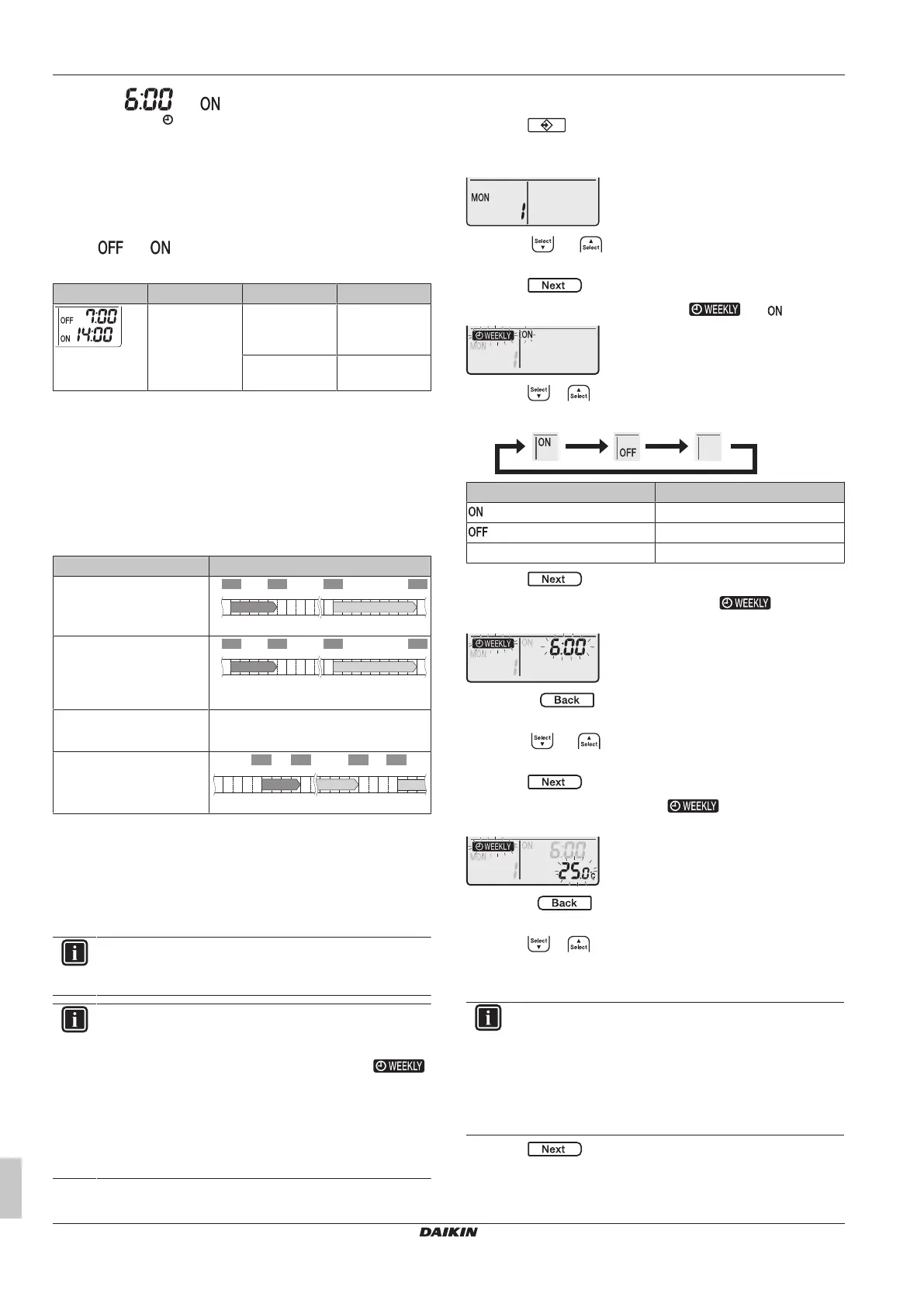
With this operation, you can save up to 4 timer settings for each day
of the week.
Example: Create a different setting from Monday to Friday and a
different setting for weekends.
Day of the week Setting example
Monday
▪ Make up to 4settings.
6:00 8:30 17:30
25°C 27°C25°C
22:00
1 2 3 4
ON OFF ON OFF
Tuesday~Friday
▪ Use the copy mode if the
settings are the same as
for Monday.
6:00 8:30 17:30
25°C 27°C25°C
22:00
1 2 3 4
ON OFF ON OFF
Saturday
▪ No timer setting
—
Sunday
▪ Make up to 4settings.
27°C 27°C25°C
ON OFF OFF ON
▪ ON-ON-ON-ON setting. Enables scheduling the operation mode
and set temperature.
▪ OFF-OFF-OFF-OFF setting. Only the turn off time can be set for
each day.
Note: Be sure to aim the user interface at the indoor unit and check
for a receiving tone when setting the Weekly timer operation.
INFORMATION
The clock MUST be set correctly before using any timer
functions. Refer to "4.3To set the clock"[45].
INFORMATION
▪ Weekly timer and OFF/ON timer operation CANNOT be
used at the same time. The OFF/ON timer operation
takes priority. Weekly timer will be in standby,
disappears from the LCD. When the OFF/ON timer is
completed, the Weekly timer becomes active.
▪ The day of the week, OFF/ON timer mode, time and
temperature (only for ON timer) can be set with the
Weekly timer. Other settings are based on previous ON
timer setting.
5.10.1 To set Weekly timer operation
1 Press .
Result: The day of the week and the reservation number of the
current day are displayed.
2 Press or to select the day of the week and the
reservation number.
3 Press .
Result: The day of the week is set. and blink.
4 Press or to select the mode.
Result: The setting will change as follows:
Display Feature
ON timer
OFF timer
Blank Deletes reservation
5 Press .
Result: The OFF/ON timer mode is set. and the time
blink.
Note: Press to return to the previous screen. If blank is
selected, continue to step 9.
6 Press or to select the time. The time can be set
between 0:00~23:50 in 10-minute intervals.
7 Press .
Result: The time is set and and the temperature
blink.
Note: Press to return to the previous screen. If OFF timer
is selected, continue to step 9.
8 Press or to select the desired temperature.
Note: The set temperature for the weekly timer is displayed only
when setting the weekly timer mode.
INFORMATION
The temperature can be set between 10~32°C on the user
interface, however:
▪ in cooling and automatic operation mode, the unit will
operate at minimum 18°C even if is set at 10~17°C;
▪ in heating and automatic operation mode, the unit will
operate at maximum 30°C even if is set at 31~32°C.
9 Press .
Result: The temperature and time are set for the ON timer. The
time is set for the OFF timer. The timer lamp lights orange.















 To Next Page