5 Operation
Operation manual
6
FTXTM30+40R2V1B
Daikin room air conditioner
3P485919-14U – 2021.03
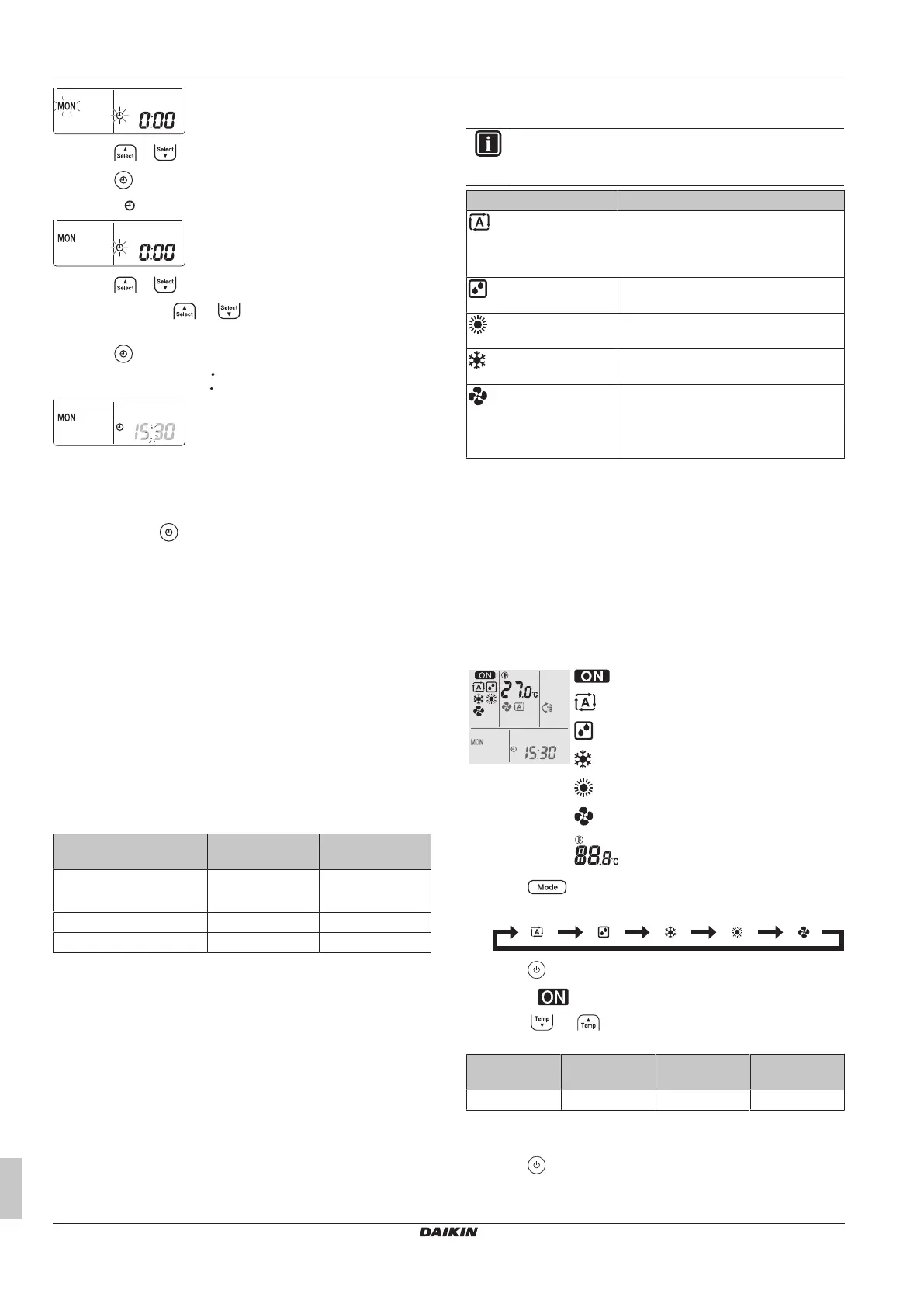
2 Press or to set the current day of the week.
3 Press .
Result: blinks.
4 Press or to set the correct time.
Note: Holding down or increases or decreases the time
setting rapidly.
5 Press .
Result: Setting is complete. blinks.
4.4 To set the brightness of the indoor
unit display
1 Keep pressed for at least 2seconds every time you need to
change the setting.
Result: Brightness will be changed in order: high, low, off.
4.5 To turn on the power supply
1 Turn the circuit breaker on.
Result: The flap of the indoor unit will open and close to set the
reference position.
5 Operation
5.1 Operation range
Use the system in the following temperature and humidity ranges for
safe and effective operation.
Cooling and
drying
(a)(b)
Heating
(a)
Outdoor temperature –10~46°CDB –25~24°CDB
(R.H. = 55.4%)
Indoor temperature 18~32°C DB 10~30°CDB
Indoor humidity ≤80%
(b)
—
(a)
A safety device might stop the operation of the system if the unit
runs outside its operation range.
(b)
Condensation and water dripping might occur if the unit runs
outside its operation range.
5.2 Operation mode and temperature
setpoint
When. Adjust the system operation mode and set the temperature
when you want to:
▪ Heat up or cool down a room
▪ Blow air in a room without heating or cooling
▪ Decrease the humidity in a room
What. The system operates differently, depending on the user
selection.
INFORMATION
Operation modes: cooling, drying and automatic are
NOT available for the heating only version of the product.
Setting Description
Automatic
The system cools down or heats up a
room to the temperature setpoint. It
automatically switches between cooling
and heating if necessary.
Drying
The system decreases the humidity in a
room.
Heating
The system heats up a room to the
temperature setpoint.
Cooling
The system cools down a room to the
temperature setpoint.
Fan
The system only controls the airflow
(airflow rate and airflow direction).
The system does NOT control the
temperature.
Additional info:
▪ Outside temperature. The system's cooling or heating effect
decreases when the outside temperature is too high or too low.
▪ Defrost operation. During heating operation, frost might occur on
the outdoor unit and decrease the heating capacity. In that case,
the system automatically switches to defrosting operation to
remove the frost. During defrosting operation, hot air is NOT
blown from the indoor unit.
5.2.1 To start/stop operation mode and to set
the temperature
: Unit is operating.
: Operation mode = Automatic
: Operation mode = Drying
: Operation mode = Cooling
: Operation mode = Heating
: Operation mode = Fan only
: Shows the set temperature.
1 Press one or more times to select the operation mode.
Result: The mode will be set as follows:
2 Press to start operation.
Result: and the selected mode are displayed on the LCD.
3 Press or one or more times to lower or raise the
temperature.
Cooling
operation
Heating
operation
Automatic
operation
Drying or Fan
only operation
18~32°C 10~30°C 18~30°C —
Note: When using drying or fan only mode, you cannot adjust the
temperature.
4 Press to stop operation.















 To Next Page