4 Before operation
Operation manual
5
FTXTM30+40R2V1B
Daikin room air conditioner
3P485919-14U – 2021.03
▪ Dust. Dust on the signal transmitter or receiver will reduce
sensitivity. Wipe off dust with a soft cloth.
▪ Fluorescent lights. Signal communication might be disabled if
fluorescent lamps are in the room. In that case, contact your
installer.
▪ Other appliances. If the user interface signals operate other
appliances, move the other appliances, or contact your installer.
▪ Curtains. Make sure that the signal between the unit and the user
interface is NOT blocked by curtains or other objects.
NOTICE
▪ Do NOT drop the user interface.
▪ Do NOT let the user interface get wet.
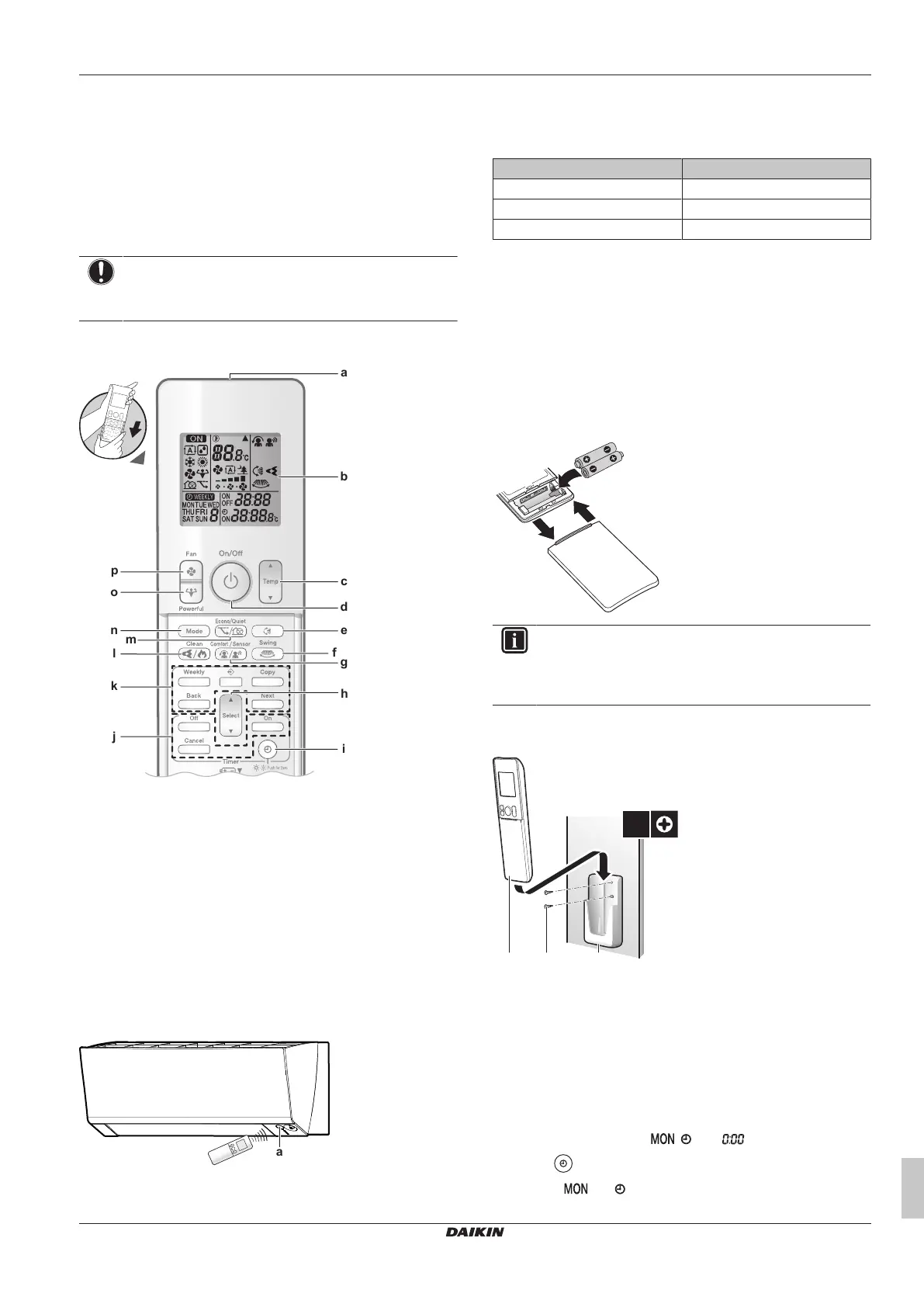
3.2.1 Components: User interface
a Signal transmitter
b LCD display
c Temperature adjustment button
d ON/OFF button
e Vertical swing button
f Horizontal swing button
g Comfort airflow and Intelligent eye operation button
h Select button
i Clock and indoor unit display brightness button
j OFF/ON timer operation buttons
k Weekly timer operation buttons
l Flash Streamer and Fireplace logic operation button
m Econo and Outdoor unit quiet operation button
n Mode button
o Powerful button
p Fan button
3.2.2 To operate the user interface
a Signal receiver
1 Aim the signal transmitter at the signal receiver on the indoor
unit (maximum distance for communication is 7m).
Result: When the indoor unit receives a signal from the user
interface, you will hear a sound:
Sound Description
Beep-beep Operation starts.
Beep Setting changes.
Long beep Operation stops.
4 Before operation
4.1 To insert the batteries
The batteries will last for about 1 year.
1 Remove the front cover.
2 Insert both batteries at once.
3 Put back the front cover.
INFORMATION
▪ Low energy of battery is indicated by flashing of LCD
display.
▪ ALWAYS replace both batteries at once.
4.2 To mount the user interface holder
a User interface
b Screws (field supply)
c User interface holder
1 Choose a place where the signals reach the unit.
2 Attach the holder with screws to the wall or a similar location.
3 Hang the user interface on the user interface holder.
4.3 To set the clock
Note: If the time is NOT set, , , and blink.
1 Press .
Result: and blink















 To Next Page