OPERATION
COOLING · HEATING · FAN Operation
This operation manual describes the explanation for a case in which the wired remote controller is used.
When using the wireless remote controller, refer to the attached operation manual.
•
Changeover cannot be made with a remote controller whose display shows “ ” (CHANGEOVER UNDER CONTROL).
•
When the display “ ” (CHANGEOVER UNDER CONTROL) flashes, refer to page 13.
•
For protecting the mechanism, supply the power for 6 house at first, then operate the air conditioner.
FOR SYSTEMS WITHOUT COOL/HEAT CHANGEOVER REMOTE CONTROLLER
1.
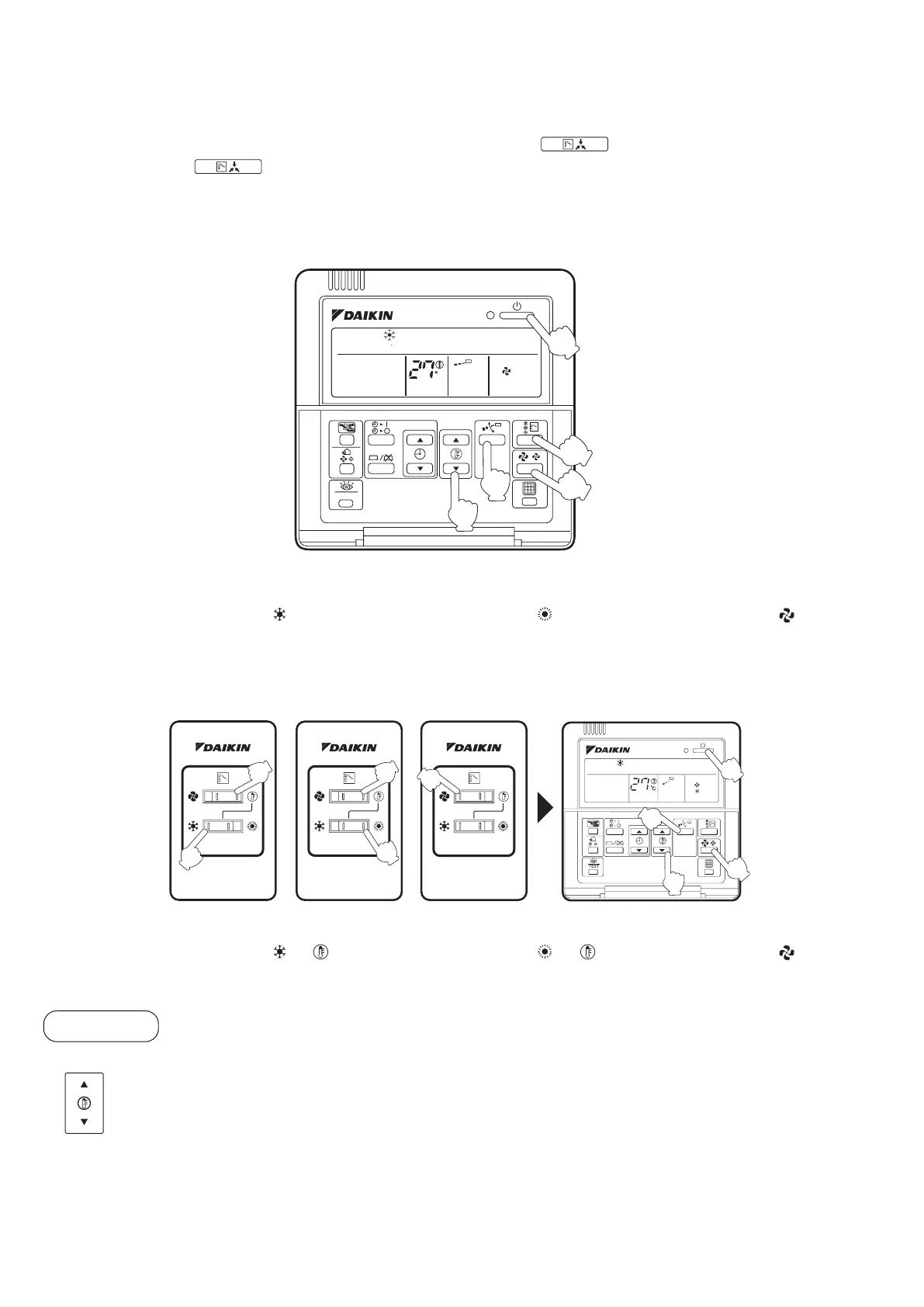
Press OPERATION MODE SELECTOR button several times and select the OPERATION MODE of your choice as follows.
COOLING Operation.......“ ” HEATING Operation .... “ ” FAN Operation...... “ ”
2.
Press ON/OFF button.
OPERATION lamp lights up and the system starts OPERATION.
FOR SYSTEMS WITH COOL/HEAT CHANGEOVER REMOTE CONTROLLER (Only for the heat pump)
1.
Select operation mode with the cool/heat changeover remote controller as follows:
COOLING Operation.......“ ” “ ” HEATING Operation .... “ ” “ ” FAN Operation...... “ ”
2.
Press ON/OFF button.
OPERATION lamp lights up and the system starts OPERATION.
3.
Press TEMPERATURE SETTING button and program the setting temperature.
NOTE:
•
Set the temperature within the operation range shown in the table on page 7.
•
The temperature cannot be set in the fan operation.
TEST
C
H
2·6
5
3
1
4
BRC1C62
Cooling Operation
Heating Operation Fan Operation
2·6
4
3
5
1
1
1
1
1
BRC1C62
Adjustment
Each time this button is pressed, setting temperature rises 1°C.
Each time this button is pressed, setting temperature lowers 1°C.
8


 To Next Page