7 Configuration
Installer and user reference guide
29
RXYSQ4~6T8V/YB
VRV IV-S system air conditioner
4P482277-1 – 2017.04
Mode 1 and 2
Mode Description
Mode 1
(monitoring
settings)
Mode1 can be used to monitor the current
situation of the outdoor unit. Some field setting
contents can be monitored as well.
Mode 2
(field settings)
Mode2 is used to change the field settings of
the system. Consulting the current field setting
value and changing the current field setting
value is possible.
In general, normal operation can be resumed
without special intervention after changing field
settings.
Some field settings are used for special
operation (e.g., 1 time operation, recovery/
vacuuming setting, manual adding refrigerant
setting, etc.). In such a case, it is required to
abort the special operation before normal
operation can restart. It will be indicated in
below explanations.
7.2.2 To access the field setting components
See "6.2.2To open the outdoor unit"on page16.
7.2.3 Field setting components
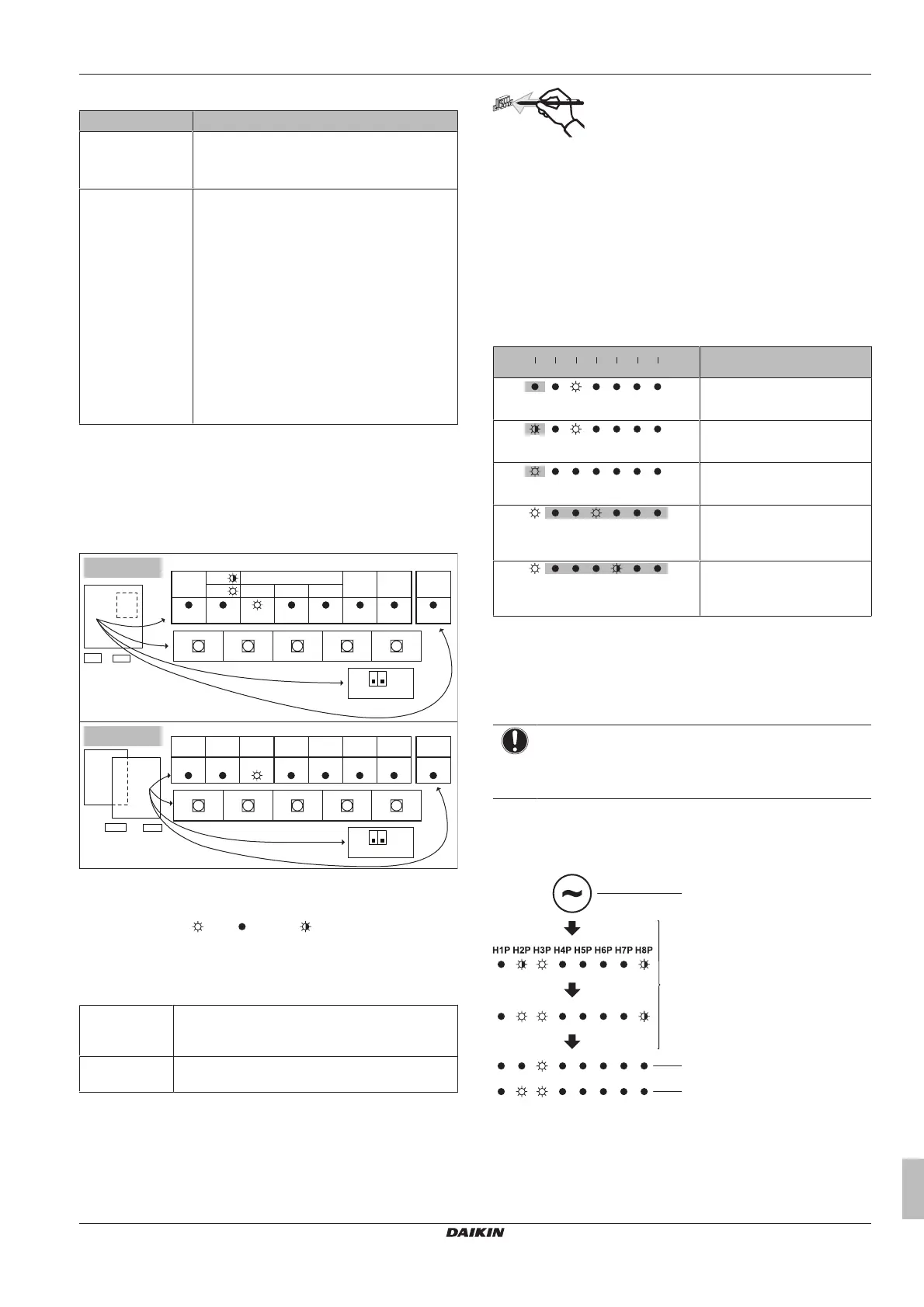
The components to make field settings are as follows:
V
Y
H1P H2P H3P H4P H5P H6P H7P
MODE
TEST:
L.N.O.P.
DEMAND
C/H SELECT
HWL:
IND
MASTER
SLAVE
H8P
MULTI
BS2
SET
BS1
MODE
BS3
RETURN
BS2
SET
BS1
MODE
BS3
RETURN
BS4
TEST
BS5
RESET
BS4
TEST
BS5
RESET
H1P H2P H3P H4P H5P H6P H7P H8P
X1M
X2M
A1P
A2P
A1P
A2P
X1M
X2M
1 2
OFF
ON
DS1
1 2
OFF
ON
DS1
MULTIDEMANDL.N.O.P.SLAVEMASTERIND
TEST/
HWL
MODE
DS1 DIP switches
BS1~BS5 Push buttons
H1P~H7P 7‑LEDs display
H8P LED for indication during initialisation
ON (
) OFF ( ) Flashing ( )
DIP switches
Only change the factory settings if you install a cool/heat selector
switch.
DS1‑1 COOL/HEAT selector (refer to the manual of the
cool/heat selector switch). OFF=not
installed=factory setting
DS1‑2 NOT USED. DO NOT CHANGE THE FACTORY
SETTING.
Push buttons
Use the push buttons to make the field settings. Operate the push
buttons with an insulated stick (such as a closed ball-point pen) to
avoid touching of live parts.
BS1 MODE: For changing the set mode
BS2 SET: For field setting
BS3 RETURN: For field setting
BS4 TEST: For test operation
BS5 RESET: For resetting the address when the wiring is
changed or when an additional indoor unit is installed
7‑LEDs display
The display gives feedback about the field settings, which are
defined as [Mode-Setting]=Value.
H1P Shows the mode
H2P~H7P Shows the settings and values, represented in binary code
H8P NOT used for field settings, but used during initialisation
Example:
H1P
H2P H3P H4P H5P H6P H7P
- + + + + +
[
H1P
32 16 8 4 2 1]
Description
(H1P OFF)
Default situation
(H1P flashing)
Mode 1
(H1P ON)
Mode 2
(H2P~H7P = binary 8)
Setting 8
(in mode 2)
(H2P~H7P = binary 4)
Value 4
(in mode 2)
7.2.4 To access mode 1 or 2
After the units are turned ON, the display goes to its default
situation. From there, you can access mode1 and mode2.
Initialisation: default situation
NOTICE
Be sure to turn on the power 6 hours before operation in
order to have power running to the crankcase heater and
to protect the compressor.
Turn on the power supply of the outdoor unit and all indoor units.
When the communication between indoor units and outdoor unit is
established and normal, the display indication state will be as below
(default situation when shipped from factory).
a Power ON
b Default situation
c LED indication when there is a malfunction
If the default situation is not displayed after 10~12 minutes, check
the malfunction code on the indoor unit user interface. Solve the
malfunction code accordingly. First, check the communication wiring.



 To Next Page