17 | Configuration
Installer and user reference guide
71
VAM350~2000J8VEB
Heat reclaim ventilation unit
4P664012-1 – 2021.08
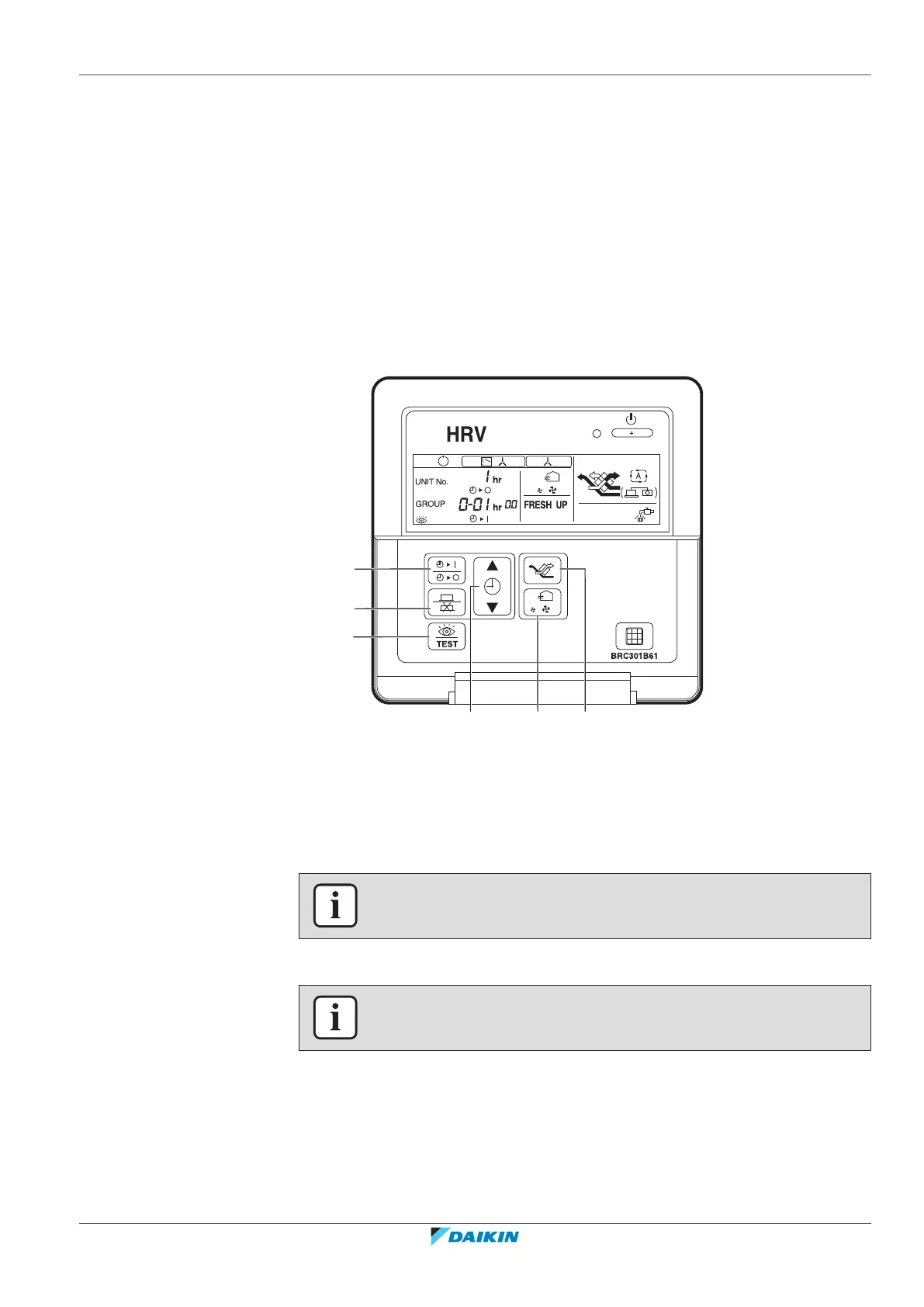
2 Use the Ventilation mode button (b) and the Airflow rate button (c) to select a
mode number.
Result: The code display is blinking.
3 To configure settings for individual units under group control, press the Timer
setting on/off button (d) and select the number of the unit that you want to
configure.
4 To select the setting switch number, press the top section of the Timer button
(e). To select the setting position number, press the lower section of the Timer
button (e).
5 Press the Program/Cancel button (f) once to enter the setting.
Result: The code display stops blinking and lights up.
6 Press the Inspection/Trial button (a) to return to normal mode.
a Inspection/Trial button
b Ventilation mode button
c Airflow rate button
d Timer setting on/off button
e Timer button
f Program/Cancel button
INFORMATION
Setting 18(28)-11 CANNOT be selected with this controller.
Case 3: Change settings with BRC1H
INFORMATION
Please refer to the Installer and user reference guide of the BRC1H user interface.



 To Next Page