Installation GuideDaintree
®
Networked Wireless Fixture Adapter (WFA100-SN)
5
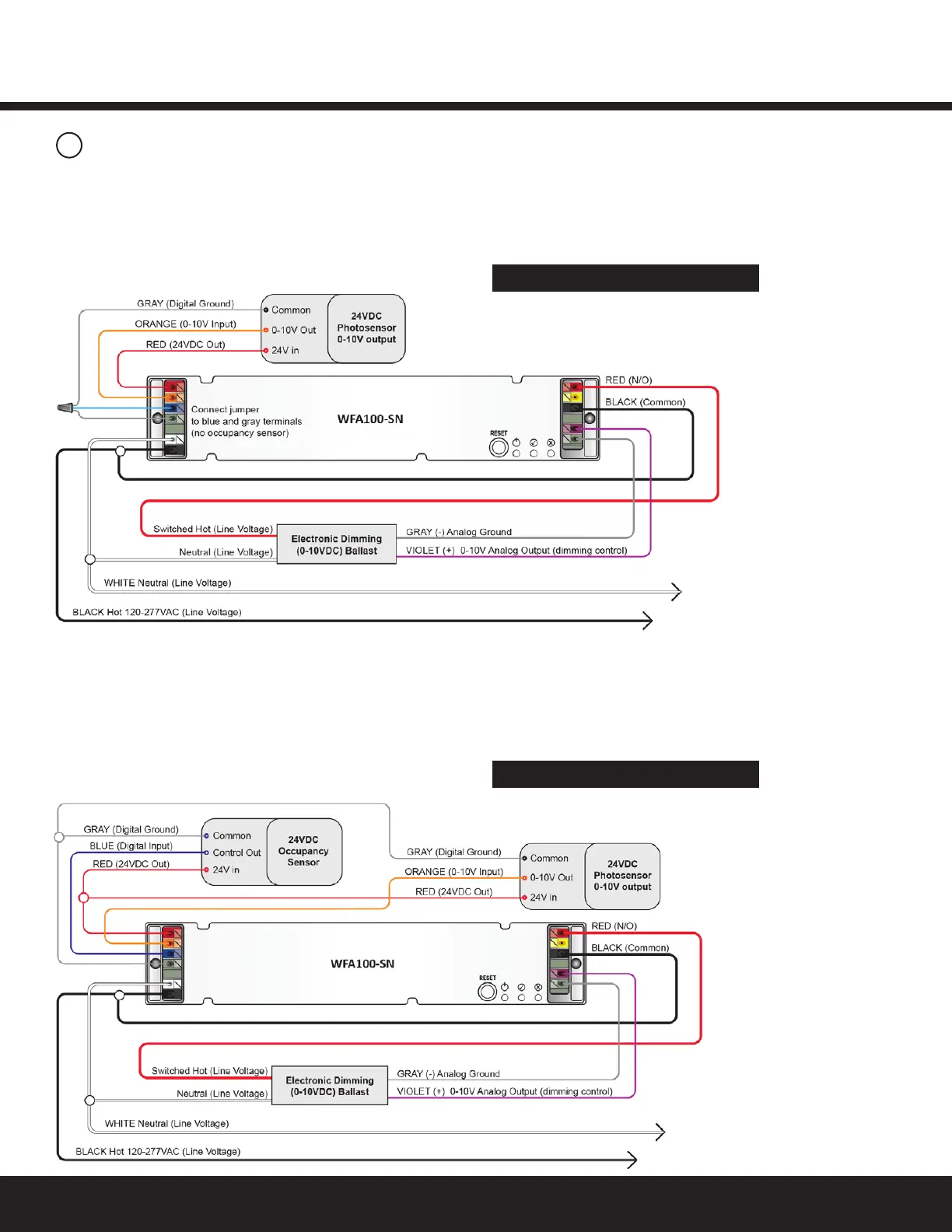
Figure 8: Dimming Ballast(s), Photosensor conguration
Figure 9: Dimming Ballast(s), Photosensor, Occupancy
Sensor conguration
Figure 5: On/Off (non-dimming) Ballasts
Perform Installation Test Suite 3
3
Wiring Continued
ThiscongurationallowstheWFA100-SNtoprovideautomatic
0-10VdimmingcontrolandtoswitchballastsOn/Off.Italso
provides an analog photosensor input (0-10V). Remove the
jumper from the violet and gray terminals before connecting
the 0-10V dimming control wires.
ThiscongurationallowstheWFA100-SNtoprovideautomatic0-10V
dimmingcontrolandtoswitchballastsOn/Off.Italsoprovidesan
occupancy sensor input. Set occupancy sensor for minimum time
delay. Remove the jumper from the violet and gray terminals before
connecting the 0-10V dimming control wires. Remove the jumper
from the blue and gray terminals before connecting the occupancy
sensor wires.
Perform Installation Test Suite 4


 To Next Page