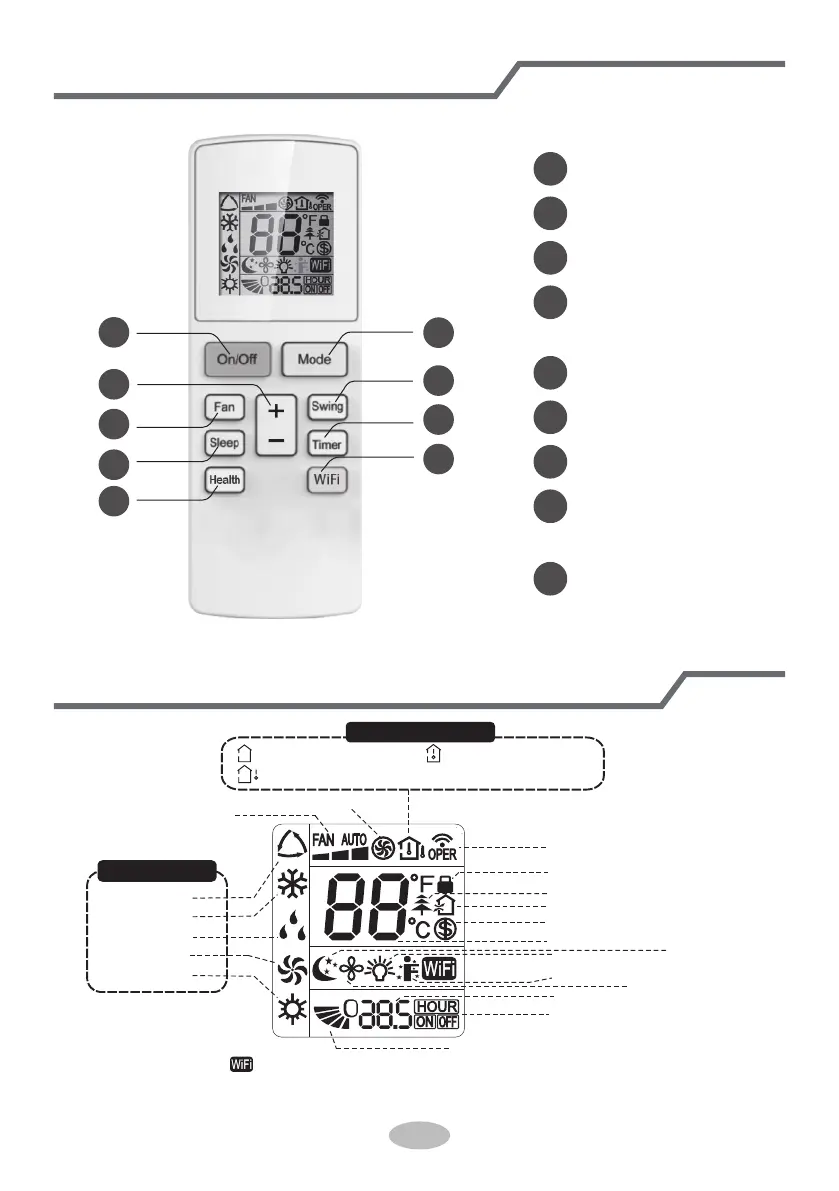
Buttons on remote controller
3
1
2
3
4
5
7
6
9
8
Introduction for icons on display screen
Set fan speed
Sleep mode
Set time
NOTICE:
“
do not. Please refer to the actual models.
9
Send signal
Child lock
health function
ventilation operation
8℃ heating function
Set temperature
Operation mode
Auto mode
Cool mode
Dry mode
Fan mode
Heat mode
TIMER ON /TIMER OFF
1
On/Off button
2
Mode button
+ / - button
4
Swing button
5
Fan button
6
Sleep button
7
Timer button
8
Health button
9
WiFi button
Light function
I feel function
X-fan mode
Up & down swing
” This is a general remote controller. Some models have this function while some
Temp. display type
:Indoor ambient temp.
:Set temp.
:Outdoor ambient temp.
Turbo mode
(This function is not applicable
for this model. )
(This function is not applicable
for this model. )


 To Next Page