DMP-8000 Content Standards Quick Guide
DD3002238
Rev 05
09 June 2020
201 Daktronics Drive
Brookings, SD 57006-5128
www.daktronics.com/support
800.325.8766
Page 3 of 8
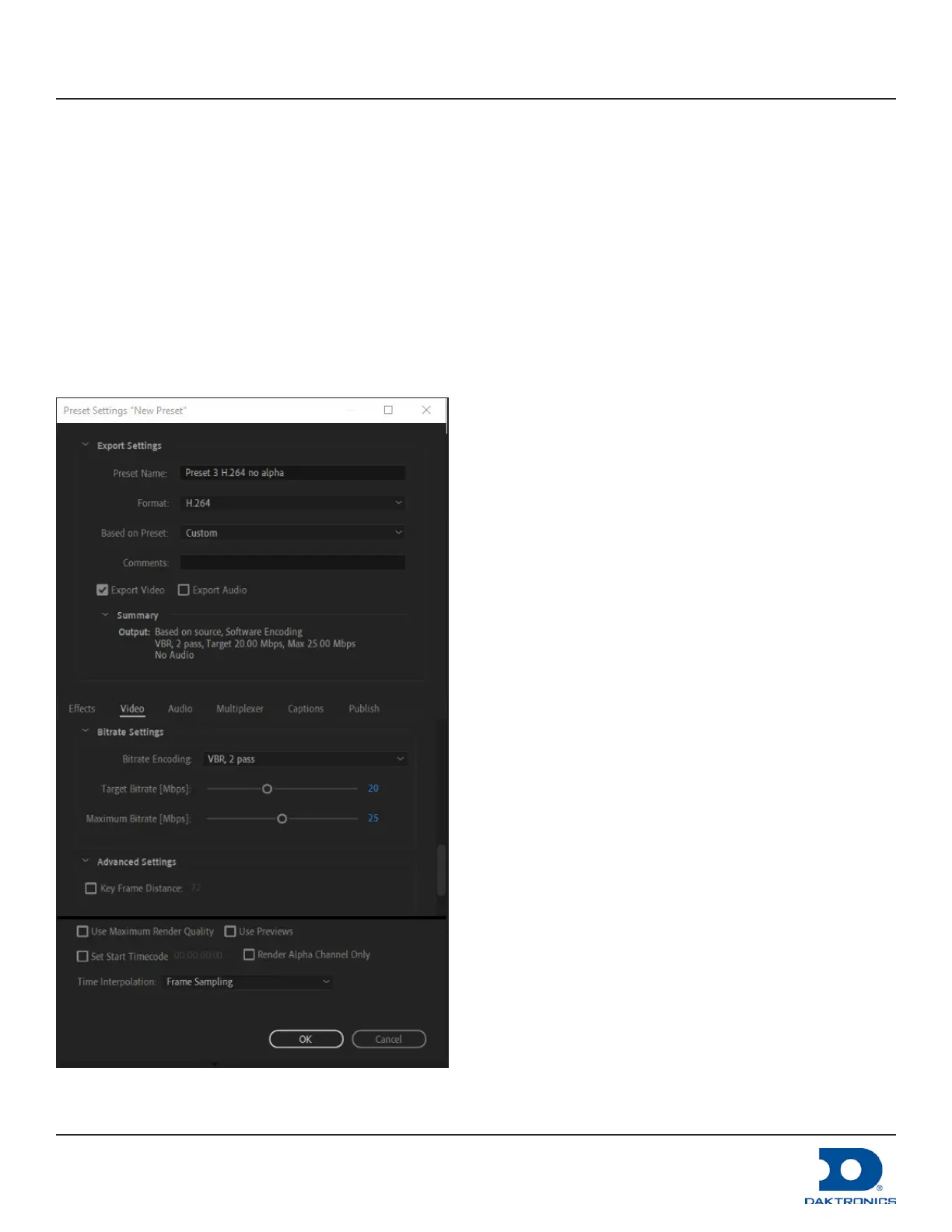
4. Select Custom from the Based on Preset eld drop-down list.
5. Select the Export Video check box.
6. Clear the Export Audio check box if the le does not contain audio.
7. Go to Basic Video Settings under the Video tab and select the Render at Maximum Depth check box.
8. If creating Preset 3, move to the Bitrate Settings under the Video tab and select VBR, 2 pass from the Bitrate
Encoding drop-down list.
9. If creating Preset 3, enter the bitrate using the sliders or enter the numbers. Refer to Figure 4.
a. Set the Target Bitrate [Mbps]: 20
b. Set the Maximum Bitrate [Mbps]: 25.
10. Click OK.
Figure 4: Preset 3 Example



 To Next Page