DMP-8000 Content Standards Quick Guide
DD3002238
Rev 05
09 June 2020
201 Daktronics Drive
Brookings, SD 57006-5128
www.daktronics.com/support
800.325.8766
Page 6 of 8
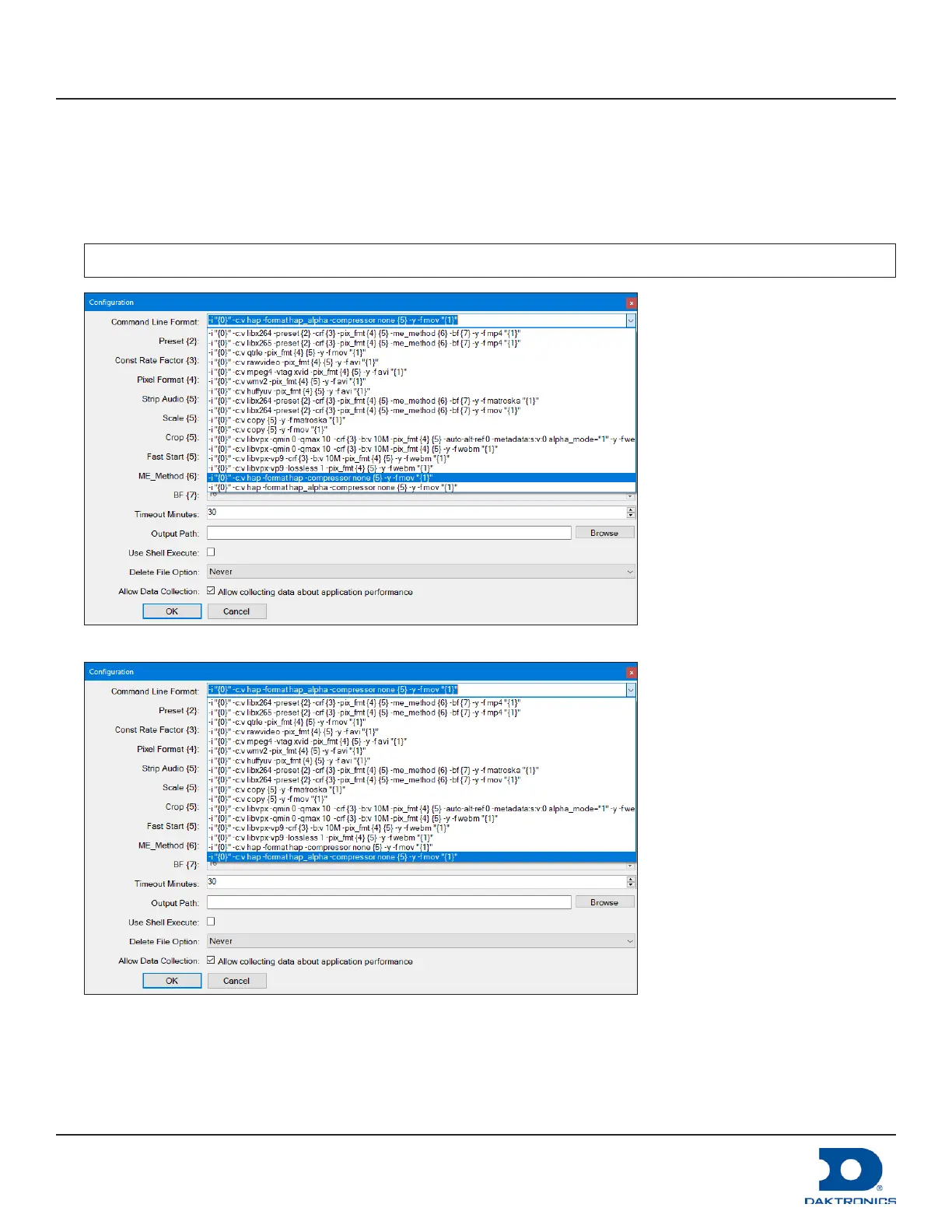
5. Choose the appropriate Command Line Format from the drop-down list. Refer to Figure 8 and Figure 9.
• For large displays with no alpha channel, select the following setting:
-i “{0}” -c:v hap -format hap -compressor none {5} -y -f mov “{1}”
• For large displays with an alpha channel, select the following setting:
-i “{0}” -c:v hap -format hap-alpha -compressor none {5} -y -f mov “{1}”
Note: The source le resolution must be divisible by 2 or the conversion will fail.
Figure 8: HAP Format - No Alpha Channel
Figure 9: HAP Format - Alpha Channel
6. Clear Strip Audio and keep the default option listed in the Audio Options eld if audio is needed.



 To Next Page