Commissioning and Remote Login
13
Commissioning
► Connect the device to the network.
► Connect the device and relevant peripherals to the voltage supply.
► Switch on the peripherals and the device.
The device is available for remote configuration via Ethernet after the start is complete (up to approx. 5 minutes).
The IP address of the device (default 192.168.2.230) can be changed without login using the software PService or IP-Finder.
► Observe the appropriate Configuration documentation.
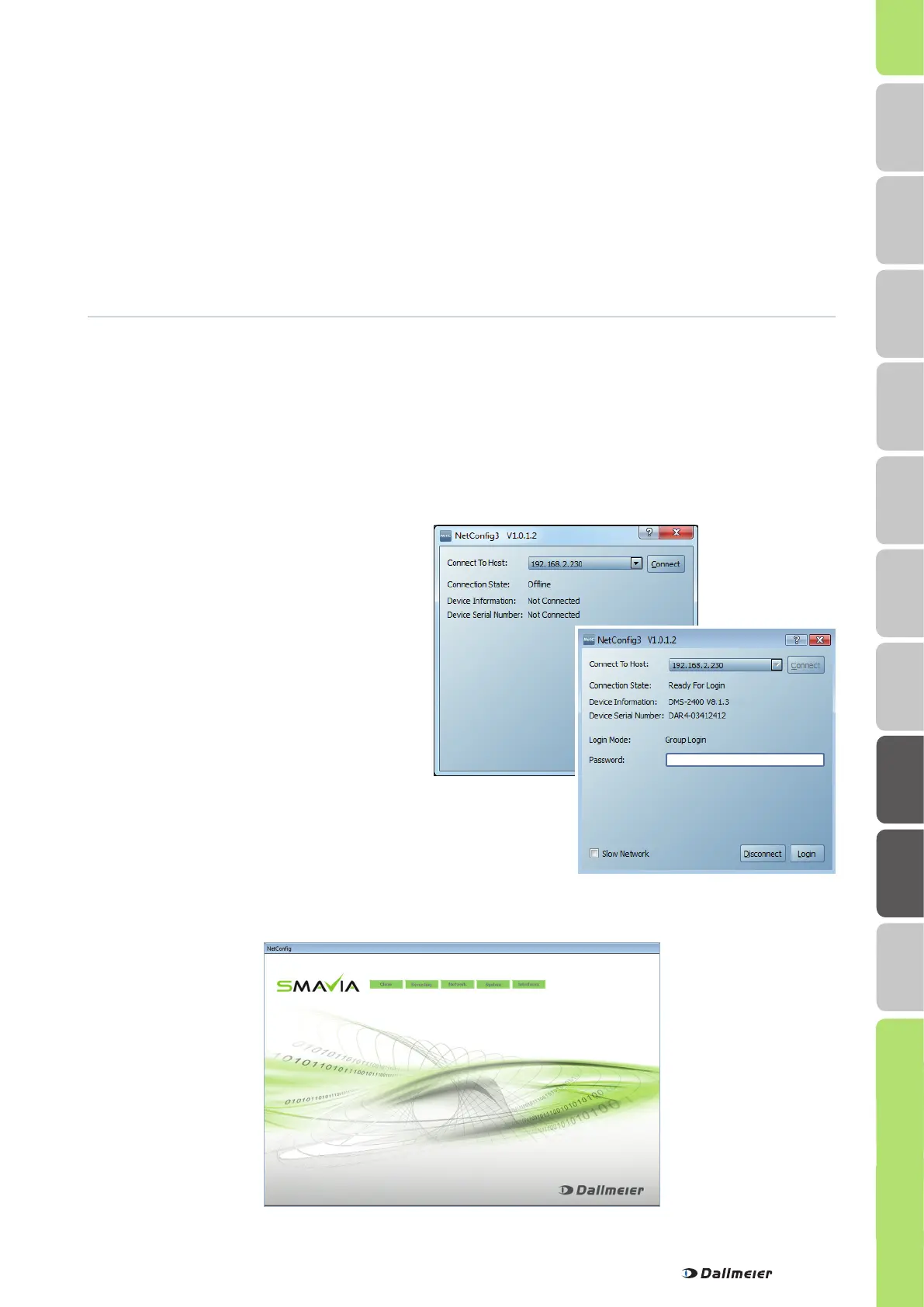
► Enter 192.168.2.230 as IP address (Host).
► Click the Connect button.
The connection will be established.
Device information is displayed.
The password input field is displayed.
Login
In the initial state it is possible to login remote using the serial number as password. The rights of the Administrator group
are valid.
Note that the definition of the passwords and of the network parameters are necessary for remote access
(SMAVIA Viewing Client).
► Observe the NetConfig documentation Installation and Commissioning.
► Start the software NetConfig.
► Enter the serial number (e.g. DAX2-12345678) as Password.
► Confirm with Login.
The configuration interface is displayed.
The configuration interface is compressed for slow network connections before transmission if the Slow Network check-box is
activated.
HDD Mounting
Mounting
Safety
Requirements
DLS 1600
Local Login
Dimensions
DMS 2400
Remote Login Indicators


 To Next Page