31
Assorting the Music Library
Assorting the Music Library
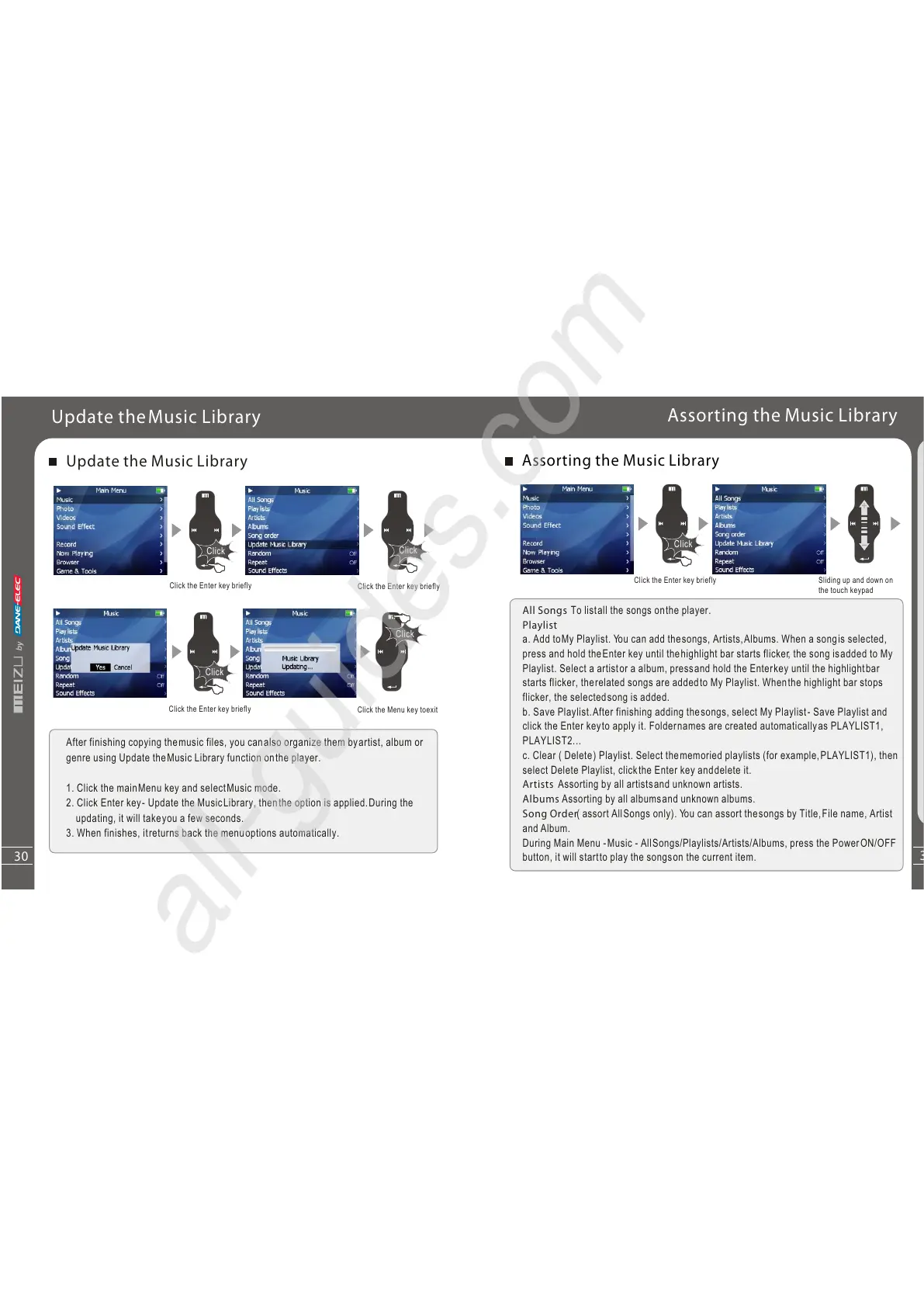
All Songs To listall the songs onthe player.
Playlist
a. Add toMy Playlist. You can add thesongs, Artists,Albums. When a songis selected,
press and hold theEnter key until thehighlight bar starts flicker, the song isadded to My
Playlist. Select a artistor a album, pressand hold the Enterkey until the highlightbar
starts flicker, therelated songs are addedto My Playlist. Whenthe highlight bar stops
flicker, the selectedsong is added.
b. Save Playlist.After finishing adding thesongs, select My Playlist- Save Playlist and
click the Enter keyto apply it. Foldernames are created automaticallyas PLAYLIST1,
PLAYLIST2...
c. Clear ( Delete) Playlist. Select thememoried playlists (for example,PLAYLIST1), then
select Delete Playlist, clickthe Enter key anddelete it.
Artists Assorting by all artistsand unknown artists.
Albums Assorting by all albumsand unknown albums.
Song Order( assort AllSongs only). You can assort thesongs by Title,File name, Artist
and Album.
During Main Menu -Music - AllSongs/Playlists/Artists/Albums, press the PowerON/OFF
button, it will startto play the songson the current item.
Click
Q
u
i
c
kSta
rt
3
Click the Enter key briefly
Sliding up and down on
the touch keypad
30
Selecting Modes
Update the Music Library
After finishing copying themusic files, you canalso organize them byartist, album or
genre using Update theMusic Library function onthe player.
1. Click the mainMenu key and selectMusic mode.
2. Click Enter key- Update the MusicLibrary, thenthe option is applied.During the
updating, it will takeyou a few seconds.
3. When finishes, itreturns back the menuoptions automatically.
Click
Click
Click
Click
Click
Update theMusic Library
Click the Enter key briefly
Click the Enter key briefly
Click the Menu key toexit
Click the Enter key briefly



 To Next Page