43
5
6
7
8
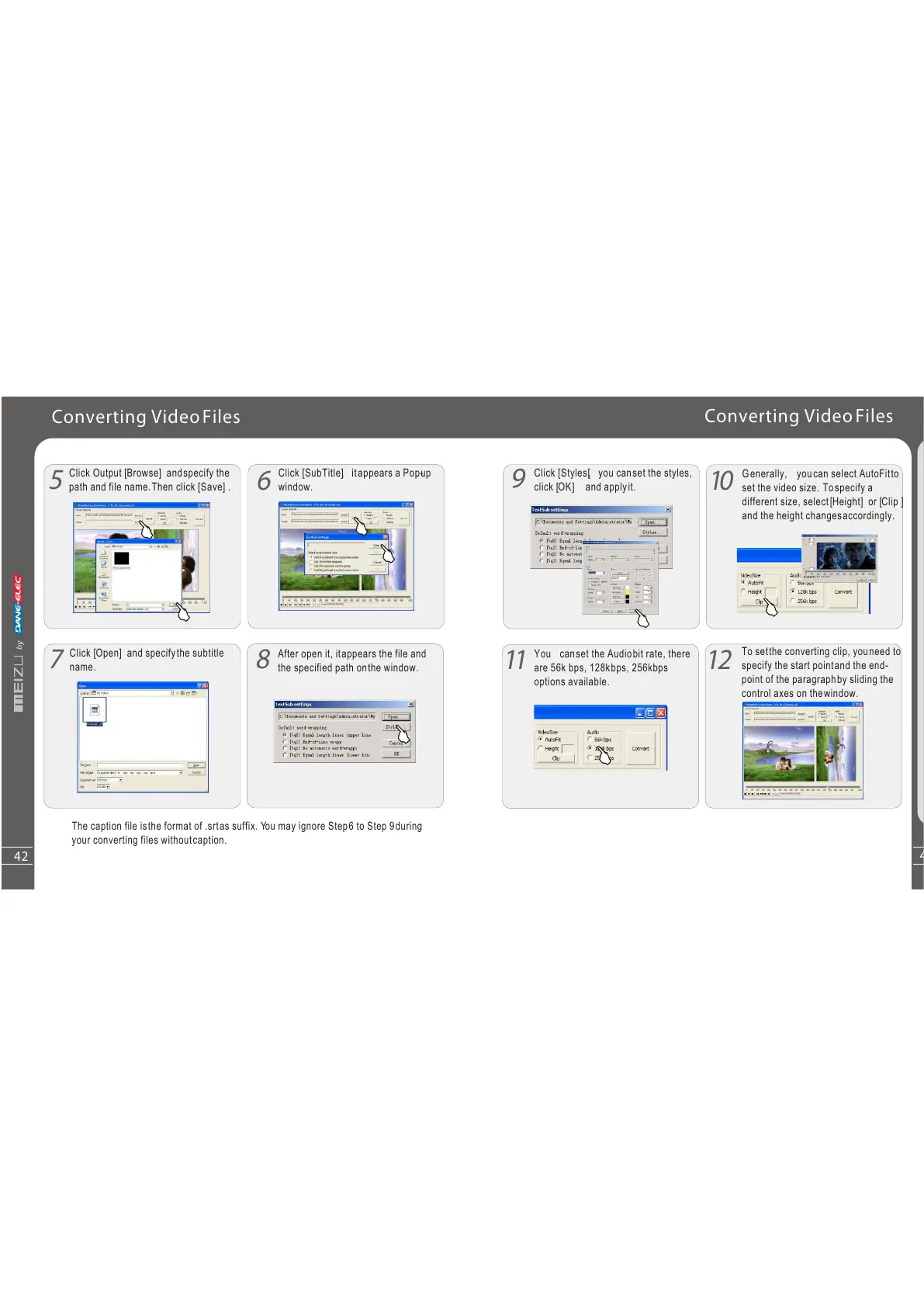
Click Output [ Browse] and specify the
path and file name. Then click [ Save] .
Click [ SubTitle], itappears a Pop-up
window.
Click [ Open] and specify the subtitle
name.
After open it, itappears the file and
the specified path onthe window.
The caption file isthe format of .srtas suffix. You may ignore Step6 to Step 9during
your converting files withoutcaption.
Converting VideoFiles
Q
u
i
c
kS
ta
rt
3
42
10
11
You canset the Audiobit rate, there
are 56k bps, 128kbps, 256kbps
options available.
6
12
Converting VideoFiles
Click [ Styles[, you can set the styles,
click [ OK] and apply it.
Generally, youcan select AutoFitto
set the video size. Tospecify a
different size, select [ Height] or [ Clip ]
and the height changesaccordingly.
To setthe converting clip, youneed to
specify the start pointand the end-
point of the paragraphby sliding the
control axes on thewindow.



 To Next Page