AK-CT 450A User Guide RS8GR602 © Danfoss 2016-10 33
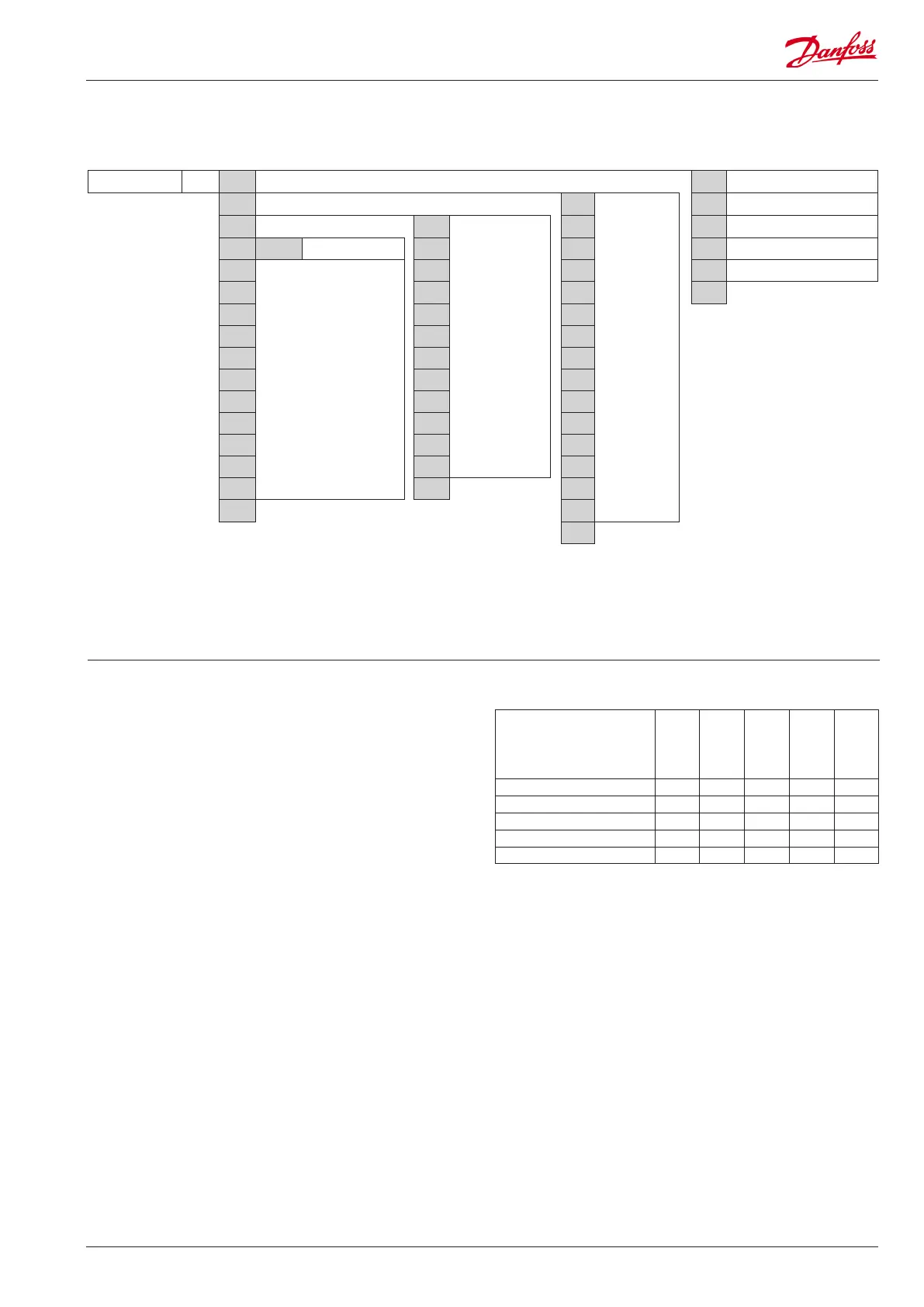
Temperatur PS cFg
➞
r12 Main switch
in
➞
S3
Read input status
r89 Product type
out
➞
do1
Read output status. /
Override output when r12 = service (-1)
S4 d10 Defrost sensor
buS b01 Modbus-kvalitet do2 S5 o03 Modbus address
r--
Menu groups
See also the following pages.
do3 S6 o04 Service pin (for LON only)
A-- do4 S3b ESc
c-- do5 S5b Retur
d-- do6 S6b
f-- do7 di1
L-- do8 di2
n-- do9 di3
o-- doA di4
P-- Ao1 di5
t-- di2 di6
u-- ESc
di7
ESc
Return di8
Return ESc
Return
Password
Conguration
Service
Service
System settings
Setting of pre-settings (r89).
After setting 1-5,
setting is returned to 0.
Product type =
1
Vege-
tables
2
Milk
3
Meat/
sh
4
Frost
5
Ice
Temperature (SP) 8°C 0°C -2°C -20°C -24°C
Max. temp. setting (r02) 10°C 4°C 2°C -16°C -20°C
Min. temp. setting (r03) 4°C -4°C -6°C -24°C -28°C
Upper alarm limit (A13) 14°C 8°C 8°C -15°C -15°C
Lower alarm limit (A14) 0°C -5°C -5°C -30°C -30°C
Product type
Menu overview
Get a good start
With the following procedure you can start regulation
very quickly:
1 Basic settings entered by appliance manufacturer
2 Enter the system-dened settings as shown above
3 End with parameter r12 = 1 to start the regulation
(in a new and not previously set unit, r12 will already be set
to 0 which means stopped regulation.)
4 Send address to system unit:
• MODBUS: Activate scan function in system unit
• If another data communication card is used in the controller:
- LON RS485: Activate the function o04
Close each group by pressing ESc
(Return)
Can only be set when r12=0.



 To Next Page
 Loading...