SOURCE | 9
Source: Mac Setup
PRO TOOLS
Plug in source via USB to your Mac.
Power up source.
Launch Pro Tools.
Navigate to the “setup” menu.
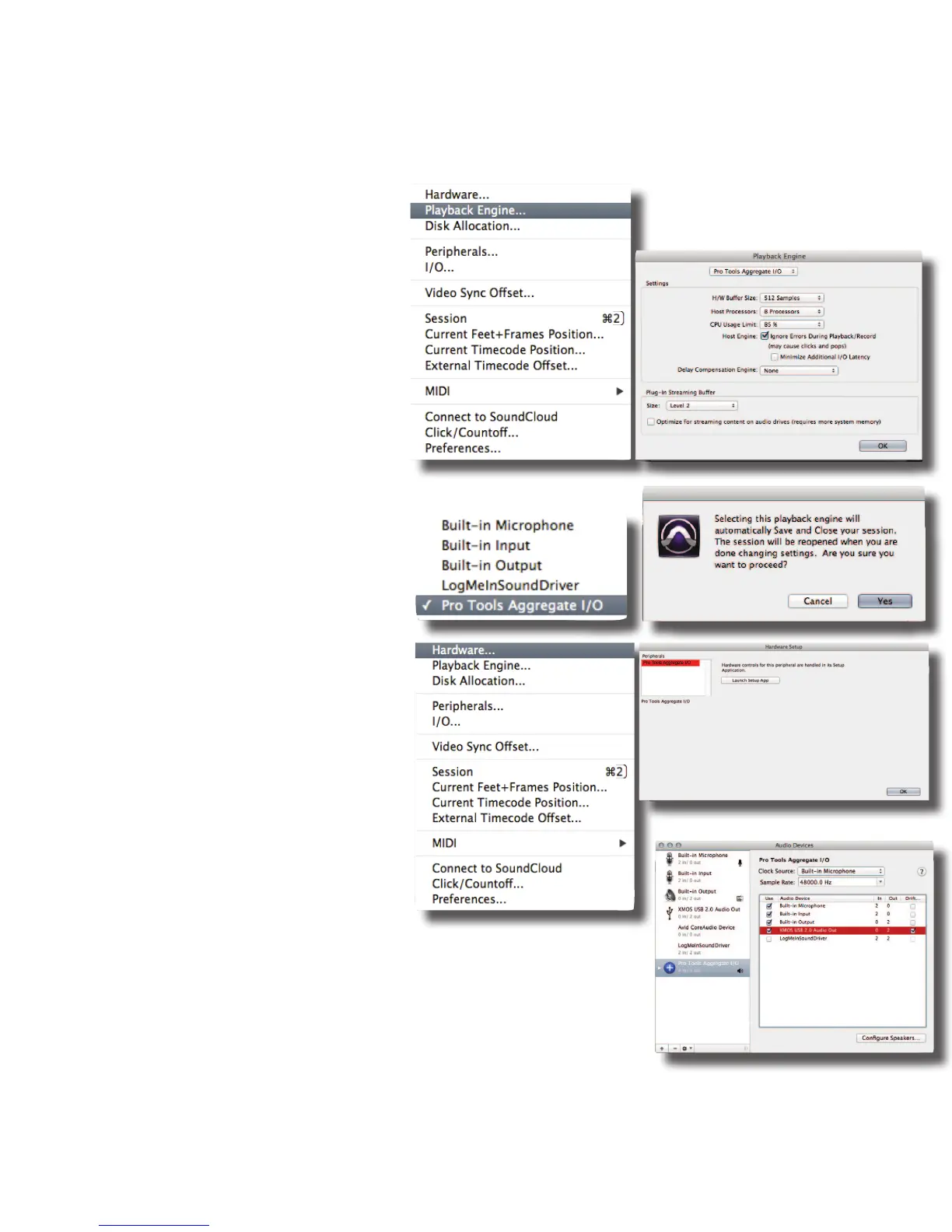
Select “playback engine”. (PHOTO OP 01)
A pop up screen will appear (PHOTO OP 02), select
“pro tools aggregate i/o” from the
drop down menu. (PHOTO OP 03)
Select “Yes” from the pop up window
(PHOTO OP 04)
Hit “okay” and the session will reopen with the
new “playback engine”
Navigate to the “setup” menu again
Select “hardware” (PHOTO OP 05)
Click on “launch setup app” (PHOTO OP 06)
Click on “pro tools aggregate i/o” from the left
hand menu (PHOTO OP 07)
Select in the checkboxes all the interfaces
you’d like to utilize, including “xmos
usb 2.0 audio out” (PHOTO OP 07)
Hit “okay”
Start monitoring from Pro Tools!
PHOTO OP 01 PHOTO OP 02
PHOTO OP 03
PHOTO OP 04
PHOTO OP 05
PHOTO OP 06
PHOTO OP 07


 To Next Page